


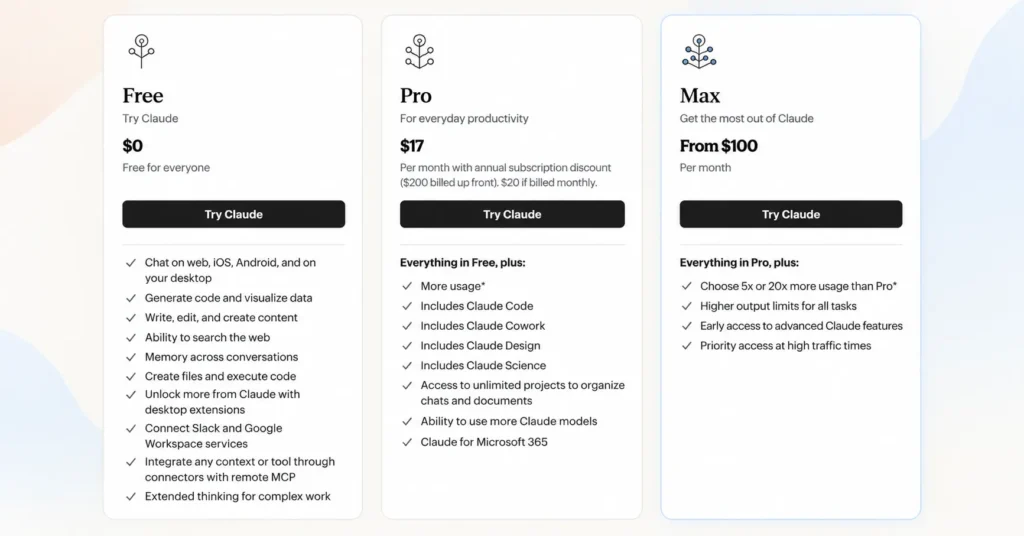
Claude Code is not a separate paid product. It is included with paid Claude plans, starting with Claude Pro at $20/month, or $17/month when billed annually at $200 upfront. Max 5x costs $100/month and Max 20x costs $200/month. Team plans include Claude Code at $20-$25 per Standard seat or $100-$125 per Premium seat, depending on billing. You can also use Claude Code through the API and pay based on token usage.
The important part is that Claude Code shares your Claude plan’s usage pool. So the cheapest plan is not always the cheapest option for heavy coding. Pro is a good starting point for lighter use, while Max is designed for developers who need substantially more usage. Paid plans can also use usage credits after reaching their included limits.
Introduction
Claude Code pricing can look confusing at first because Claude Code does not have its own standalone subscription price. Instead, you get Claude Code through a paid Claude plan or use it with Anthropic’s API and pay based on usage. In short, Claude Code runs on top of regular Claude pricing, so understanding one means understanding the other.
For most individual developers, the starting point is Claude Pro at $20 per month, or $17 per month when billed annually. Developers who use Claude Code heavily can move to Max 5x for $100/month or Max 20x for $200/month. Team and Enterprise options are also available.
The bigger question, however, is not simply “How much does Claude Code cost?” It is “Which pricing option gives me enough usage without paying more than I need?”
That’s because Claude Code shares your Claude usage pool, and your actual capacity depends on factors such as conversation length, model, features, and how frequently you use it. Paid users can also purchase usage credits after reaching their included limits.
This guide breaks down Claude Code pricing, Pro vs Max, Team and Enterprise costs, API pricing, usage limits, credits, and which option makes the most sense for different types of developers.
How Much Does Claude Code Cost?
Claude Code does not have its own separate price tag. It comes bundled inside paid Claude plans, starting with Pro at $20 a month, or $17 a month if you pay for a full year at once. Max plans cost $100 or $200 a month. Team and Enterprise plans charge per seat or bill based on how much you use. If you connect Claude Code to the API instead of a subscription, you pay only for the tokens you use. With a Pro or Max plan, your terminal coding work and your regular Claude chats share one unified subscription and draw from the same usage pool.
| Option | Price | Claude Code |
| Free | $0 | No |
| Pro | $20/mo | Yes |
| Max 5x | $100/mo | Yes |
| Max 20x | $200/mo | Yes |
| Team Standard | $25/seat/mo | Yes |
| Team Premium | $125/seat/mo | Yes |
| API | Usage-based | Yes |
Team seat prices drop with annual billing. Standard seats cost $25 a month if billed monthly, or $20 a month per seat with annual billing. Premium seats cost $125 a month, or $100 a month per seat with annual billing.
What Each Plan Includes
Free plan. The free plan lets you chat with Claude on the web, phone, or desktop app. It does not include Claude Code. You need a paid plan or API credits to use the coding tool.
Pro plan. Pro is the cheapest way to get Claude Code. For $20 a month, or $17 a month with annual billing, you get more usage room than the free tier, access to more Claude models, and full access to the coding assistant in your terminal.
Max plans. Max comes in two levels. Max 5x gives about five times the usage of Pro for $100 a month. Max 20x gives about twenty times the usage for $200 a month. Both fit people who run long coding sessions or heavy, agent-style workflows.
Team plans. Team pricing is seat based, which means you pay per person on your team. A Standard seat costs $25 a month, or $20 a month with a yearly plan. A Premium seat costs $125 a month, or $100 a month with a yearly plan. Team plans work well for small groups of developers who want shared billing and admin controls.
Enterprise plan. Enterprise pricing starts at $20 per seat each month, plus usage billed at standard API rates, so cost scales with the models and tasks your team runs. This plan fits large companies that need single sign-on, audit logs, and custom data retention rules.
API pricing. If you skip the subscription route, you can connect Claude Code straight to the Claude API through a Console account. You then pay per token, based on the model you pick, such as Sonnet, Opus, or Haiku. This path has no monthly cap and no session limit, but your bill can grow fast during heavy use.
Why Claude Code Has No Separate Fee
Claude Code is not sold as its own standalone product with its own price list. Anthropic treats it as one more way to use a Claude subscription you already have. Your Claude Code sessions in the terminal draw from the same usage pool as your Claude chats on the web or mobile app. This setup keeps billing simple. One plan gives you one price, plus access to both the chat assistant and the coding tool.
Prices don’t include tax and can change at Anthropic’s discretion. Check Anthropic’s official pricing page for the latest numbers before you buy.
Claude Code Pricing at a Glance
This table lays out complete Claude pricing across every subscription tier, side by side. Use it to find the right fit fast, based on your monthly price, your billing model, and how much coding work you plan to do.
| Plan | Monthly Price | Annual Equivalent | Claude Code Access | Usage Level | Best Suited For | Billing Model |
| Free | $0 | $0 | No | Baseline usage, chat only | Evaluating Claude before upgrading | Free, no billing cycle |
| Pro | $20/mo | $17/mo (billed annually) | Yes | 5x more usage than Free | Occasional individual coding | Monthly or annual |
| Max 5x | $100/mo | Not offered (monthly only) | Yes | 5x more usage than Pro | Daily individual coding | Monthly only |
| Max 20x | $200/mo | Not offered (monthly only) | Yes | 20x more usage than Pro | Heavy agentic coding | Monthly only |
| Team Standard | $25/seat/mo | $20/seat/mo (billed annually) | Yes | More usage than Pro, per seat | Small engineering teams | Monthly or annual |
| Team Premium | $125/seat/mo | $100/seat/mo (billed annually) | Yes | 5x more usage than Standard seats | Small engineering teams | Monthly or annual |
| Enterprise | $20/seat/mo + usage, or fully usage-based | Annual only | Yes | Custom, scales with usage | Large organizations | Seat-based (seat plus API-rate usage) or fully usage-based, depending on your arrangement* |
| API (pay as you go) | Usage-based | Usage-based | Yes | No cap, billed per token | Automated pipelines, custom workloads | Pay per token |
Reading the Table
The monthly price column shows what you pay if you bill month to month. The annual equivalent column shows the lower per-month rate you get by paying for a full year up front. Max plans skip this discount. Anthropic bills Max 5x and Max 20x monthly only, with no annual option.
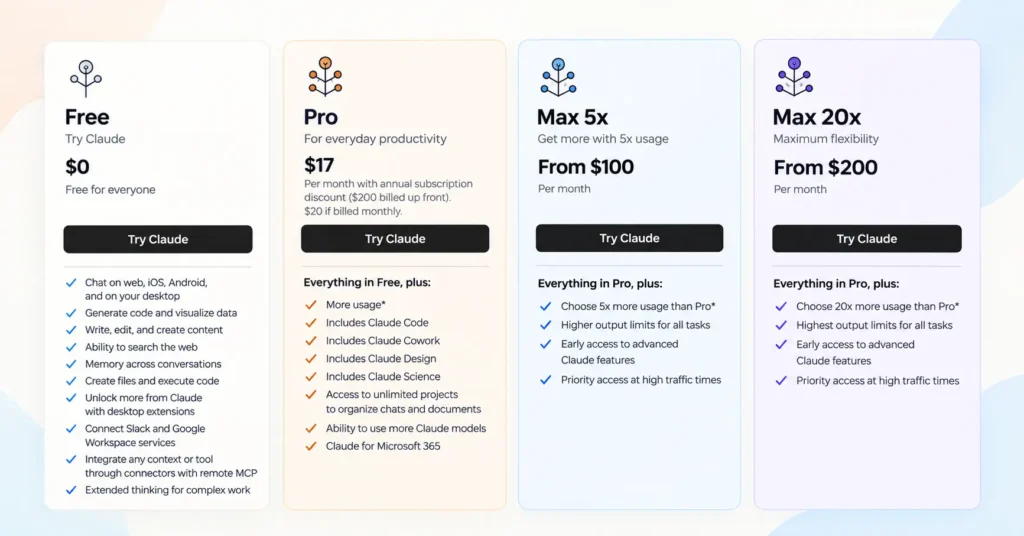
Claude Code pricing access tells you which plans unlock the terminal-based coding assistant. The free tier is the only one without it. Every paid plan, from Pro through Enterprise, includes Claude Code at no extra cost, and it draws from the same usage pool as your regular Claude chats.
Usage level reflects how much room you get in each five-hour session, relative to the tier below it. Anthropic sets these as multipliers rather than fixed message counts, since usage depends on your model choice, your context length, and how long your sessions run.
Best suited for matches each plan to a real coding pattern instead of a vague label. Pro fits someone who opens Claude Code a few times a week. Max 5x fits a developer who codes with Claude most of the day. Max 20x fits near-constant, agent-driven coding runs. Team plans fit a group of developers who want shared billing and admin controls. Enterprise fits a large organization that needs SSO, audit logs, and custom data retention.
Billing model shows how each tier structures payment: flat monthly or annual fee, per-seat pricing for teams, seat plus metered usage for Enterprise, or pure token-based billing through the API.
Is Claude Code Free?
No. The current Free Claude plan does not include Claude Code. The lowest-cost individual plan that includes Claude Code is Pro at $20 per month, or $17 per month when billed annually. Anthropic also supports API-based Claude Code usage, which is billed according to API usage rather than a monthly Claude subscription.
Why the Free Plan Leaves Claude Code Out
The free tier gives you chat access on the web, phone, and desktop app, plus web search and file uploads. It stops short of the terminal-based coding agent. If you want to run Claude Code, you need either a paid Claude subscription or a funded API account. There is no hidden free version and no limited trial mode built into the free tier itself.
The Cheapest Way In: Claude Pro
Pro is the entry point for real Claude Code use. For $20 a month, or $17 a month with annual billing, you unlock the coding assistant in your terminal along with more usage room than the free plan, access to more Claude models, and the rest of the Pro feature set. This is the lowest-cost route to steady, day-to-day coding work with Claude.
A Small Way to Test It First: API Credits
If you are not ready to commit to a subscription, Anthropic gives new API accounts a small starter credit when you sign up at the Claude Console. This credit lets you connect Claude Code to your own API key and run a handful of test sessions before deciding whether to upgrade. If you would rather not use your main inbox while testing, you can also sign up for a Claude account using a temporary email address. Once the starter credit runs out, usage bills at standard per-token API rates, with no monthly plan required. This path suits developers who want a quick trial run, not ongoing daily use, since the credit is small and spends fast on larger coding tasks.
Quick Summary
- Free plan: no Claude Code access, chat only
- Pro plan: cheapest paid option with full Claude Code access, $20/mo or $17/mo annual
- API account: small starter credit for testing, then pay-per-token billing with no subscription needed
- Max, Team, and Enterprise plans: all include Claude Code, built for heavier or shared usage
If your goal is daily coding work, Pro is the realistic starting price. If you only want to kick the tires, the API starter credit is the closest thing to a free trial that Anthropic offers.
How Much Is Claude Pro With Claude Code?
Claude Pro costs $20 a month if you pay month to month. If you pay for a full year up front, the cost drops to $200 billed annually, which works out to $17 a month. Either way, Claude Code comes included at no extra charge. You do not pay a separate fee for the coding tool on top of your Pro subscription.
$20 a Month, or $17 a Month With Annual Billing
Pro has two billing choices. The monthly plan bills $20 every month, with no upfront commitment. The annual plan bills $200 once a year, which brings the effective monthly rate down to $17. Both options unlock the same features, including Claude Code, more Claude models, and higher usage limits than the free plan. The annual option simply saves you money over twelve months, since you lock in a lower monthly rate in exchange for paying the full year at once.
One Subscription, One Shared Usage Pool
This is the part people get wrong most often, so it deserves its own spotlight. Claude Code is not a separate product with its own allowance. With a Pro or Max plan, you get access to both Claude in the web, desktop, and mobile apps and Claude Code in your terminal through one unified subscription. Every bit of activity you do across all of those surfaces, your Claude chats on the website, your prompts on the mobile app, and your coding sessions in Claude Code, pulls from the same shared usage pool.
In plain terms, that means a long chat session on the web can eat into the room you have left for Claude Code later that day. There is no separate Claude Code bucket sitting off to the side. One plan, one price, one shared limit.
Limits Depend on How You Use Claude
Anthropic does not publish a fixed message count or a fixed number of coding prompts for Pro. Instead, usage limits reset on a rolling five-hour window, and how far that window stretches depends on a few things:
- The length and complexity of your conversations
- Which Claude model you choose for a task
- Whether you are chatting, generating code, or running longer agentic workflows in Claude Code
A short chat question uses very little of your pool. A long Claude Code session working through a large codebase uses much more. That is why two Pro users can have very different experiences even though they pay the exact same $20 a month.
Quick Recap
- Monthly price: $20
- Annual billing: $200 up front
- Effective annual rate: $17 a month
- Claude Code: included, no extra fee
- Usage pool: shared across Claude web, desktop, mobile, and Claude Code
- Usage limits: flexible, based on conversation length, model choice, and workload, not a fixed message count
How Much Do Claude Max Plans Cost?
Claude Max comes in two price tiers, both built for people who use Claude every day and want more room before they hit a limit. Max costs more than Pro, but it buys you a bigger usage pool, not a separate product.
Max 5x
Max 5x costs $100 a month. This plan gives you five times more usage per five-hour session than Claude Pro. Everything in Pro comes included, plus higher output limits, early access to new Claude features, and priority access during busy traffic times.
Max 20x
Max 20x costs $200 a month. This plan gives you twenty times more usage per five-hour session than Pro. Like Max 5x, it includes everything in Pro, along with the same higher output limits, early feature access, and priority access perks, just with a much larger usage pool behind it.
What “5x” and “20x” Actually Mean
This is the part worth slowing down for. The “5x” and “20x” labels describe usage capacity, not finished work. They tell you how much room you get in a five-hour session compared to Pro. They do not promise five times more completed coding projects, five times more finished features, or five times more bug fixes.
Anthropic is clear about this on its own pricing page. Usage limits reset on a rolling five-hour window, and how far that window stretches depends on several things:
- The length of your conversations
- How complex each task is
- Which Claude model you choose, such as Sonnet, Opus, or Haiku
- Which features you turn on, including extended thinking or longer agentic runs in Claude Code
So a “5x” plan does not mean five times the output. It means five times the room before you hit your limit. A short, simple coding task might barely touch your usage pool. A long, complex refactor across a big codebase can burn through a large share of it in one sitting, even on Max 20x. Two Max users paying the same monthly price can land very different results, depending on how they work.
Quick Recap
- Max 5x: $100 a month, 5x more usage than Pro per five-hour session
- Max 20x: $200 a month, 20x more usage than Pro per five-hour session
- Billing: monthly only, no annual discount on Max
- What “5x” and “20x” mean: more usage capacity, not a fixed multiple of finished projects or coding output
- What actually shapes your limit: conversation length, task complexity, model choice, and which features you use
What Is the Difference Between Pro, Max 5x, and Max 20x?

All three plans give you the exact same Claude Code tool. The real difference between them comes down to how much usage room you get, not what the tool can do. Use the table below to see how Pro, Max 5x, and Max 20x stack up side by side.
| Factor | Pro | Max 5x | Max 20x |
| Monthly price | $20 | $100 | $200 |
| Claude Code | Yes | Yes | Yes |
| Usage | Baseline | Higher | Highest |
| Target user | Light/regular | Heavy | Power user |
| Main reason to upgrade | More capacity | More frequent coding | Very heavy agent use |
The Key Message: Same Tool, More Room
Here is the one thing worth remembering from this whole comparison. You are mainly paying for more usage capacity, not a fundamentally different Claude Code product. Pro, Max 5x, and Max 20x all give you the same coding assistant, the same terminal access, and the same core features. What changes as you move up the ladder is how much you can do before you hit your usage limit in a five-hour session.
Pro: The Baseline Plan
Pro fits someone with light or regular coding needs. You get full Claude Code access for $20 a month, along with everyday Claude chat on the web, desktop, and mobile app. Pro works well if you use Claude Code a few times a week, or for shorter coding tasks that do not eat through a large usage pool.
Max 5x: Built for Heavy Daily Use
Max 5x steps up to $100 a month and gives you five times the usage capacity of Pro. This tier fits a developer who codes with Claude Code often throughout the day, not just occasionally. The upgrade reason here is simple: more frequent coding sessions without running into limits as often.
Max 20x: Built for Power Users
Max 20x costs $200 a month and gives you twenty times the usage capacity of Pro. This is the plan for power users running very heavy agentic workflows, long multi-step coding runs, or large codebases that demand a lot of back-and-forth with Claude Code. If your work involves near-constant use of Claude Code across the day, this tier gives you the most room to work without interruption.
How to Choose
Ask yourself how often you actually open Claude Code, not how much you think you might use it.
- Occasional or light use → Pro covers you at the lowest price
- Daily, steady coding work → Max 5x gives you breathing room
- Constant, heavy agentic coding → Max 20x removes most of the friction
Since all three plans run the same underlying Claude Code product, the smart move is to start at the lowest tier that fits your current habits. You can always upgrade later if you find yourself hitting usage limits on a regular basis.
What Does Claude Code API Pricing Cost?
Claude Code can run in two very different ways, and mixing them up is the easiest way to end up with a bill you did not expect. One path is subscription billing. The other is API billing. They work nothing alike.
Subscription Billing: A Fixed Monthly Plan
With subscription billing, you pay one flat price each month, or once a year with annual billing. That price covers a set amount of usage, shared across Claude Code and your regular Claude chats on web, desktop, and mobile. Pro, Max, Team, and Enterprise all work this way. You know your cost ahead of time. Once you hit your usage limit, you either wait for it to reset or turn on optional usage credits to keep working.
API Billing: Pay for What You Use
API billing works differently. Instead of a flat monthly fee, you connect Claude Code to a Claude Platform API key through a Console account. From that point on, every token you use gets billed directly, based on the model you pick and how much you send and receive. There is no fixed monthly allowance and no shared usage pool. Anthropic’s own documentation confirms that Claude Code connected through an API key does not behave like a subscription plan. It behaves like standard API usage, metered per token, with no built in cap and no session limit.
This path gives you more flexibility, since there is no five-hour window to bump against. It also means your bill can grow quickly if you run large, complex coding sessions, since every input token and output token adds to the total.
Claude API Pricing by Model
Token costs are billed per million tokens, split between input tokens and output tokens. Here are the current official rates, verified directly from Anthropic’s pricing page:
| Model | Input | Output |
| Haiku 4.5 | $1 / MTok | $5 / MTok |
| Sonnet 5 | $2 / MTok | $10 / MTok |
| Opus 5 | $5 / MTok | $25 / MTok |
Haiku is the fastest and cheapest model, good for simple lookups and quick tasks. Sonnet handles most everyday coding and agentic work at a middle price point. Opus costs the most but suits complex, multi-file coding tasks and heavier reasoning work. Anthropic also offers prompt caching, which lowers the cost of repeated context across a session, and batch processing, which cuts costs further for workloads that do not need an instant response.
Which Billing Model Fits You
- Choose subscription billing if you want a predictable monthly cost and use Claude Code alongside regular Claude chats.
- Choose API billing if you need Claude Code inside an automated pipeline, want fine-grained control over model choice per task, or run workloads that do not fit neatly into a five-hour session window.
Many teams end up using both: subscription seats for day-to-day developer work, and a Claude API key for automation or large batch jobs. If you are weighing this against other API-billed coding tools, OpenAI Codex prices its API access in a similar per-token structure.
API prices change, and model lineups get updated over time. Always check Anthropic’s official pricing page for the current rates before you budget a project.
What Are Claude Code Usage Credits?
Usage credits are a way to keep working with Claude Code after you run out of your plan’s included usage, instead of getting cut off. Anthropic built this feature for Pro, Max 5x, and Max 20x subscribers, and it changes how people should think about hitting a limit.
How Usage Credits Work, Step by Step
1. You reach your included limit. Every paid plan comes with a set amount of usage that resets on a rolling five-hour window. Once you use it all up, whether through Claude chat, Claude Code, or a mix of both, you hit that limit.
2. Claude warns you. You do not get cut off without notice. Claude shows a warning as you approach your limit, then lets you know once you have reached it, along with the time your session will reset.
3. Usage credits can be enabled. At that point, you have a choice. You can wait for your limit to reset, or you can turn on usage credits and keep working right away. Anthropic’s help center describes this clearly: usage credits let subscribers on Pro, Max 5x, and Max 20x continue using Claude smoothly after reaching their included usage limits, instead of being blocked.
4. Additional usage is charged separately. Once usage credits are on, anything past your included limit gets billed at standard API rates. This is pay-as-you-go pricing, based on the tokens you use, not a flat add-on fee.
5. You can set spending limits. Usage credits are not open-ended. You control them with a monthly spending cap, the maximum amount you are willing to spend on extra usage each month. You can also turn on auto-reload, so funds get added automatically when your balance drops low, and usage alerts, so you get notified as you approach your spending cap.
6. Credits are separate from your subscription. Usage credits do not replace or change your subscription price. Your $20, $100, or $200 monthly plan cost stays the same either way. Credits sit on top as an optional layer, billed and tracked separately from your subscription charge, and you can view real-time usage and spending history anytime in Settings.
Why This Matters More Than “Just Upgrade to Max”
Older advice on hitting a Claude Code limit usually stopped at one option: upgrade to a bigger plan. Usage credits give you a second path that fits a different kind of user, someone who mostly stays within their plan but occasionally needs extra room for one busy day or one large coding session. Instead of paying $80 or $180 more a month for a permanent upgrade, you can enable usage credits, set a small spending cap as a safety net, and only pay for the extra usage you actually need, when you actually need it.
Quick Recap
- Included usage resets every five hours, shared across Claude chat and Claude Code
- Claude warns you before and when you hit your limit
- Usage credits let Pro, Max 5x, and Max 20x subscribers keep working past that limit
- Extra usage bills at standard API rates, not a flat fee
- You set a monthly spending cap, with optional auto-reload and usage alerts
- Credits bill separately from your subscription and do not change your plan price
How Do Claude Code Usage Limits Work?
Claude usage limits do not work like a simple daily message count. There is no fixed number of prompts you get each day, no matter what other articles might tell you. Instead, Anthropic uses a flexible system built around time windows, task complexity, and shared usage across every way you use Claude.
Five-Hour Usage Windows
Your usage limit resets on a rolling five-hour window, not a fixed daily reset. The window starts the moment you send your first message. If you start working at 9:00 in the morning, your window runs until 2:00 in the afternoon. Once that window closes, your usage limit resets and you get a fresh block of usage to work with.
Usage Varies by Task
Anthropic does not publish a fixed message count for any plan, and for good reason. A short question uses very little of your usage pool. A long, complex coding task in Claude Code, one that reads through many files or works through a multi-step problem, uses far more. This means two people on the same plan can have very different experiences, depending on the kind of work they send Claude’s way.
Model Choice Matters
Which Claude model you pick also changes how fast you use up your limit. Faster, lighter models like Haiku use less of your usage pool per task. Larger, more capable models like Opus use more, since they take on heavier reasoning and more complex work. Choosing the right model for each task, not just the most powerful one by default, helps you stretch your usage further.
Conversation Length Matters
Longer conversations use more of your limit than short ones, since Claude has to process more context with every new message. A quick back and forth barely touches your usage pool. A long chat thread, or a Claude Code session working through a large codebase over many turns, adds up much faster. Starting fresh conversations for new topics, instead of letting one thread grow very long, can help you manage usage more efficiently.
Claude Code and Claude Chat Share Usage
This point matters more than any other on this list. Claude Code does not have its own separate usage allowance. Every surface you use, Claude chat on the web, the desktop app, the mobile app, and Claude Code in your terminal, all draws from the same shared usage pool. A long morning spent chatting with Claude on the web can leave you with less room for a Claude Code session later that same day. Anthropic confirms this directly: activity across Claude web, desktop, mobile, and Claude Code all counts against one shared limit, not separate ones.
Weekly and Monthly Controls May Also Apply
On top of the five-hour session window, paid plans can also carry a weekly limit across all models, and some plans layer on additional controls depending on the model or feature you use. These extra limits work as a second ceiling sitting above the five-hour window, meant to keep usage fair and predictable across all Claude users. The exact shape of these limits can shift over time, so it is worth checking your account’s usage settings for the most current picture of where you stand.
What Actually Controls Your Limit
Instead of a fixed number, think of your usage limit as depending on four things working together:
- How long your conversations run
- How complex each task is
- Which model you choose
- Which features you use, such as extended thinking or longer agentic runs
There is no way to boil this down to “you get exactly this many prompts a day,” because the same plan can stretch very differently depending on how you use it. If you want a real-time picture of where you stand, check your usage dashboard in Settings rather than relying on a fixed number from any outside source.
How Much Does Claude Code Cost for a Typical Developer?
There is no single dollar figure that fits every developer, because the right plan depends on how you actually work, not just how much you would like to spend. The table below maps common developer profiles to a likely plan, based on typical usage patterns. This is decision guidance to help you think through your own situation, not an official recommendation from Anthropic.
| Developer Profile | Likely Route |
| Trying Claude Code | Pro |
| Coding a few times per week | Pro |
| Daily coding | Pro or Max 5x |
| Heavy agentic work | Max 5x |
| Near-constant coding | Max 20x |
| CI/automation | API |
| Team development | Team |
| Enterprise deployment | Enterprise |
Trying Claude Code Out
If you just want to see what Claude Code can do, Pro at $20 a month is the natural starting point. It gives you full access to the coding assistant along with regular Claude chat, without committing to a bigger monthly cost before you know if it fits your workflow.
Coding a Few Times a Week
Light, occasional use also points to Pro. If you open Claude Code now and then for a quick fix, a small script, or the occasional refactor, Pro’s usage pool is usually enough room without paying for capacity you won’t use.
Daily Coding
Once Claude Code becomes part of your everyday routine, the right plan depends on how intense your sessions get. Pro can still work if your daily sessions stay short and focused. If you start bumping into your usage limit regularly, Max 5x gives you five times more usage per session, which smooths out that daily friction.
Heavy Agentic Work
Developers running longer, multi-step agentic workflows, ones where Claude Code reads through many files, plans out changes, and executes several steps in a row, tend to burn through usage faster. Max 5x fits this pattern well, giving enough headroom for sustained, complex coding sessions without constant interruptions. Developers building custom agent pipelines with frameworks like the OpenAI Agents SDK run into similar usage-based cost tradeoffs.
Near-Constant Coding
If Claude Code stays open most of your working day, running large tasks back to back across a big codebase, Max 20x is built for that level of use. Its twenty times usage capacity over Pro gives the most room before you hit a limit, which matters most for people whose daily output depends on staying in flow.
CI/Automation
Automated pipelines, continuous integration jobs, and scripted workflows do not fit neatly into a five-hour session window built for human use. These workloads usually make more sense on the API, connected through a Claude Platform API key, since you pay per token with no session cap and no shared usage pool to worry about. This is the same reasoning that applies to automation platforms like n8n, which also charge
Team Development
Once more than one developer needs access, a Team plan usually beats separate individual subscriptions. Team pricing is seat based, with shared billing, admin controls, and the option to mix Standard and Premium seats depending on who on your team needs heavier usage.
Enterprise Deployment
Large organizations with compliance needs, such as single sign-on, audit logs, or custom data retention rules, generally land on Enterprise. Anthropic offers two different ways to structure this. Some organizations pay $20 per seat each month plus usage billed at API rates. Others skip the seat fee entirely and pay purely for what they consume. Which one you get depends on how your organization sets up the account, not a single fixed price.
A Note on This Guidance
These profiles are meant as a starting point, not a strict rulebook. Real usage varies by conversation length, task complexity, model choice, and the specific features you turn on, so your own experience may land you on a different plan than the table suggests. The best approach is to start with the lowest tier that seems to fit, watch your usage dashboard for a couple of weeks, and adjust from there.
Is Claude Code Pro Worth It?
Whether Claude Pro is worth it depends entirely on how you use Claude Code, not on which plan sounds more impressive. Pro is a strong fit for plenty of developers. It is simply not built for every workload, and neither is Max. Here is how to think through the decision for your own situation.
Pro Makes Sense If
Pro tends to be the right call for lighter, steadier coding patterns. Consider Pro a good fit if:
- You code part-time. If Claude Code is one tool among several you use during the week, not your main daily driver, Pro’s usage pool is usually enough.
- You are learning Claude Code. New users benefit from starting on Pro. It lets you get comfortable with the coding assistant, test it against real work, and get a feel for how usage limits behave before committing to a bigger monthly cost.
- You work on smaller projects. Short scripts, small fixes, and focused single-file changes use up far less of your usage pool than large, multi-step coding sessions.
- You rarely hit usage limits. If you check your usage dashboard and rarely see a warning, that is a strong sign Pro already covers your needs. Paying more for capacity you are not using does not make sense.
Consider Max If
Max fits a different pattern of work, built around volume and session length rather than occasional use. Consider Max if:
- You frequently hit Pro limits. Regularly running into your usage limit, especially more than once or twice a week, is the clearest signal that Pro’s usage pool is too small for how you work.
- You run long sessions. Extended coding sessions that stretch across a big chunk of your five-hour window use up usage fast. Max gives you more room to keep working without a forced pause.
- You work on large codebases. Claude Code reading through many files, tracking a lot of context, and making changes across a big project consumes more of your usage pool per task than smaller, single-file work.
- You use Claude Code heavily throughout the day. If Claude Code stays open for most of your working hours, not just a session here and there, the daily volume adds up quickly, and Max is built to absorb that.
Max Is Not Automatically Better
It is worth being clear about one thing: Max is not a better version of Claude Code. Every plan runs the exact same coding assistant, with the same features and capabilities. Max simply gives you a bigger usage pool for a higher monthly price. If your actual usage stays comfortably within Pro’s limits, paying $100 or $200 a month for extra room you do not need is not “worth it,” no matter how appealing the bigger number sounds.
How to Decide for Yourself
Rather than guessing, the most reliable approach is to start on Pro, use Claude Code the way you normally would for a week or two, and watch your usage dashboard in Settings. If you consistently stay within your limits, Pro is doing its job. If you keep hitting the ceiling and reaching for usage credits or waiting out the reset window, that pattern is your signal to look at Max, not a general sense that a pricier plan must be the better one.
When Should You Choose Max 5x or Max 20x?
Choosing between Pro, Max 5x, and Max 20x comes down to one question: how much usage capacity does your actual work demand? Here is a simple decision framework to help you land on the right tier, based on Anthropic’s own product positioning for each plan.
Start With Pro
Pro should be your default starting point unless you already know, from real experience, that you need more capacity. There is no benefit to guessing your way into a bigger plan before you have data. Sign up for Pro, use Claude Code the way you normally would, and watch your usage dashboard for a week or two. If you rarely hit your limit, Pro is already the right fit, and there is no reason to pay more.
Move to Max 5x If You Regularly Need More Usage
Max 5x is built for users who need substantially more usage than Pro provides on a regular basis, not just once in a while. This tier makes sense once you notice a pattern, not a one-off busy day. Signs that point toward Max 5x include:
- Hitting your Pro usage limit more than once or twice a week
- Running coding sessions that stretch across most of your five-hour window
- Working on projects large enough that Claude Code needs to process a lot of context per task
- Using Claude Code as a steady part of your daily workflow, not an occasional tool
Max 5x gives five times more usage per session than Pro, which is usually enough headroom to smooth out that daily friction without paying for the largest tier.
Move to Max 20x If You Run Heavy, Frequent Agentic Work
Max 20x is positioned for power users running intensive, long, or frequent agentic coding sessions. This is the plan for developers whose work depends on staying in flow with Claude Code for extended stretches, not just longer than average sessions, but consistently heavy ones. Signs that point toward Max 20x include:
- Claude Code staying open and in active use for most of your working day
- Long, multi-step agentic runs that touch many files or execute several steps in sequence
- Large codebases that demand a lot of back-and-forth context with every task
- Still hitting limits regularly even on Max 5x
Max 20x gives twenty times more usage per session than Pro, built specifically for this kind of near-constant, high-volume coding pattern.
Quick Decision Guide
| If you… | Choose |
| Are new to Claude Code, or use it occasionally | Pro |
| Rarely hit your usage limit | Pro |
| Regularly hit Pro’s limit, work on bigger projects, or code daily | Max 5x |
| Run long, intensive agentic sessions or use Claude Code nearly all day | Max 20x |
| Still hit limits on Max 5x | Max 20x |
Move up a tier only when your actual usage data tells you to, not because a higher number feels safer. Pro covers light and regular use well. Max 5x fits developers who lean on Claude Code daily and need real breathing room. Max 20x fits power users running the heaviest, most constant agentic workloads. Start at the bottom of this framework and let your own usage patterns guide you upward.
What Does Claude Code Cost for Teams?
Team plans give a group of developers access to Claude under one shared account, with pricing that scales by seat rather than one flat fee for everyone. Premium seats have included Claude Code since Anthropic first split Team into two seat types. Whether Standard seats now include it too has changed over 2026 and varies across current sources, so confirm this directly on Anthropic’s pricing page for your account before you buy, especially if Claude Code access is the reason you are choosing Team.
Team Standard
A Standard seat costs $25 a month per person if billed monthly, or $20 a month per seat if billed annually. Standard seats cover the full Claude Code experience along with everyday Claude chat, and give more usage than an individual Pro plan.
Team Premium
A Premium seat costs $125 a month per person if billed monthly, or $100 a month per seat if billed annually. Premium seats include everything Standard seats offer, with a much larger usage pool on top, built for team members who lean on Claude Code more heavily.
Seat minimums. Team plans currently require at least 2 seats to get started, down from an earlier 5-seat minimum, and cap out at 150 seats. If your organization needs more than 150 seats, or needs features like SSO and custom data retention, that points you toward Enterprise instead.
| Seat Type | Monthly Price | Annual Price | Claude Code |
| Team Standard | $25/seat | $20/seat | Yes |
| Team Premium | $125/seat | $100/seat | Yes |
What Team Plans Add Beyond Individual Plans
Team pricing is not just about seats. It also unlocks features built for groups working together, not single users working alone.
Central billing. Instead of every developer paying for their own subscription, one account handles billing for the whole team. This keeps costs in one place and makes it easy to track spending across your organization.
Administration. Team plans include admin controls that let an owner or admin manage who has access, adjust seat types, and oversee the account without relying on each person to manage their own plan.
Single sign-on (SSO). Team plans support single sign-on, so team members can log in using your organization’s existing identity provider instead of a separate Claude password. This makes onboarding and offboarding developers simpler and more secure.
Team workspace. Everyone on a Team plan shares a workspace built for collaboration, rather than working in isolated individual accounts. This makes it easier to keep a team’s Claude Code usage organized under one umbrella.
Usage differences. Anthropic sets these as multiples of what a Pro plan gets per five-hour session. A Standard seat gives roughly 1.25 times Pro’s usage. A Premium seat gives roughly 6.25 times Pro’s usage, which works out to about five times more room than a Standard seat. This matters for developers who run heavier or more frequent Claude Code sessions.
Premium seats. One of the more useful features of Team plans is the ability to mix seat types. Not everyone on a team needs the same amount of usage. You can assign Standard seats to team members with lighter needs and Premium seats to developers doing heavy, daily Claude Code work, all within the same Team account.
Who Team Plans Fit
Team plans make the most sense once more than one developer needs Claude Code under a shared setup. Instead of managing several separate Pro or Max subscriptions, a Team plan centralizes billing, gives admins control over access, and lets you match seat type to how much each person actually uses Claude Code. For small to mid-sized engineering teams, this usually works out simpler and more predictable than a patchwork of individual plans. Some engineering teams also pair Claude Code with internal tools built in Retool for managing shared workflows.
How Does Enterprise Claude Code Pricing Work?
Enterprise pricing does not follow one fixed public price the way Pro or Max does. Anthropic structures Enterprise plans around each organization’s arrangement, and the exact cost depends on which setup your organization lands in.
Anthropic’s own documentation draws a clear line between two Enterprise paths. Some organizations run on a seat-based Enterprise plan, priced at $20 per seat each month, with usage on top billed separately at standard API rates. Others run on a usage-based Enterprise arrangement, where there are no fixed per-seat limits at all, and the organization is simply charged based on how much it actually consumes.
Claude Code pricing is included either way. What changes is how the bill gets built. Seat-based Enterprise ties cost to headcount, plus metered usage layered on top. Usage-based Enterprise ties cost entirely to consumption, without a seat fee setting the floor.
Because of this split, there is no single number that fairly represents what “Enterprise costs.” A small organization on a seat-based plan with light usage pays very differently than a large organization running heavy, usage-based workloads across many teams. Enterprise also includes features built for this scale, such as single sign-on, audit logs, custom data retention controls, and role-based access, all of which come bundled into the arrangement rather than priced separately.
If your organization is exploring Enterprise, the most accurate next step is to talk with Anthropic directly, or start a self-serve Enterprise setup, rather than budgeting off a single public price. Enterprise is built to be shaped around how your organization actually works, not the other way around.
Claude Code Subscription vs API: Which Is Cheaper?

This question gets asked a lot, and most answers get it wrong from the start. Subscription pricing and API pricing are not two prices for the same thing. They are two completely different ways of paying for Claude Code, and picking the cheaper option depends on how you actually work, not which number looks smaller on paper.
| If You… | Consider |
| Code occasionally | Pro |
| Code every day | Pro or Max |
| Hit limits frequently | Max |
| Run automated workflows | API |
| Run CI/CD workloads | API |
| Need predictable monthly cost | Subscription |
| Need consumption-based billing | API |
| Need organization controls | Team/Enterprise |
Why You Can’t Compare $20 to $3 Per Million Tokens
Here is the mistake that trips up almost every Claude Code pricing comparison. Someone sees Pro at $20 a month, then sees an API rate like $2 or $3 per million tokens, and tries to line them up side by side as if they are the same kind of charge. They are not.
A subscription price is a flat monthly fee that covers a usage pool. You pay $20, $100, or $200, and that one payment covers a bundle of usage across Claude chat and Claude Code, up to your plan’s limit. Your cost stays the same whether you have a light week or a heavy one, as long as you stay under your limit.
An API rate is a per-token price, not a monthly fee. There is no bundle and no included allowance. Every input token and output token adds to your bill, one request at a time, with no ceiling and no shared pool. A single heavy coding session could cost more than a subscription, or it could cost a few cents, depending entirely on how much you send and receive.
Putting these two numbers in the same sentence, as if $20 and $3 per million tokens describe the same product, misleads more than it helps. One is a fixed price for a bundle of usage. The other is a variable price for raw consumption. Comparing them directly is like comparing a gym membership to a pay-per-visit gym pass. Both get you into the gym, but the math behind each one works completely differently.
Subscription: Best for Predictable, Human Coding Work
A subscription plan fits most individual developers well. You know your monthly cost ahead of time, Claude Code and Claude chat share one simple usage pool, and you never have to watch a per-token meter while you work. This predictability is the main reason Pro or Max tends to be the cheaper, simpler choice for regular, day-to-day coding.
API: Best for Automated or Variable Workloads
The API makes more sense once your usage stops looking like a person typing prompts and starts looking like a machine running jobs. Continuous integration pipelines, automated scripts, and workflows that run on their own schedule do not fit neatly into a five-hour session window built for interactive use. For these workloads, paying per token, with no session cap and full control over which model handles each task, usually works out cheaper and more flexible than trying to force automation through a subscription plan.
The Real Answer
Neither option is universally cheaper. A subscription is cheaper for steady, predictable, human-driven coding. The API is cheaper and more practical for automated, high-volume, or unpredictable workloads. The right move is to match the billing model to how the work actually happens, not to compare a flat monthly number against a per-token rate as though they are the same currency.
What Happens When You Reach Your Claude Code Limit?
Hitting your usage limit is not the dead end many older articles make it sound like. Anthropic built a clear, predictable process for what happens next, confirmed in its current help documentation. Here is exactly how it plays out.
Your Included Usage Limit Is Reached
Every paid plan comes with a set amount of usage that resets on a rolling five-hour window. Once you use it all, whether through Claude chat, Claude Code, or a mix of both, you hit that limit. Claude does not cut you off without warning. You see a message letting you know you have reached your limit, along with the time your window will reset.
The Normal Usage Window Resets
Nothing about your account, your data, or your work gets deleted. The five-hour session window simply runs its course and resets on its own. Once that happens, your usage limit refreshes and you get a new block of usage to work with, no action needed on your part.
You Can Wait
The simplest option is to do nothing and wait for the reset. Since the window is rolling and tied to when you started, not a fixed daily clock, the wait is usually shorter than people expect. This works well if you can pause a coding session or pick it back up in an hour or two.
Paid Users May Use Usage Credits If Enabled
If waiting is not practical, Pro, Max 5x, and Max 20x subscribers have a second option. If usage credits are turned on, you can keep working right away instead of pausing. This feature exists specifically so a busy day does not force a full stop, as long as you have enabled it ahead of time in your account settings.
Additional Usage Is Charged Separately
Usage credits are not free. Once you go past your plan’s included limit, extra usage bills at standard API rates, based on the tokens you use. This charge is separate from your subscription price. Your monthly plan cost does not change. The additional usage shows up as its own line item, and you control it with a monthly spending cap you set yourself, so it never grows without a limit you chose in advance.
Quick Recap
- You hit your included limit, and Claude tells you clearly when this happens
- Your five-hour usage window resets on its own, with nothing lost
- Waiting for the reset is always free and always available
- Pro, Max 5x, and Max 20x users can enable usage credits to keep working immediately
- Extra usage bills separately at standard API rates, under a spending cap you control
How Can You Reduce Claude Code Costs?
Whether you are on a subscription or paying through the API, a few simple habits can stretch your Claude Code usage much further. Anthropic itself recommends several of these practices, and none of them require a bigger plan, just smarter day-to-day use.
Use the Right Model for the Task
Not every task needs your most powerful model. Haiku handles quick lookups and simple edits well, at a much lower cost than Opus. Sonnet covers most everyday coding and agentic work. Save Opus for genuinely complex, multi-file problems that need deeper reasoning. Picking the right model for each job, instead of defaulting to the biggest one out of habit, is one of the easiest ways to cut both usage and token costs.
Avoid Unnecessary Giant Contexts
Feeding Claude Code huge amounts of unnecessary context slows things down and burns through usage fast. Share the files and information actually relevant to the task at hand, rather than pointing Claude Code at an entire codebase when only a few files matter. Trimming context to what the task really needs keeps sessions leaner without losing accuracy.
Start Fresh Conversations When Appropriate
Long conversation threads use more of your usage pool with every new message, since Claude has to process all that earlier context again. When you move on to a new topic or a different part of a project, starting a fresh conversation instead of continuing an old, sprawling thread helps keep each session efficient. Anthropic recommends this same approach: begin new conversations for new topics rather than letting one thread grow indefinitely.
Use Caching Effectively
Claude supports prompt caching, which lowers the cost of context you reuse across a session. Content stored in projects gets cached and does not count against your limits the same way each time it is reused. Frequently used prompts also get partially cached. Structuring your work to take advantage of this, by reusing project knowledge instead of re-pasting the same context over and over, cuts down on wasted usage.
Set Usage-Credit Spending Limits
If you enable usage credits to work past your plan’s included limit, set a monthly spending cap right away. This keeps extra usage predictable instead of open-ended. Pair it with usage alerts, so you get notified as you approach your cap, and you get the flexibility of usage credits without the risk of a surprise bill.
Track Actual Usage
Guessing at your usage patterns leads to bad plan decisions in both directions, paying for capacity you don’t need, or hitting limits on a plan that’s too small. Your usage dashboard in Settings shows real-time consumption and usage history, so you can see exactly where your usage goes, which tasks eat the most, and whether your current plan actually matches how you work.
Don’t Upgrade to Max Before Establishing Your Usage Pattern
It is tempting to jump straight to Max the first time you hit a limit on Pro. Resist that urge until you have real data. One busy day does not mean you need five or twenty times more usage every day. Give it a couple of weeks, watch your usage dashboard, and upgrade only once a genuine pattern shows up, not after a single limit warning.
Quick Recap
- Match the model to the task instead of always reaching for the most powerful one
- Keep context focused on what the task actually needs
- Start new conversations for new topics instead of letting threads run long
- Take advantage of prompt caching and reused project knowledge
- Set a spending cap and usage alerts before turning on usage credits
- Check your usage dashboard regularly instead of guessing
- Wait for a real usage pattern before upgrading to Max
Claude Code Pricing vs Cursor and GitHub Copilot
| Tool | Pricing Model | Main Difference |
| Claude Code | Claude subscription/API | Terminal/agent workflow |
| Cursor | Subscription | AI-first editor |
| GitHub Copilot | Subscription | IDE/GitHub workflow |
All three tools charge through a subscription, though each one wraps that subscription around a different kind of coding experience. Claude Code lives in your terminal and runs through your existing Claude Pro, Max, Team, or Enterprise plan, or through direct API billing. Cursor is a standalone AI-first code editor, with paid plans starting around $20 a month for its Pro tier. GitHub Copilot works inside your existing IDE and GitHub workflow, with paid plans starting around $10 a month for individuals and per-seat pricing for teams. Windsurf is a similar AI-first editor built around agentic coding inside your IDE, with its own separate pricing tiers.
The bigger point worth remembering: all three tools now blend a flat subscription fee with usage-based limits behind it, so the sticker price alone does not tell the full story. How much a plan actually costs you depends on your usage pattern, not just which monthly number looks smallest.
Pricing across all three tools changes often. Check each provider’s official pricing page before making a decision.
FAQ
What is Claude’s pricing?
Claude pricing starts at $0 for the free plan and $20 a month for Pro, or $17 a month billed annually. Max plans run $100 or $200 a month. Team plans cost $20 to $125 per seat, depending on the seat type and billing cycle. Enterprise pricing is custom. Every paid tier includes Claude Code at no extra cost.
Does Claude Code cost extra on top of my Claude subscription?
No. Claude Code is included in Pro, Max, Team, and Enterprise plans at no added cost. You only pay extra if you turn on usage credits after hitting your limit, or if you connect Claude Code to the API instead of a subscription.
Can I use Claude Code without a Claude account?
No. You need either a paid Claude subscription or a funded Anthropic Console account with an API key. There is no way to run Claude Code with a completely free, unlimited account.
Does annual billing work on every plan?
No. Pro and Team plans offer a lower monthly rate with annual billing. Max 5x and Max 20x are billed monthly only, with no annual discount option.
Will switching to Max double my coding output?
No. The “5x” and “20x” labels describe usage capacity in a five-hour session, not finished work. A bigger plan gives you more room before you hit a limit. It does not guarantee more completed features or fixes.
Is API pricing always cheaper than a subscription?
Not always. A subscription is usually cheaper and simpler for steady, everyday coding. The API tends to work out better for automated jobs, CI pipelines, and workloads that do not fit a normal five-hour session.
What happens to my work if I hit my usage limit mid-task?
Nothing gets lost. You can wait for your five-hour window to reset, or turn on usage credits to keep working right away if you are on Pro, Max 5x, or Max 20x.
Final Thoughts
Claude Code pricing looks confusing at first glance, mostly because it is not sold as its own product. Once you see it as an extension of a Claude plan you already have, the picture gets much simpler. Pro covers light, regular coding for $20 a month. Max steps up the usage pool for people coding daily or running heavy agentic work. Team and Enterprise exist for groups that need shared billing and admin controls. The API sits off to the side for automated jobs that do not fit a normal subscription.
The real decision is not “which plan is cheapest,” since the cheapest plan on paper can end up costing you more time if it does not fit your actual usage. Start on Pro, watch your usage dashboard for a week or two, and move up only once your own data tells you to. That approach beats guessing every time.