


Cursor AI is an AI-powered code editor built on Visual Studio Code. It uses large language models like Claude, GPT-4o, and Gemini to help you write, edit, fix, and understand code using plain language. It has a free plan and a popular $20/month Pro tier. Its biggest strength is that it reads and understands your entire codebase, not just one file at a time. It is best for developers, startup founders, and vibe coders who want AI built directly into their coding workflow.
No software tool has grown this fast in recent history. Cursor AI went from $1 million in revenue in 2023 to $2 billion in annualized revenue by 2025, making it the fastest-growing SaaS product ever recorded. More than 1 million people now pay for it, and 67% of Fortune 500 companies have adopted it across their engineering teams. That kind of growth does not happen by accident.
In this guide, you will learn exactly what Cursor AI is, what it can do, how its pricing works, how it compares to GitHub Copilot and Windsurf, and whether it is actually worth using in 2026.
What Is Cursor AI?
Cursor AI is an AI-first code editor built on top of Visual Studio Code (VS Code). It was created by a San Francisco company called Anysphere and launched in 2023. It is not a plugin or an extension. It is a full IDE, meaning it replaces your existing code editor entirely.
What makes it different from a regular code editor is that AI is built directly into every part of the workflow. You can type a question in plain English, and Cursor will read your code files and give you a working answer or fix. It supports multiple large language models including Claude 4 Sonnet, GPT-4o, Gemini 2.5, and its own fast in-house model for quicker completions.
Because it is built on VS Code, most developers can import their existing settings, themes, and extensions and get started without learning a whole new tool.
Three things to know right away:
- Cursor AI is a standalone IDE, not a VS Code plugin
- It indexes your entire codebase so the AI understands your full project
- It reached a $2.6 billion valuation by January 2025
What Can Cursor AI Do? Key Features Explained
This is where most people get surprised. Cursor is not just a smarter autocomplete. It has layers of features that work together to speed up how you build software.
Editing and Writing Features
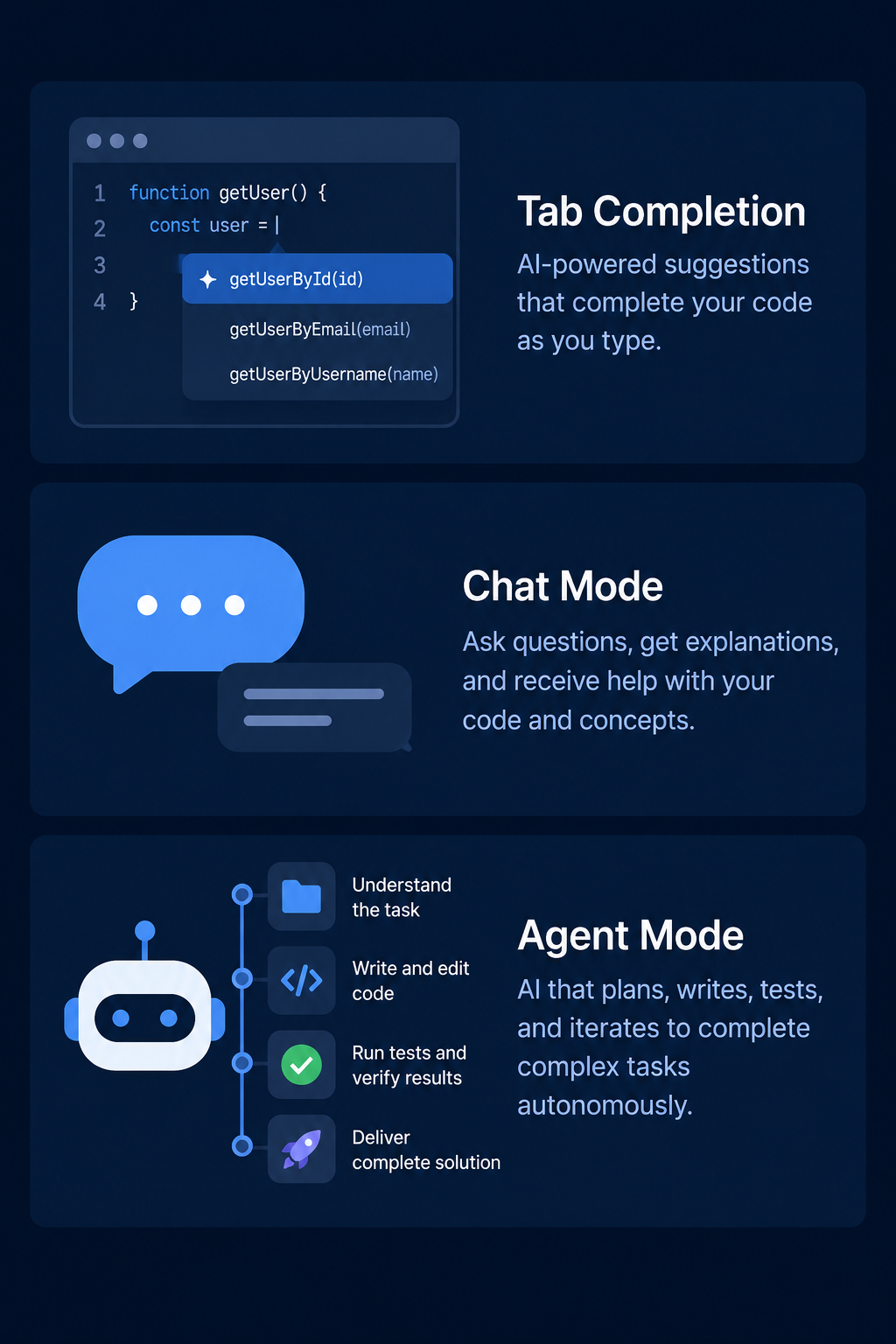
Tab Completion is Cursor’s most-used feature. As you type, the AI predicts what you want to write next, often completing full lines or even full functions. This is powered by Cursor’s own fine-tuned models and only available on paid plans.
Inline Editing lets you highlight any piece of code, press a keyboard shortcut, and type what change you want in plain English. Cursor shows you a side-by-side diff so you can accept or reject the change before it is applied.
Chat Mode (Ask Mode) works like a chat window inside the editor. You can ask questions about your code, request explanations, or ask for new functions, and the AI responds with code you can apply directly.
Agentic Features
Agent Mode is Cursor’s most powerful capability. Instead of answering one question at a time, Agent Mode lets Cursor autonomously plan and make changes across multiple files in your project at once. You describe a task in plain language, and the AI figures out which files to edit and how.
Codebase Indexing means Cursor reads and remembers your entire project directory. This gives the AI full context when you ask a question, instead of only seeing one open file.
MCP Support and Cloud Agents were added in 2026. The Model Context Protocol (MCP) lets Cursor connect to external tools, APIs, and data sources. Cloud agents let background tasks run without keeping the editor open.
AI pair programmer tools that only work on single files miss the most important part of real development work. Cursor’s whole-codebase context awareness is one reason developers say it can save 8 to 12 hours per week on complex projects.
How Does Cursor AI Compare to GitHub Copilot and Windsurf?
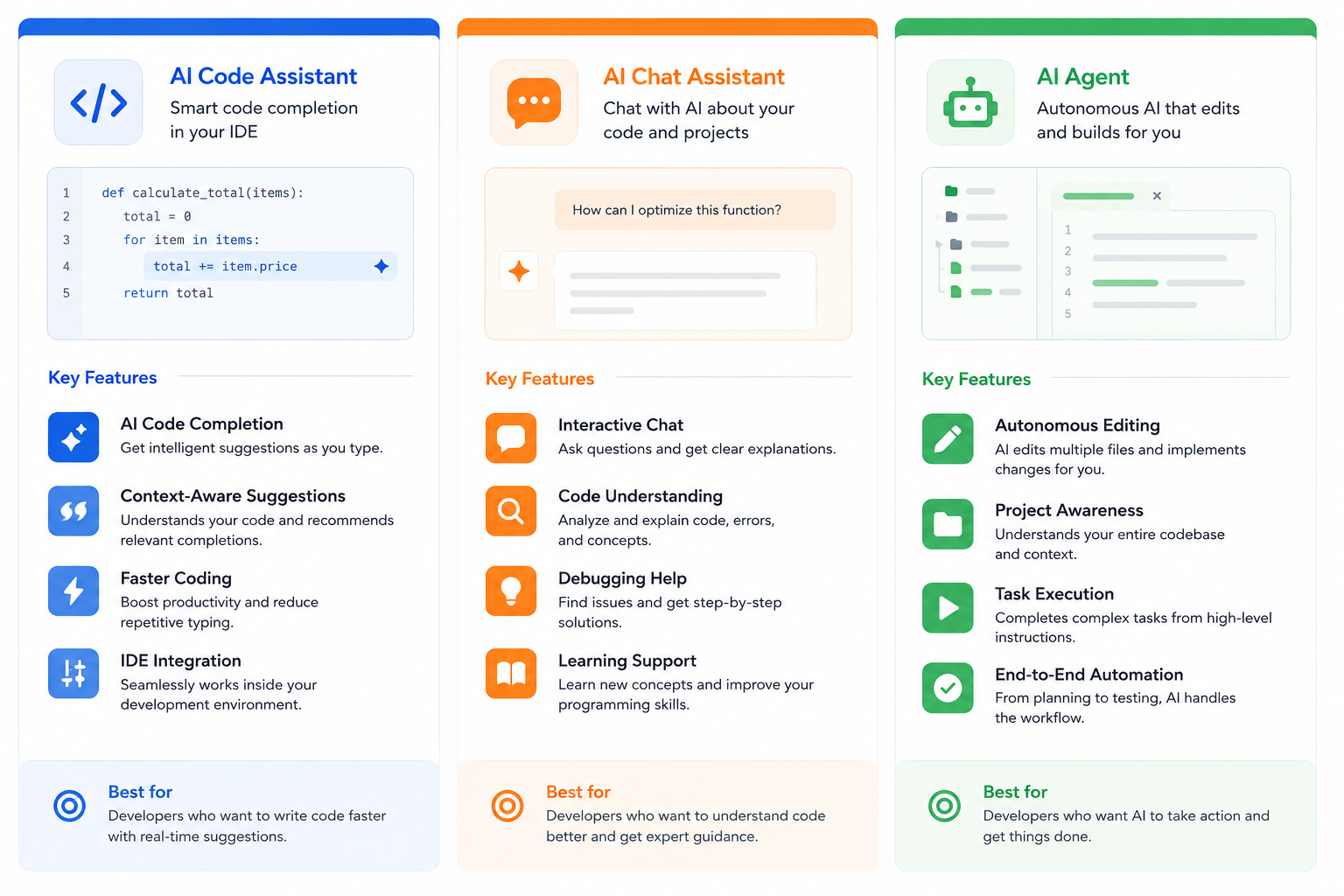
There are now dozens of AI coding assistant tools on the market. The AI code tools market is estimated between $7 billion and $10 billion in 2025 to 2026. But three names come up in nearly every comparison: Cursor, GitHub Copilot, and Windsurf.
| Feature | Cursor AI | GitHub Copilot | Windsurf |
| Built on VS Code | Yes (full IDE fork) | No (extension only) | Yes (IDE fork) |
| Whole codebase context | Yes | Limited | Yes |
| Agent Mode | Yes | Limited | Yes |
| Model flexibility | Claude, GPT-4o, Gemini, own model | GPT-4o, Claude (via Copilot Chat) | Claude, GPT-4o |
| Free plan | Yes | Yes (limited) | Yes |
| Starting paid price | $20/month | $10/month | $15/month |
| Best for | Complex multi-file projects, power developers | Developers already in GitHub ecosystem | Cursor users wanting a cheaper alternative |
GitHub Copilot works as an extension inside your existing IDE. It is great for inline suggestions and integrates tightly with GitHub pull requests and repositories. But it does not rebuild the editor around AI the way Cursor does.
Windsurf, formerly known as Codeium, is the closest direct alternative to Cursor. Both are VS Code-based with agentic chat modes. Windsurf starts at a lower price point, but Cursor holds approximately 18% of the paid AI coding market, reflecting a clear preference among professional developers.
The bottom line: if you want the deepest AI integration in a full IDE, Cursor wins. If you want to stay inside your existing VS Code setup, Copilot is the easier choice.
Cursor AI Pricing: What Does It Cost?
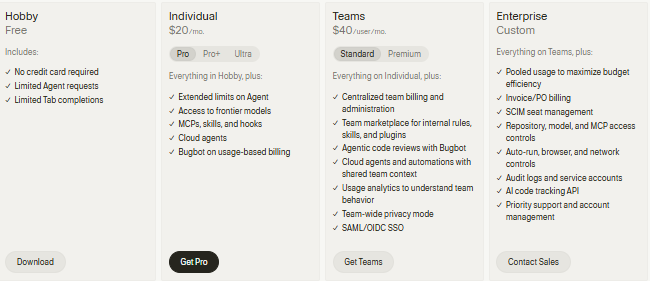
Cursor’s pricing changed significantly in June 2025 when Anysphere replaced fixed “fast request” caps with a credit-based system tied to actual model usage. This means heavier model use, especially with frontier models like Claude 4 Opus, draws down your credit balance faster than lighter use.
| Plan | Price | Best For |
| Hobby (Free) | $0 | Testing the tool, no credit card needed |
| Pro | $20/month ($16/month billed annually) | Individual developers, daily use |
| Pro Plus | $60/month | Power users needing extended model access |
| Ultra | $200/month ($160/month billed annually) | Heavy users, 20x Pro agent limits |
| Business | $40/seat/month | Teams needing admin controls and shared rules |
| Enterprise | Custom pricing | Large organizations |
The Pro plan gives you unlimited Tab completions plus 500 premium model requests per month. Each time you call a frontier model like Claude 4 Sonnet, one request is deducted. After 500 requests, you can enable usage-based pricing at $0.04 per additional request, or you are moved to a slower queue.
For a full breakdown of every plan, credits, and hidden costs, see our complete Cursor AI pricing guide.
Who Is Cursor AI Best For?
Not every developer or builder needs the same tool. Here is a simple breakdown of who gets the most out of Cursor AI.
- Working developers on complex projects: If you work across large codebases with multiple files and folders, Agent Mode and codebase indexing will save you significant time. Pro at $20/month pays for itself quickly for full-time developers.
- Vibe coders and non-developers: However, learners who want a structured path into AI development may benefit from an AI engineer course covering Python, machine learning, large language models, and AI application development. You can describe what you want and let the AI write most of the code.
- Startup founders and solo builders: Cursor speeds up prototyping. You can go from an idea to a working code structure much faster than typing everything manually.
- Engineering teams: The Business plan adds centralized billing, team-wide rules, and admin controls. Over 50,000 engineering teams use Cursor across their organizations.
Cursor AI is NOT ideal for: Developers who strongly prefer to stay inside IntelliJ IDEA, Xcode, or other non-VS Code IDEs. For backend Java or Spring Boot work in particular, IntelliJ still offers a deeper ecosystem integration.
Is Cursor AI Worth It in 2026?
With so many AI tools competing for attention, it is fair to ask whether Cursor AI still deserves its reputation. The short answer is yes, for most developers it does.
What Cursor does well:
- Reads and understands your entire project, not just one file
- Flexible model routing means you can pick the best AI model for each task
- Agent Mode handles complex, multi-step tasks without constant manual prompting
- Familiar VS Code foundation means almost no learning curve for existing VS Code users
- Active development with Claude 4.x as the 2026 default model
What Cursor does not do well:
- Pricing model complexity after the June 2025 credit overhaul confuses new users
- Heavy use of frontier models can push monthly costs above the base $20 plan
- Users locked into a VS Code fork lose flexibility if they prefer other IDEs
- Complete beginners with no coding background may find the environment overwhelming
The honest verdict: Cursor AI earned its place as the go-to AI IDE for serious developers. Its codebase-wide context, strong Agent Mode, and model flexibility give it an edge that simpler tools cannot match. For casual users or beginners, the free plan is worth trying before committing to Pro. For anyone building software daily, the Pro plan at $20/month is one of the highest-value subscriptions in the developer productivity space.
Pros and Cons at a Glance
| Pros | Cons |
| Reads entire codebase for context | Credit billing can be confusing |
| Multiple frontier model options | Heavy users pay more than $20/month |
| Agent Mode handles multi-file tasks | Tied to VS Code fork only |
| Free plan requires no credit card | Steep for complete non-coders |
| Trusted by 67% of Fortune 500 companies | Not ideal for Java/IntelliJ workflows |
Final Thoughts
Cursor AI has gone from a startup experiment to an industry standard in just two years. Over 1 million paying developers, $2 billion in annualized revenue, and adoption inside most of the world’s biggest companies tells a clear story. This is not a passing trend in the AI tools space. It is becoming the default environment for AI-assisted development.
If you write code regularly or want to start building with AI help, Cursor AI is worth your time. Start with the free Hobby plan, run it through a real project, and see how Agent Mode and codebase indexing change the way you work. For most people who try it seriously, upgrading to Pro quickly becomes an obvious decision.
AI coding tools are changing fast. The best way to stay ahead is to understand what each tool actually does and who it is built for. Explore more AI tool guides on FreeMail.AI and find the right stack for how you build.