


Windsurf AI is an agent-native code editor that goes beyond autocomplete. Its Cascade agent reads your entire codebase, makes multi-file edits, runs terminal commands, and fixes errors on its own. The free plan requires no credit card. Paid plans start at $20 per month. If you want an AI that takes initiative instead of waiting for your next prompt, Windsurf is worth a serious look in 2026.
Most AI coding tools wait for you to tell them what to do next. Windsurf does not.
While tools like GitHub Copilot suggest the next line of code, Windsurf reads your entire project, plans ahead, and takes action across multiple files at once. It is built around an agent called Cascade, and it works more like a co-author than a code suggestion engine.
This review covers everything you need to know before trying Windsurf. You will find a full features overview, the updated 2026 pricing plans, an honest Windsurf vs Cursor comparison, and a clear answer to whether Windsurf is right for your workflow.
What Is Windsurf AI?
Windsurf AI is an agentic code editor built by the team behind Codeium. It is a full VS Code fork, which means it looks and feels like the editor most developers already know. You can bring your existing extensions, keybindings, and settings over with almost no setup friction.
But Windsurf is not just Codeium with a new name. It is a full rebuild. Codeium was a code completion extension. Windsurf is an entire development environment designed around the idea that AI should act, not just suggest.
The team behind Windsurf includes engineers from DeepMind and the GitHub Copilot project, which helps explain the depth of the agent architecture.
If you have used VS Code before, you will feel at home in Windsurf within minutes. The difference shows up the moment you give Cascade a task.
How Does Windsurf’s Cascade Agent Work?
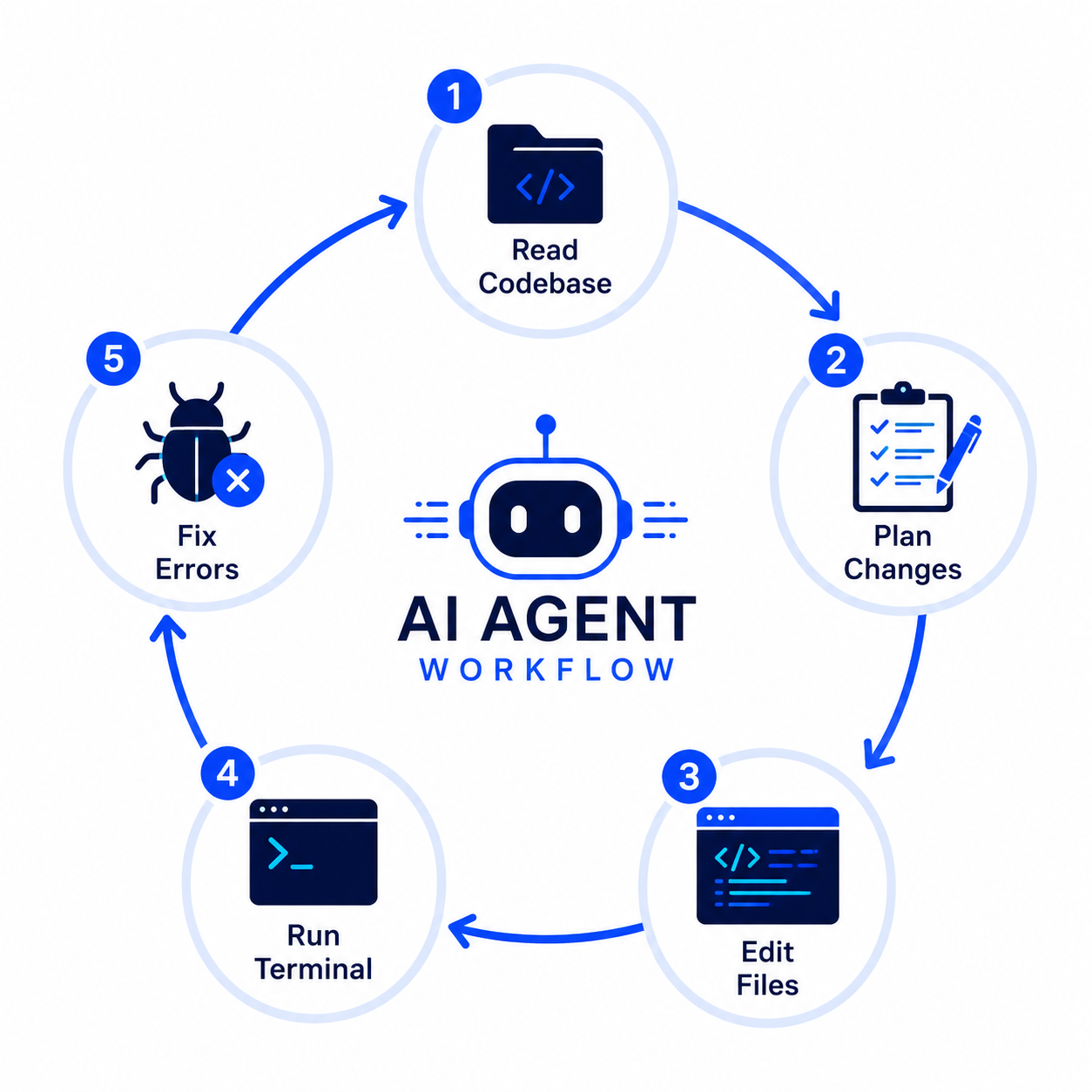
Cascade is the core of everything Windsurf does differently. It is not a chat window you type into and wait. It is an AI agent that reads your project, decides what needs to change, and does the work across multiple files at the same time.
Here is how Cascade handles a task step by step:
- Reads your codebase to understand the full project context before touching anything
- Plans the changes needed across all relevant files, not just the one you have open
- Executes the edits across multiple files simultaneously
- Runs terminal commands like install, build, or test without you having to switch windows
- Checks the output and automatically retries if something fails, without needing a new prompt
That last step matters. Most AI coding tools stop and ask you what to do when they hit an error. Cascade keeps going.
Cascade Write Mode vs. Chat Mode
Windsurf gives you two ways to work with Cascade. In Write Mode, the agent takes full control and makes changes directly to your files. In Chat Mode, it talks through ideas and suggestions without editing. You switch between them depending on whether you want the AI to act or advise.
What Are Codemaps?
Codemaps is a Windsurf feature that builds a visual map of your codebase structure. It helps both you and the AI understand how files and components connect. This gives Cascade better context when it decides what to change, which leads to more accurate multi-file editing.
Windsurf AI Features Overview
Windsurf packs a strong set of features for individual developers and teams. Here is what you get:
- Cascade agent with autonomous multi-file editing and terminal command execution
- Tab autocomplete that predicts your next move based on full project context
- Inline code generation directly inside any file without switching to a chat window
- Codemaps for codebase visualization and smarter AI context
- Agent mode for fully automated task execution from a single prompt
- VS Code extension support through the VS Code fork foundation
Built-In Browser and Deployment
Windsurf includes a built-in browser and deployment tools directly inside the editor. This means you can preview your app, test interactions, and deploy without ever leaving the IDE. Cursor does not offer this as a native feature.
Model Support: Claude, GPT-4o, and Gemini
Windsurf gives you access to models from OpenAI, Anthropic, and Google depending on your plan. This includes GPT-4o, Claude from Anthropic, and Gemini from Google. You are not locked into one model provider, which gives you flexibility based on the task at hand.
Windsurf AI Pricing Plans (2026)
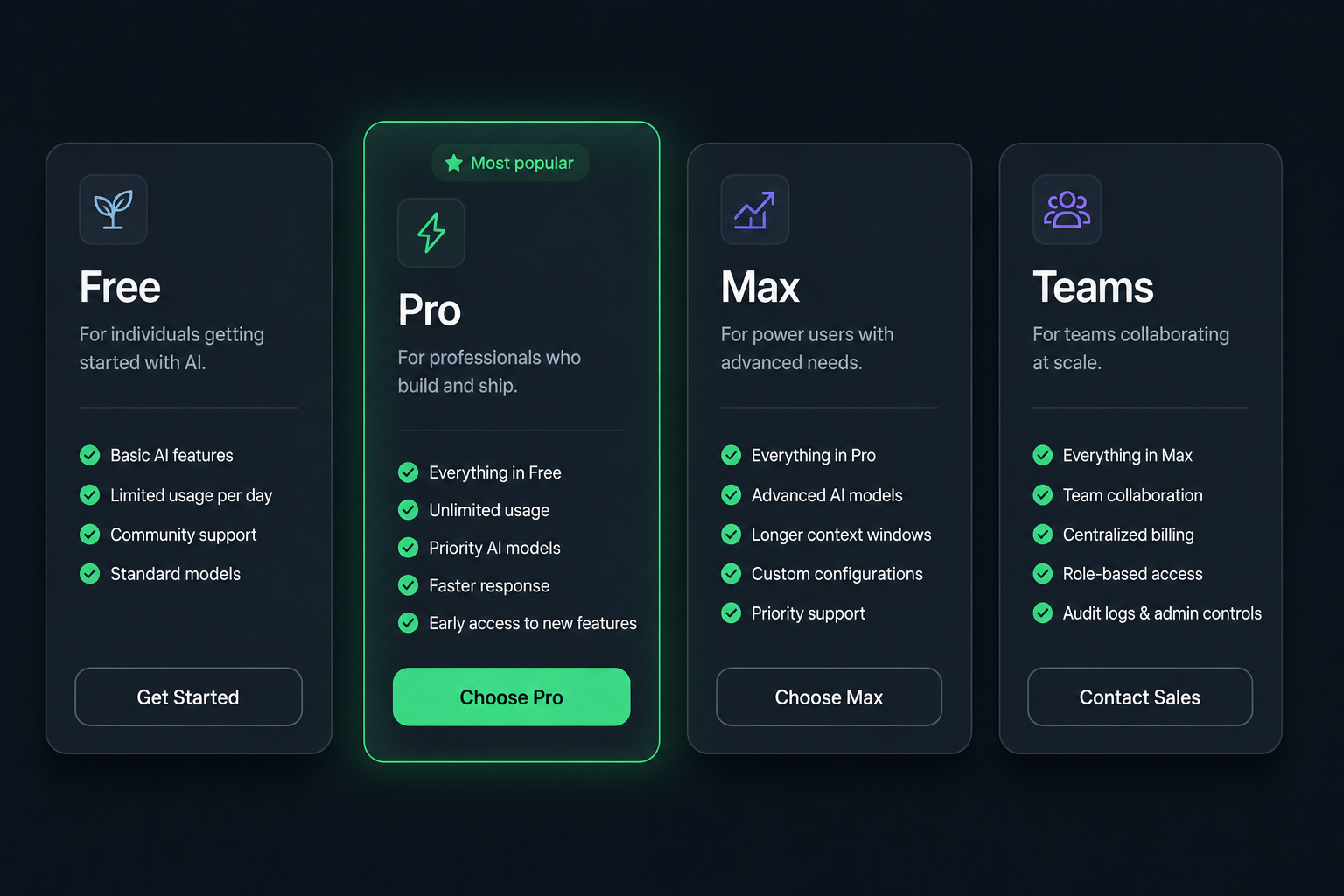
In March 2026, Windsurf replaced its old credit-based system with a new quota-based model. Quotas now refresh on a daily and weekly cycle instead of depleting from a one-time pool. This change makes costs more predictable for regular users.
Here is how each plan breaks down:
| Plan | Monthly Price | Quota | Best For |
| Free | $0 | Light daily quota | Trying Windsurf, hobby projects |
| Pro | $20/month | Standard quota (daily + weekly refresh) | Solo developers, freelancers |
| Max | $200/month | Heavy quota for power use | Heavy Cascade use, professionals |
| Teams | $40/user/month | Standard quota per seat | Teams up to 200 members |
| Enterprise | Custom pricing | Custom | Large organizations, compliance needs |
The free plan requires no credit card and gives you enough quota to test Cascade on a real project. The Pro plan at $20 per month hits the sweet spot for most solo developers who want unlimited daily use without the power-user overhead of the Max tier.
For a side-by-side look at how Windsurf stacks up on price, see our Cursor AI Pricing 2026 guide.
Windsurf AI vs. Cursor: Which Should You Use?
This is the question most developers ask first, and it has a clear answer once you understand how each tool is built.
Cursor acts as a copilot. It stays beside you, makes suggestions, and waits for your next instruction. You drive; the AI assists. Windsurf acts as a co-author. It reads your project context, takes initiative, and moves things forward without constant prompting.
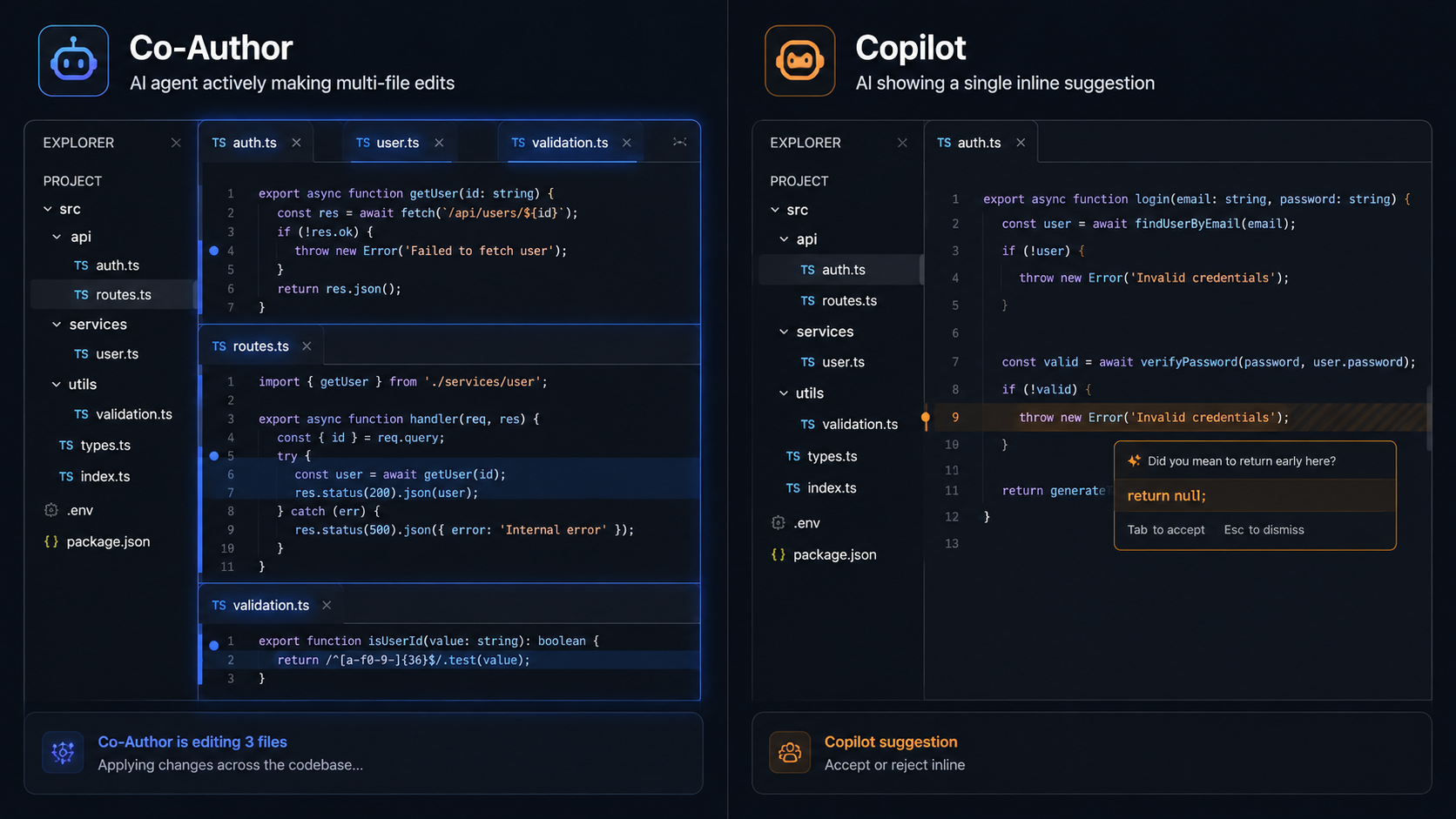
Neither approach is wrong. The right choice depends on how much control you want to hand over to the AI.
| Dimension | Windsurf AI | Cursor AI |
| AI style | Co-author (takes initiative) | Copilot (waits for direction) |
| IDE format | Standalone IDE + VS Code extension | Standalone IDE only |
| Free plan | Yes, light quota | Yes, Hobby plan |
| Pro price | $20/month | $20/month |
| Codebase context | Cascade + Codemaps | Rules + project index |
| Built-in browser | Yes | No |
| Best for | Autonomous, agent-first developers | Manual, suggestion-first developers |
If you spend a lot of time jumping between the editor, terminal, and browser, Windsurf removes most of that context-switching. If you prefer tight control over every suggestion, Cursor gives you that predictability.
For a full breakdown of the Cursor experience, read our Cursor AI review.
Who Should Use Windsurf AI?
Windsurf is a strong fit for a specific type of developer. Here is who gets the most value from it:
Windsurf is ideal if you:
- Want the AI to take initiative and work ahead without constant prompting
- Build projects that span many files and components
- Switch between coding, terminal, and browser constantly
- Are evaluating a move away from passive AI tools like Copilot
- Work solo or in a small team and want to move fast
Windsurf may not be the right fit if you:
- Prefer full control over every suggestion the AI makes
- Use deep VS Code integrations that do not transfer cleanly
- Are working in a large enterprise with strict compliance requirements and need fully custom deployment
- Are looking for a no-code builder rather than a code editor
If you fall into the last category, tools like Lovable AI or Bolt AI may be a better starting point since they are built for building apps through prompts rather than writing code directly.
How to Get Started with Windsurf AI (Free)
Getting Windsurf running takes less than ten minutes if you already use VS Code. Here is the full process:
- Download Windsurf from windsurf.com. It is available for Mac, Windows, and Linux.
- Import your VS Code settings. On first launch, Windsurf prompts you to bring over your extensions, themes, and keybindings automatically.
- Create a free account. No credit card required. The free plan activates instantly with a daily quota.
- Open your first project inside Windsurf the same way you would in VS Code.
- Start a Cascade session. Open the Cascade panel, describe what you want to build or change, and watch it work across your files.
The learning curve is gentle if you come from VS Code. The interface is familiar. The only adjustment is getting used to letting Cascade take action instead of waiting for you to approve every step.
Windsurf AI Pros and Cons
No tool is perfect. Here is an honest look at where Windsurf delivers and where it falls short.
Pros:
- Cascade handles multi-file editing and terminal tasks without extra prompting
- Free plan is genuinely usable for real projects, not just demos
- Available as both a standalone IDE and a VS Code extension (Cursor is IDE only)
- Built-in browser and deployment tools cut context-switching time significantly
- Model flexibility with OpenAI, Anthropic, and Google model support
- Independent review ratings average around 8 out of 10 for speed and value
Cons:
- The free plan quota is light and can run out during a heavy session
- Handing full initiative to an AI agent can feel uncomfortable for developers who want tight control
- The Max plan at $200 per month is expensive for casual or part-time developers
- Some advanced VS Code integrations do not transfer perfectly
- Less predictable than Cursor for developers who prefer suggestion-based assistance
Final Thoughts: Is Windsurf AI Worth It in 2026?
Windsurf AI is one of the most capable agentic code editors available right now. The March 2026 quota update made pricing more predictable. The Cascade agent is genuinely different from what Cursor, Copilot, or any other autocomplete-style tool offers. And the free plan gives you a real test drive with no commitment.
If your workflow involves a lot of multi-file work, frequent terminal use, and browser testing, Windsurf cuts through that friction better than anything else in its category. It earns its place as the top option for developers who want their AI to move the project forward, not just respond to it.
If you are not sure whether Windsurf or Cursor fits your workflow better, start with the free plan on both. The difference in how they feel becomes obvious within a single session.
Ready to try it? The Windsurf free plan is available at windsurf.com with no credit card required. Test Cascade on a real project and decide from there.