

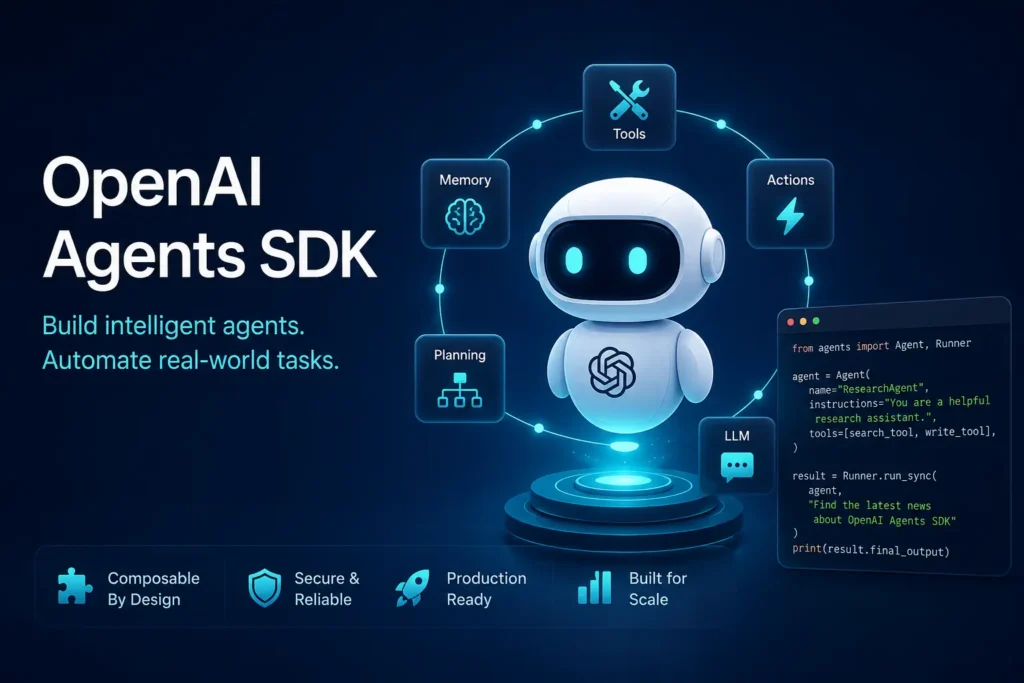
The OpenAI Agents SDK is a Python framework for building AI agents with tools, handoffs, guardrails, sessions, and tracing. It works best when you want the SDK to manage multi-step workflows instead of writing every step yourself. Use it for complex apps with multiple steps, specialist agents, safety checks, or debugging needs. Use direct API calls when your task is simple and short.
Many developers want to build AI agents but are not sure if they need the OpenAI Agents SDK or just direct API calls. This guide explains what the OpenAI Agents SDK is, how it works, and when you should use it. You will learn the core concepts, see a quick setup guide, and find a clear comparison with the Responses API so you can decide with confidence.
What Is the OpenAI Agents SDK?
The OpenAI Agents SDK is a lightweight Python framework for building agent-based applications with tools, handoffs, guardrails, sessions, and tracing. It is designed for developers who want managed orchestration instead of wiring every model call and tool loop by hand.
The SDK is the production-ready successor to an earlier experimental project called Swarm. It uses very few abstractions. You define agents as simple Python objects, give them instructions and tools, and connect them with handoffs. The SDK handles the rest.
Key points:
- Open source and free to use
- Python 3.10 or newer required
- Works with OpenAI models and over 100 other models through the Chat Completions API
- Built on top of the Responses API by default
Why Do Developers Use the OpenAI Agents SDK?
Developers choose the OpenAI Agents SDK when they want the runtime to manage turns, tool execution, handoffs, guardrails, and tracing without building that orchestration layer themselves.
Common use cases include:
- Research agents that browse, summarize, and cite sources
- Customer support routing that hands off to specialist agents
- Code assistants that write, test, and fix code in a loop
- Workflow automation with multiple steps and decision points
- QA and testing flows that need sandbox accounts or temporary email addresses
The SDK saves time when your application has multiple steps, needs safety checks, or benefits from built-in observability.
How Does the OpenAI Agents SDK Work?
The SDK wraps model calls in a higher-level runtime that can manage turns, tools, handoffs, validation, and state. The runner handles the loop until the task finishes or pauses for review.
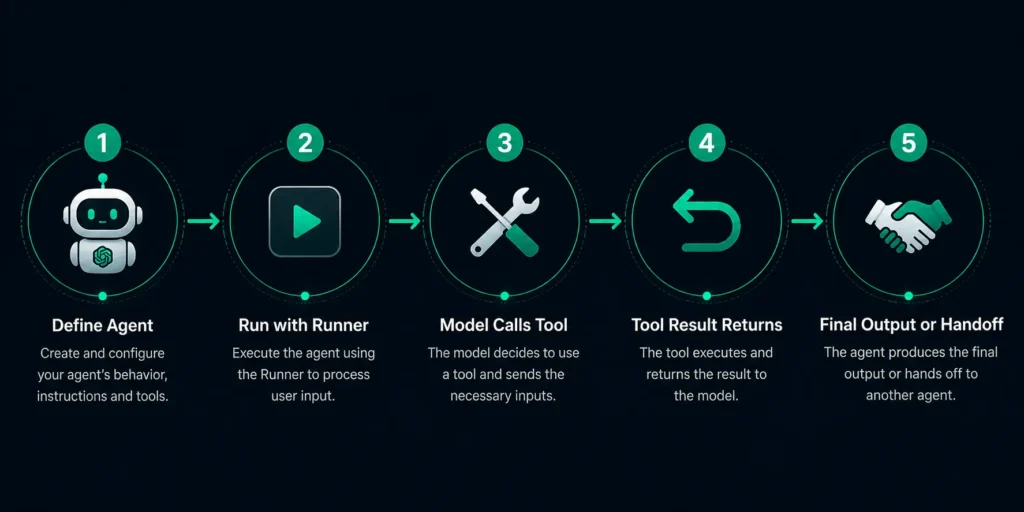
Here is the basic flow:
- You create an agent with instructions, tools, and optional settings like guardrails or handoffs.
- You pass the agent and a user message to the runner.
- The runner calls the model. If the model asks for a tool, the runner executes the tool and sends the result back to the model.
- This loop continues until the model produces a final answer or a handoff triggers a switch to another agent.
- Guardrails can validate inputs or outputs at any step.
- Sessions keep conversation state across runs.
- Tracing records every step for debugging.
Core Concepts You Need to Know
Agents
An agent is a large language model configured with instructions, tools, and optional runtime behavior such as handoffs, guardrails, and structured outputs. You can think of it as a specialized worker with a clear job description.
Tools
Tools let agents take actions. The SDK supports three main types:
- Hosted tools like web search or file search
- Function tools that call your own Python functions
- Agents as tools, which let one agent call another agent as a function
Handoffs
Handoffs let one agent delegate a task to another agent that is better suited for it. This helps organize specialist workflows in multi-agent systems. For example, a triage agent can hand off billing questions to a billing agent and technical questions to a support agent.
Guardrails
Guardrails validate inputs and outputs so workflows can fail fast or stay within safety and quality rules. Input guardrails run before the agent processes a message. Output guardrails run after the agent produces a result.
Sessions
Sessions keep conversation state across multiple runs. This is useful for chat applications or long-running workflows where context must persist.
Tracing
Tracing records every step of an agent run including model calls, tool calls, handoffs, and guardrail checks. You can view traces in the OpenAI platform to debug and optimize your agents.
Sandbox Agents
Sandbox agents run in isolated environments where they can inspect files, run commands, and work on long-horizon tasks safely. They are useful for code execution, data analysis, and file manipulation tasks.
Realtime Agents
Realtime agents enable low-latency voice and streaming interactions. They are built for applications that need immediate responses such as voice assistants or live translation.
How Do You Install OpenAI Agents SDK?
Install the package with pip, create an API key, set the environment variable, and run a simple test.
Steps:
- Make sure you have Python 3.10 or newer.
- Run pip install openai-agents in your terminal.
- Get an API key from the OpenAI platform.
- Create a .env file in your project root and add OPENAI_API_KEY=your_key_here.
- Write a short script to test the installation.
Minimal example:
pythonfrom agents import Agent, Runner
from dotenv import load_dotenv
import os

load_dotenv()
os.environ["OPENAI_API_KEY"] = os.getenv("OPENAI_API_KEY")

agent = Agent(name="Assistant", instructions="You are a helpful assistant")
result = Runner.run_sync(agent, "Write a haiku about recursion")
print(result.final_output)
Run the script. If you see a haiku, the SDK is working.
OpenAI Agents SDK vs Responses API
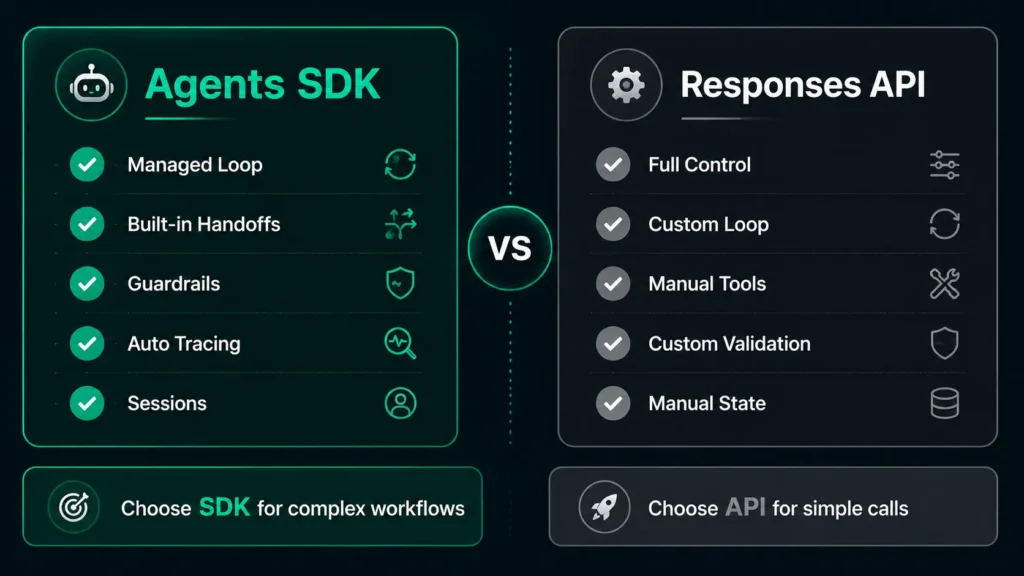
This is the most important decision for many developers. The table below shows the key differences.
| Factor | OpenAI Agents SDK | Responses API (Direct) |
| Orchestration | Managed by SDK runner | You write the loop |
| Tools | Built-in tool calling and result handling | You dispatch tools and send results |
| Handoffs | Native support | You implement delegation logic |
| Guardrails | Input and output validation built in | You write validation code |
| Sessions | Built-in conversation state | You manage history |
| Tracing | Automatic detailed traces | You add logging yourself |
| Best for | Multi-step, multi-agent, safety-critical, debug-heavy apps | Simple request-response, single-turn, full control |
Simple rule: Use the Agents SDK when your app has multiple steps, needs specialist agents, needs safety checks, or needs debugging visibility. Use the Responses API directly when a single model call or a short fixed loop is enough.
When Should You Use the OpenAI Agents SDK?
Use the SDK when:
- Your workflow has multiple steps that depend on each other
- You need different specialist agents for different tasks
- You want input or output validation without writing custom code
- You need detailed traces to debug agent behavior
- You want to hand off tasks between agents cleanly
- You are building a code assistant, research agent, or support router
Skip the SDK when:
- A single model call solves the problem
- You want total control over every token and tool call
- Your team prefers to own the orchestration layer
- The added abstraction does not save you time
OpenAI Agents SDK vs LangGraph and Other Frameworks
The OpenAI Agents SDK is not the only option. Here is a high-level comparison.
| Framework | Style | Strength | Consider When |
| OpenAI Agents SDK | Lightweight, Python-first, GPT-native | Fast to start, built-in tracing and guardrails | You use OpenAI models and want minimal boilerplate |
| LangGraph | Graph-based, flexible state | Complex cycles, custom state machines | You need fine-grained control over graph execution |
| CrewAI | Role-based crews | Team-style collaboration patterns | You like the crew metaphor and declarative setup |
| AutoGen | Conversational agents | Multi-agent chat and code execution | You need strong code execution in a chat loop |
The OpenAI Agents SDK wins on simplicity and native integration with OpenAI models. Other frameworks win on flexibility or specific orchestration patterns. Choose based on your team’s preferences and the problem shape.
Real Use Cases for the OpenAI Agents SDK
Research Agent
A research agent can search the web, read pages, summarize findings, and cite sources. Tools handle search and browsing. Guardrails ensure citations are present.
Customer Support Router
A triage agent classifies incoming tickets and hands off to billing, technical, or account specialists. Each specialist agent has its own tools and knowledge base.
Code Assistant
An agent writes code, runs tests, fixes errors, and iterates until tests pass. Sandbox agents can execute code safely in isolated environments.
Workflow Automation
Agents can chain actions like reading a spreadsheet, calling an API, updating a database, and sending a notification. Sessions keep track of progress across runs.
QA and Test Flow Automation
Developers testing signup flows or email-based workflows can use agents to create temporary accounts, verify confirmation emails, and clean up afterward. A temporary email service like freemail.ai can keep test runs separate from real inboxes.
Common Mistakes and Limits
Over-Engineering Simple Tasks
Do not reach for the SDK if a single prompt and one tool call solve the problem. The abstraction adds complexity you do not need.
Using Multi-Agent for Everything
Handoffs are powerful but not always necessary. A single agent with multiple tools is often simpler and easier to debug.
Ignoring Tracing
Tracing is one of the biggest advantages of the SDK. Turn it on and review traces when things go wrong. It saves hours of guesswork.
Skipping Guardrails
Guardrails catch bad inputs and bad outputs early. They are cheap insurance for production apps.
Forgetting API Costs Still Apply
The SDK itself is free and open source. However, every model call, tool call, and token still costs money through your OpenAI API usage. If you are comparing overall OpenAI tool costs, you can also check our OpenAI Codex pricing guide for a broader view.
Should You Learn OpenAI Agents SDK in 2026?
Yes, if you build agentic applications on OpenAI and want a practical orchestration layer that handles loops, tools, handoffs, guardrails, and tracing out of the box. No, if your workflows are simple enough for direct API calls or if you prefer a different orchestration philosophy.
Start with the quickstart. Build a tiny agent. Add a tool. Add a handoff. Add a guardrail. Look at the trace. You will know quickly if the SDK fits your style.
Final Thoughts
The OpenAI Agents SDK gives you a clean, Python-first way to build agents that can use tools, hand off to specialists, validate their own inputs and outputs, remember conversation state, and show you exactly what happened at every step. It is not magic. It is a well-designed orchestration layer that saves you from rebuilding the same plumbing on every project.
If your project has multiple steps, needs safety checks, or benefits from visible traces, the SDK is a strong choice. If your task is simple, the Responses API is lighter and more direct. Both are valid. Pick the one that matches the complexity of your problem.