

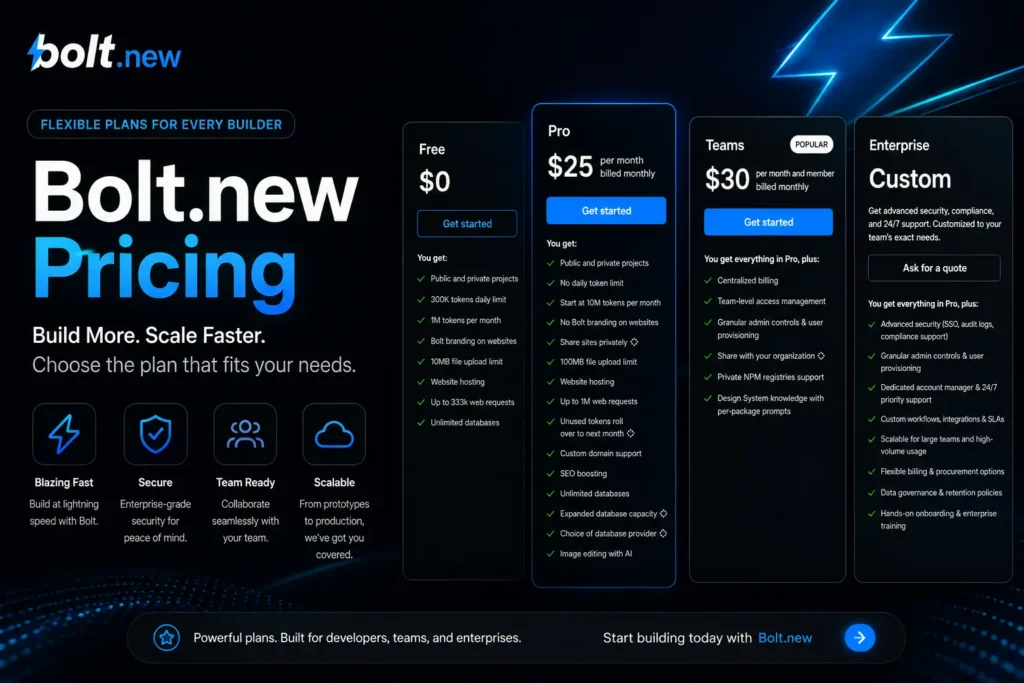
If you are checking bolt.new pricing, you likely want a fast answer. Bolt.new has a free tier, paid plans for heavier use, and a token-based pricing model, so the real cost depends on how much you build and how often you refine your app.
This guide breaks down bolt.new cost, explains bolt.new pricing plans, and shows how bolt.new tokens can change the value of each plan. It also covers the bolt.new free plan, bolt.new pro pricing, bolt.new teams pricing, bolt.new enterprise pricing, and the bolt.new token limit in simple words.
Bolt.new Pricing at a Glance
Bolt.new uses token-based pricing instead of a simple unlimited monthly plan. That means the price you pay is only one part of the story. Your real cost also depends on your monthly token allowance, your daily token limit, and how large your project becomes.
Here is a simple look at the current plan setup based on the available sources.
| Plan | Price | What You Get | Best For |
| Free | $0 | 1M tokens per month and 300K daily limit | Testing, learning, small experiments |
| Pro | $25/month | 10M tokens | Solo builders, freelancers, MVP work |
| Teams | $30/member/month | 26M tokens and team features | Small teams with shared work |
| Enterprise | Custom pricing | Higher-scale setup and support | Bigger companies and large app work |
Some sources also mention an annual discount for yearly billing. One recent source says the discount can be 10%, but you should still check the live pricing page before you publish or buy.
What Does Bolt.new Cost Right Now?
The short answer is this: bolt.new cost starts at free, then moves up as your needs grow. The free tier is good for light use, while the Pro, Teams, and Enterprise options are built for heavier work, more features, and more room to build.
The bolt.new free plan gives you a way to test the platform without paying. It includes 1 million tokens per month and a 300K daily limit, so it works best for trial runs, small ideas, and basic rapid prototyping.
The next step is bolt.new pro pricing. Recent sources describe Pro at $25 per month with 10 million tokens, which makes it a stronger pick for repeated building, editing, and MVP work.
For groups, bolt.new teams pricing is described at $30 per member per month. A recent source says this plan includes 26 million tokens, plus features such as centralized billing and team management, which matter when more than one person is working on the same workflow.
If you need more scale, bolt.new enterprise pricing is custom. That usually means you need to talk with the company for a setup that fits your use case, team size, security needs, and bigger build volume.
How Bolt.new Tokens Change the Real Price
This is the part many readers miss. Bolt.new tokens matter just as much as the monthly fee because they shape how much real work you can do inside the platform.
Think of tokens like fuel for the AI. Every prompt, code change, or rebuild uses some of that fuel. If your project is small, the fuel lasts longer. If your project is big and you keep asking for changes, the fuel runs out faster.
One source says small projects may use about 50K to 150K tokens per prompt. Medium projects may use about 150K to 500K tokens per prompt. A simple SaaS app can use around 3 million tokens in total.
That means a plan that looks cheap at first can feel costly later if your app grows fast. This is why real usage limits matter more than the sticker price alone.
It also helps explain the bolt.new token limit question. If you hit your daily or monthly cap, your build work slows down until the limit resets or you move to a bigger plan.
How Token-Based Pricing Works in Plain English
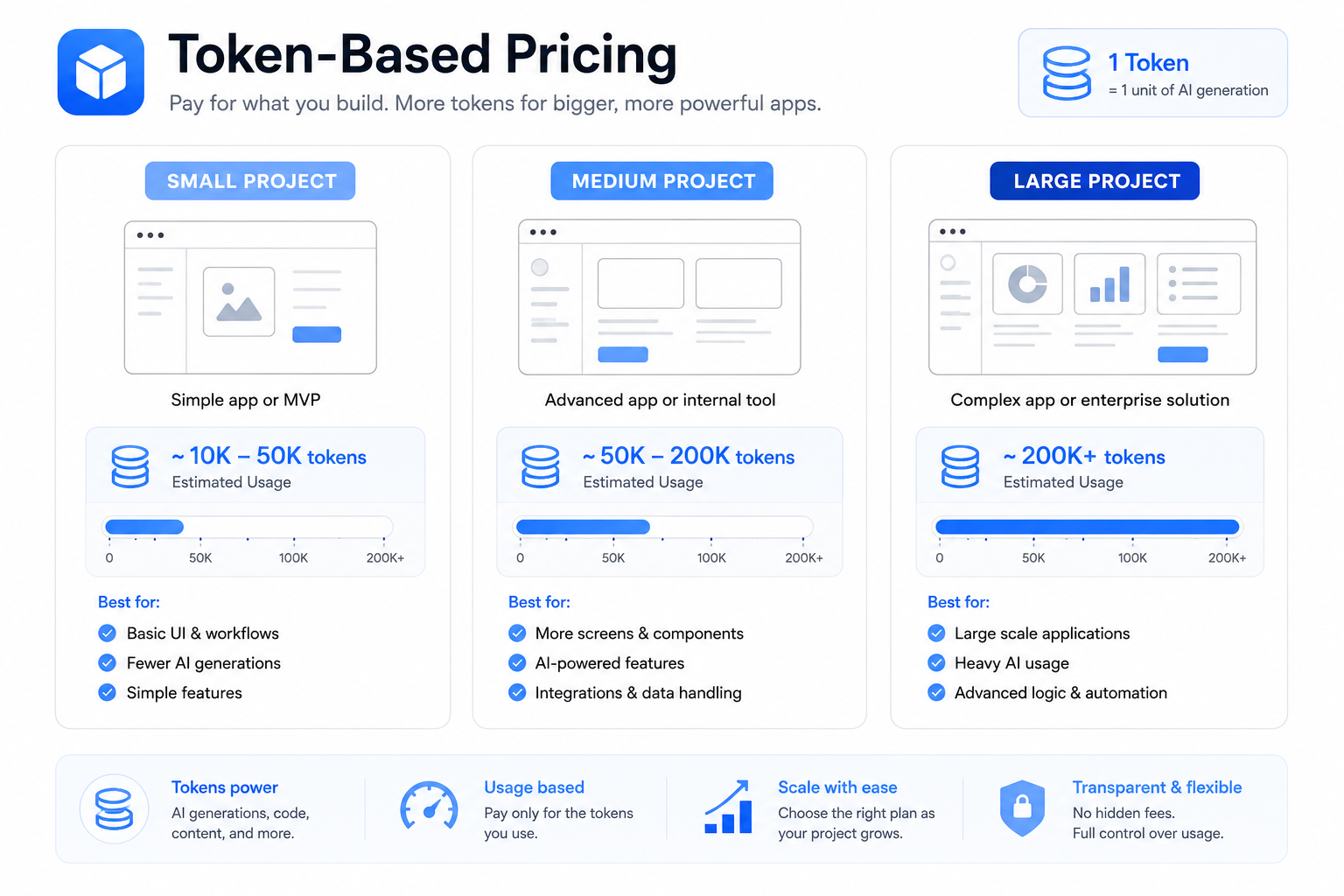
A lot of people see a monthly plan and assume they can use it as much as they want. That is not how Bolt.new works. The system is based on tokens, so each action uses part of your allowance.
The daily token limit controls how much you can use in one day. The monthly token allowance controls how much you can use across the full month.
This matters for builders who like to test many versions. If you keep changing prompts, fixing layouts, adding features, or rewriting flows, you can burn through tokens much faster than expected. That is one of the biggest hidden costs in this model.
Some buyers also look for token rollover, but the visible source set reviewed here does not clearly confirm rollover as a core feature. Because of that, do not promise rollover unless the live product page says so.
Which Bolt.new Plan Fits Your Workload?
The best plan depends on what kind of builder you are. It also depends on how often you build, how many prompts you use, and whether you work alone or with a team.
If you are just testing ideas
Use the bolt.new free plan first. It is the best starting point if you want to try the platform, learn the flow, or build a very small sample project.
This is a smart pick for simple tests, landing page ideas, and first drafts of an app builder project. It is less ideal for heavy changes or a full MVP with lots of screens and edits.
If you are building an MVP or client project
The Pro plan is often the better fit. Recent sources tie Pro to 10 million tokens, which gives solo users much more room for repeated work.
If you do freelance work, side projects, or startup MVP builds, Pro can make more sense than free because it reduces pressure from the daily token limit. It also gives more room for trial and error, which is a big part of rapid prototyping.
If you work with other people
Teams is a stronger fit when you need shared workflows. One recent source says this tier includes centralized billing and team management, which helps keep group work organized.
This matters if your team is building together and wants one place for planning, usage, and payment. In that case, bolt.new teams pricing may be worth the step up from Pro.
If you need more scale or special support
Enterprise is for larger needs. This can include bigger workloads, more control, and custom setup needs that do not fit the normal plan list.
Private Projects, No Branding, and Team Features
Some pricing pages do more than show cost. They also signal what type of user each tier is made for. The visible official pricing snippet mentions public and private projects, which suggests project privacy is part of plan value.
For some buyers, private projects matter more than price alone. If you are building client work, internal tools, or product tests, privacy can be a key reason to move beyond a free tier.
Another value point can be no branding or cleaner output, though you should only include that point if the live product page confirms it during final publishing. The same goes for items tied to Bolt Cloud or special deployment options.
For team use, centralized billing and team management help the plan feel more business-ready. These are not just add-ons. They shape how easy the platform is to run inside a real workflow.
Hidden Costs and Real Usage Limits
Many articles stop after showing the plan prices. That is not enough for this topic. The bigger issue is how quickly tokens can disappear once your app becomes more complex.
Here are the main cost risks to watch:
- Big prompts can use more tokens than expected.
- Repeating the same task many times can eat through your plan faster.
- Larger apps often need more edits, more fixes, and more rebuilds.
- The free tier can feel tight if you work every day.
- A low monthly fee can still lead to weak value if your real usage limits are too small for your workflow.
This is why many users search for the real cost, not just the list price. In simple terms, the plan price tells you the door fee, but tokens tell you how far you can really go inside.
Is Bolt.new Pricing Worth It?
Bolt.new pricing can be worth it if your work fits the plan well. It looks strongest for solo builders, startups, and teams doing fast app drafts, tests, and MVP builds.
The value drops when buyers guess wrong about token usage. If you expect very large builds, lots of refactoring, or long daily sessions, you may hit the plan limits sooner than you hoped.
That does not make the tool bad. It just means the value depends on fit. A small project and a heavy project can have very different cost results even on the same plan.
Bolt.new in the Wider Builder Stack
Bolt.new is often discussed as part of a modern AI building stack. The brand is tied to StackBlitz, and related product language across the ecosystem includes terms like WebContainers, Bolt Help Center, and deployment ideas connected with tools such as Vercel.
These names help readers understand the product world around Bolt.new. Still, for this article, pricing should stay the main focus, not deep platform history.
If you mention Bolt Cloud, keep it short and only as supporting context. Do not let it pull the article away from the exact keyword intent.
How Does Bolt Compare to Other Tools?
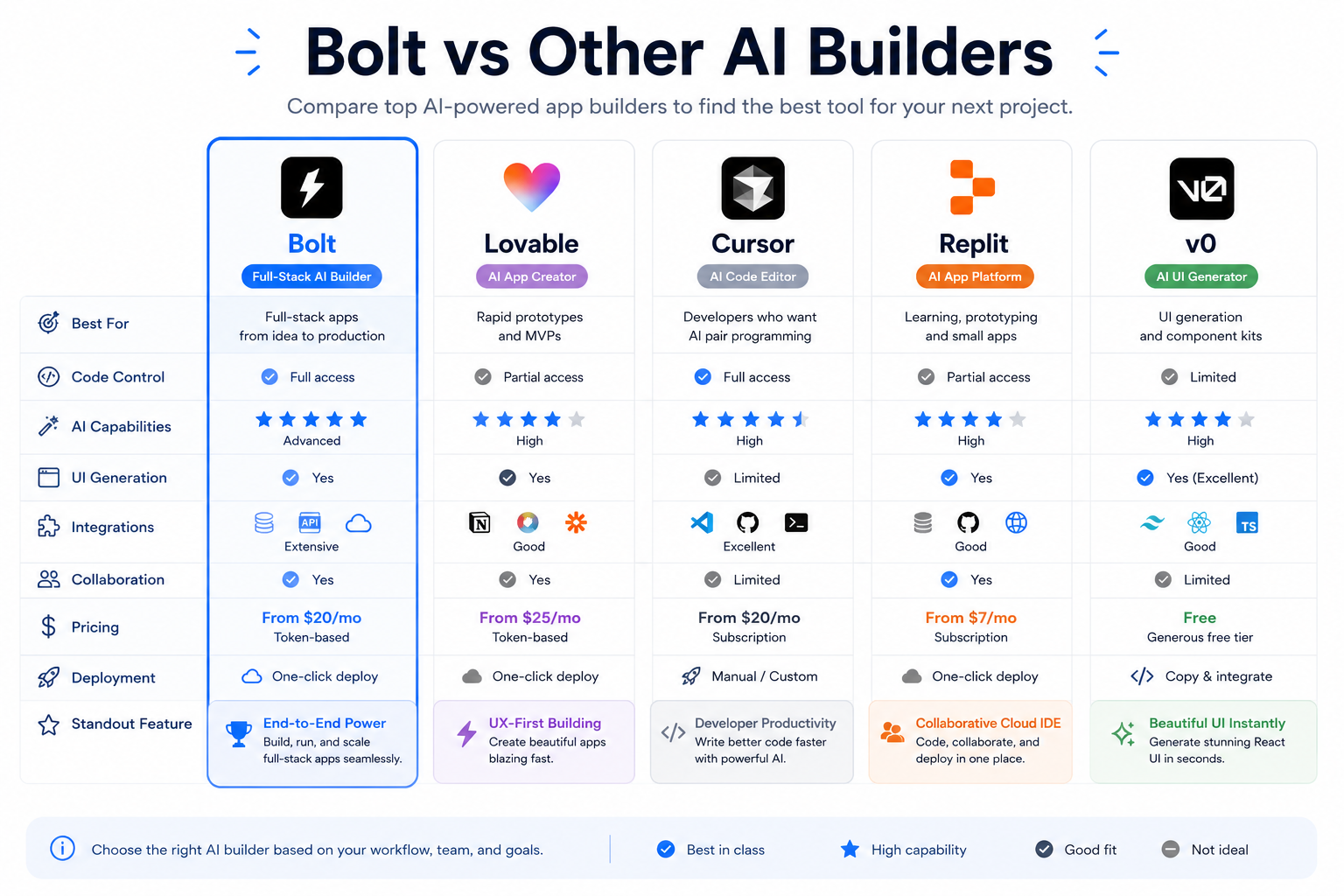
Bolt.new is strong when speed matters most. It is built for fast app drafts, quick tests, and simple MVP work inside a browser. Many users like it because they can go from idea to working app fast without a full local setup.
Other tools may be a better fit if you need more control, deeper coding workflows, or stronger long-term project handling. Some alternatives focus more on GitHub sync, local development, database setup, or team-level code ownership.
For example, Lovable is often seen as more beginner-friendly and strong for guided app building, while Cursor is better for people who want a full IDE and local development flow. Replit can be a stronger pick for browser-based coding with broader infrastructure, and v0 is often used for UI and component generation.
Bolt.new still stands out for rapid prototyping, quick changes, and a simple path from prompt to product idea. But if your project is getting larger, needs full Git workflows, or requires more flexible long-term development, another tool may offer better value.
| Tool | Best For | Where It Beats Bolt | Where Bolt Wins |
| Lovable | Beginner-friendly app building | Easier guided flow, GitHub sync | Faster iteration and quick prompt-to-app flow |
| Cursor | Developers and local coding | IDE workflow, local dev, Git control | Easier browser-based setup for fast starts |
| Replit | Browser coding with more infrastructure | Better app environment, deploy flow, Git support | Simpler fast prototype experience |
| v0 | UI and component generation | Frontend and UI-focused output | Broader app-building flow from natural |
Who Should Choose Free, Pro, Teams, or Enterprise?
Choose Free if you want to test ideas and learn the flow first. It is the safest low-risk choice for simple builds and first tries.
Choose Pro if you build often and need more room for edits, prompts, and MVP work. This is likely the best middle-ground option for many solo users.
Choose Teams if you work with others and need shared workflows, centralized billing, and team management. It is the better fit when building becomes a group task instead of a solo one.
Choose Enterprise if you need custom support, bigger limits, or a larger business setup. That is where enterprise pricing becomes the better path.
Final Thoughts
If you only remember one thing about bolt.new pricing, remember this: the monthly fee is not the full story. The real value comes from how far your tokens go, how strict the daily token limit is, and how well the plan fits your real build style.
For most readers, the smartest move is to compare the free tier with Pro, estimate how often you will build, and choose based on usage instead of guesswork. That simple step can save both time and money.
If you want a fuller product breakdown beyond price alone, read FreeMail AI’s Bolt AI review, then compare it with your own workload before you pick a plan.