


TL;DR: “Temp Mail Ninja” is actually the name used by several separate disposable email services, including TempMailNinja.com, TempMail.Ninja, and TempMailNinja.pw, plus a popular browser extension for Chrome, Firefox, and Microsoft Edge. All of them create free throwaway email addresses in seconds without registration. They work well for quick signups and spam protection, but some domains get blocked by major platforms, most tiers are receive-only, and expired inboxes cannot be recovered. This guide explains what each service offers, where each one falls short, and what the best free alternatives look like in 2026.
If you searched for Temp Mail Ninja and landed on three different websites, you are not alone. “Temp Mail Ninja” is not one single service. It is a name shared by at least three separate disposable email platforms, plus a browser extension available on Chrome, Firefox, and Microsoft Edge. You may have also seen it written as tempmail ninja or ninja temp mail in tech forums and Reddit threads. These all point to the same overlapping cluster of services.
This review covers all of them in one place. You will see what each Temp Mail Ninja service offers, how it performs on real websites, where it falls short, and which free alternative works best when this one does not.
What Is Temp Mail Ninja?
Three main services use the “Temp Mail Ninja” name. They are separate products built by different teams, with different features and different websites.
| Service | Website | Key Difference |
| TempMailNinja.com | tempmailninja.com | Free, no registration, built to work with Facebook, Instagram, Twitter/X, TikTok, Discord, and Reddit signups |
| TempMail.Ninja | tempmail.ninja | Tiered plan system called Ninja Ranks (Quick, Shadow, Master), longest inbox lifespans of the three, email sending on the top tier |
| TempMailNinja.pw | tempmailninja.pw | Comes with a browser extension for Chrome, Firefox, and Edge, 24-hour inbox on the free tier |
On top of the three websites, there is a Temp Mail Ninja browser extension listed on the Chrome Web Store, Firefox Add-ons, and Microsoft Edge Add-ons. The extension is published by the tempmailninja.pw team. It auto-fills signup forms with a throwaway email address and delivers real-time inbox notifications, all without opening a new tab.
The naming overlap between these three creates real confusion. A recommendation to “use Temp Mail Ninja” from a forum post may send you to the wrong site entirely and give you a completely different experience. Now that you know which service is which, here is how all three of them work.
How Does Temp Mail Ninja Work?
Temp Mail Ninja services use a catch-all server configured to accept every email sent to their registered domains. When you open the site, the service assigns you a random temporary address on one of its domains. Any email sent to that address lands in a short-lived database and appears in your browser inbox, with no account or password required.
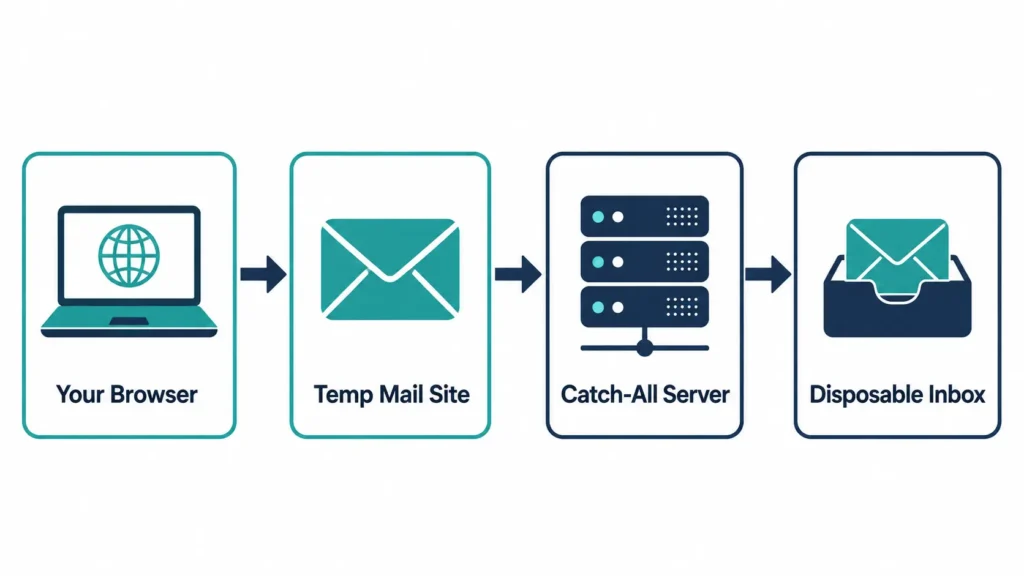
Here is what happens step by step:
- The service registers domains and points their MX records to a catch-all server.
- That server accepts any email sent to any address on those domains, whether the address “exists” or not.
- When you open the Temp Mail Ninja site, the service picks a random username and combines it with one of its active domains.
- Your inbox shows you only the emails sent to that specific address.
- After the inbox expiration period ends, all stored emails are deleted from the database.
TempMail.Ninja rotates across more than 240 domains. This reduces the chance that any one domain is already on a blocklist when you need it.
To see more about how this catch-all inbox technology works in practice, visit the disposable mail page on freemail.ai.
What Are Temp Mail Ninja’s Main Features?
The three services share a core set of features, with some meaningful differences in the details.
Instant inbox generation: All three create a burner email address the moment you open the page. No forms, no waiting, no account creation.
Domain switching: Each service lets you choose from several email domains. If one domain gets blocked by a website, you switch to another and get a fresh anonymous email address. TempMail.Ninja has the largest rotating pool at 240-plus domains.
Multiple inbox lifespan options:
- TempMail.Ninja Quick tier: 10 minutes, the same concept as a 10 Minute Mail one-time email tool
- TempMail.Ninja public domains: up to 3 months
- TempMail.Ninja private domains for registered users: up to 8 months
- TempMailNinja.com and TempMailNinja.pw: approximately 24 hours on the free tier
Custom email alias: TempMail.Ninja lets registered users set a custom username instead of a random string. This can help when a website’s validation system blocks addresses that look machine-generated.
Password-protected inbox: Available on TempMail.Ninja for registered users. The .com and .pw versions do not offer this on the free tier.
Email sending: Only TempMail.Ninja’s Master tier includes outgoing email. All other tiers, and both of the other services, are receive-only. If you need two-way communication from a temporary address, you will need a different tool.
Browser extension: The tempmailninja.pw extension for Chrome, Firefox, and Edge fills email fields automatically and sends real-time inbox notifications to your browser, cutting out the need to switch tabs.
Spam protection: All three services filter out spam and phishing attempts before they show up in the temporary inbox.
Is Temp Mail Ninja Safe to Use?
Yes, Temp Mail Ninja is a legitimate privacy-focused email tool, and using it is legal. It keeps your real inbox clean by preventing unknown websites from ever seeing your personal email address. That said, it provides anonymity, not security. Most free-tier Temp Mail Ninja inboxes are not password-protected, so anyone who finds or guesses your temporary address can read what is in it.

Here is the difference that matters:
- Anonymity means the website you signed up with does not know who you really are.
- Privacy means no outside party can read the emails in your inbox.
A free Temp Mail Ninja address gives you the first. It does not reliably give you the second.
All three services use HTTPS and SSL encryption on the connection between your browser and their servers. This protects your email while it travels. The inbox itself, after the email lands, is a different matter. Most free-tier inboxes have no password and sit at a predictable URL, which means the inbox is effectively semi-public.
The average cost of a data breach reached $4.88 million in 2024, according to SQ Magazine. With 376.4 billion emails sent daily and 46.8% of that traffic classified as spam or unwanted, according to DeBounce, it makes sense that so many people now treat a disposable email address as a basic privacy habit. The global disposable email market was valued at $375.1 million in 2024 and is expected to reach $1.5 billion by 2035 at a 13.4% annual growth rate, according to Verified.Email.
Never use Temp Mail Ninja for:
- Banking and financial accounts
- Government services or tax portals
- Social media accounts tied to your real name
- Any paid subscription you plan to keep
- Any account where losing the password would lock you out permanently
What Are the Limitations of Temp Mail Ninja?
Before you commit to using this service, these are the real drawbacks worth knowing about.
- Domain blocklisting is the biggest issue. Facebook, Instagram, Netflix, OpenAI, and most SaaS platforms with free trial restrictions keep updated email blocklists of known disposable email providers. When your Temp Mail Ninja address gets rejected, it is because that domain is already on the list. Switching domains helps, but high-traffic disposable services get flagged quickly.
- Most versions are receive-only. You cannot reply to emails or send new ones from TempMailNinja.com, TempMailNinja.pw, or TempMail.Ninja below the Master tier.
- No account recovery. If inbox expiration hits before you return, or you close the tab and lose the address, there is no way to get it back. Any account registered with that email becomes unreachable if you ever need a password reset.
- Ads on some pages. TempMailNinja.com and TempMailNinja.pw carry ads on their free-tier pages. This adds clutter and slows the experience.
- The naming confusion adds friction. Because three separate services share the name, a recommendation to “try Temp Mail Ninja” may send you to the wrong one.
- Advanced features need registration. Custom aliases, password-protected inboxes, and longer inbox lifespans on TempMail.Ninja require logging in with Google. This partially breaks the anonymous email premise for users who want no link to their real identity.
Before trying a signup on a site that often blocks throwaway addresses, you can check whether a domain is already flagged with a disposable email checker at freemail.ai.
How to Use Temp Mail Ninja: Step-by-Step
Using any of the three Temp Mail Ninja services follows the same basic process.
- Pick your service. Go to tempmailninja.com, tempmail.ninja, or install the tempmailninja.pw browser extension, depending on what features you need.
- Your address is already waiting. It appears automatically when the page loads. No signup needed.
- Copy the address. Paste it into the signup form on whatever website you are joining.
- Watch the inbox. Return to your Temp Mail Ninja tab. Most verification emails arrive within 10 to 30 seconds.
- Click the link or copy the OTP. Complete whatever action the email requires.
- Switch domains if the address gets rejected. Use the domain selector to try a different one, then paste the new address into the signup form.
- Leave when you are done. The inbox will clean itself up once the inbox expiration period ends.
For a real-world example of how this looks in practice, see the guide to temp mail for Discord signups at freemail.ai.
Which Websites Block Temp Mail Ninja Addresses?
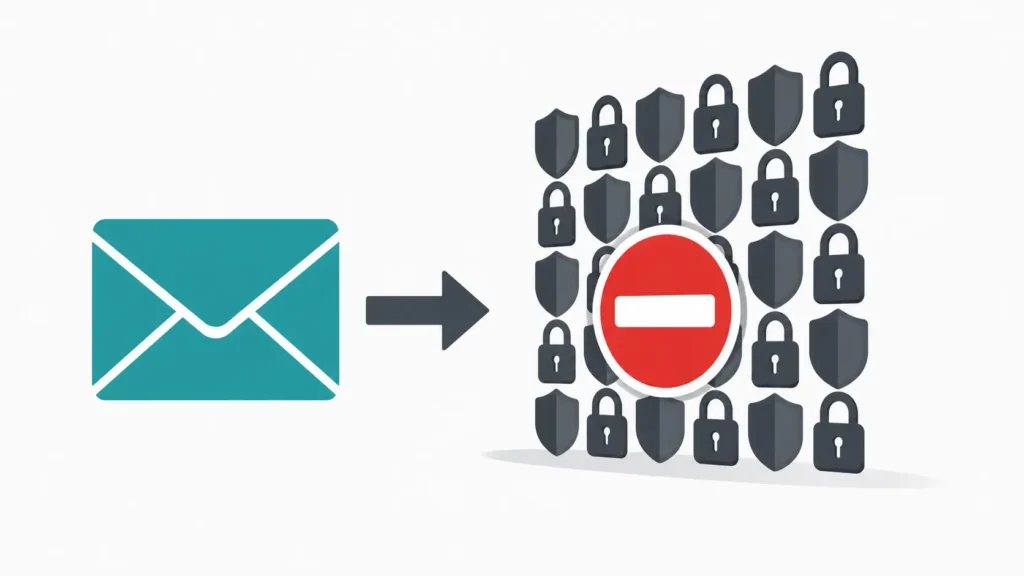
Many major platforms block known disposable email domains, including most Temp Mail Ninja domains. Social networks, streaming services, SaaS platforms, and financial sites are the most aggressive about this. Switching to a different domain within the service, or moving to a provider with fresher domains, usually gets around the block.
The websites most likely to reject a Temp Mail Ninja address include Facebook, Instagram, Netflix, OpenAI’s ChatGPT signup page, Google when creating new Gmail accounts, Discord on high-security servers, Reddit, and most SaaS tools that use email verification to protect free trial access.
Bots now account for 46% of all online signups, according to Verified.Email. That number explains why platforms spend real money keeping their email blocklists current.
What to Do When Your Temp Mail Ninja Address Gets Blocked
If your Temp Mail Ninja address is not working on a specific site, try these steps:
- Open the domain selector on the Temp Mail Ninja page and switch to a different domain.
- If that domain is also blocked, move to a different provider with a fresher domain pool.
- If you need the account for the long term, a temp Gmail address or a dedicated secondary inbox is the more reliable choice.
For platform-by-platform help, see the temp mail for Facebook guide and the temp mail for Instagram guide at freemail.ai.
Temp Mail Ninja vs. FreeMail AI: Feature Comparison
With the limitations in view, here is how the main Temp Mail Ninja services compare to FreeMail AI on the features that matter most for everyday use.
| Feature | TempMail.Ninja | TempMailNinja.com | FreeMail AI |
| Registration required | No for basic, Yes for advanced features | No | No |
| Inbox lifespan | 10 minutes to 8 months | Around 24 hours | Session-based |
| Custom email alias | Yes, registered users only | No | Yes, via AI Mail Generator |
| Email sending | Master tier only | No | No |
| Browser extension | No | No (see .pw version) | No |
| Domain rotation | Yes, 240-plus domains | Multiple domains | Yes, AI-assisted |
| Password-protected inbox | Yes, registered users only | No | No |
| Ads on free tier | Minimal | Present | None |
| Platform-specific how-to guides | No | No | Yes, Discord, Facebook, Instagram, Claude AI, TextNow, and more |
FreeMail AI is receive-only and has no browser extension, the same as most temp mail services. Where it differs is in its AI-assisted generation and the library of platform-specific guides that explain exactly which approaches work and which ones fail on each major website.
Best Temp Mail Ninja Alternatives in 2026
If Temp Mail Ninja domains keep getting flagged, or if you need features the service does not offer, these are the strongest free options right now.
1. FreeMail AI (freemail.ai) Best for: AI-powered address generation and platform-specific guidance. Key advantage over Temp Mail Ninja: No registration, no ads, and step-by-step guides for Facebook, Instagram, Discord, Claude AI, and TextNow. The AI Mail Generator creates addresses designed to get through more platform filters. Limitation: Receive-only, no browser extension.
2. Guerrilla Mail Best for: Anyone who needs to both receive and send emails from a throwaway address. Key advantage over Temp Mail Ninja: One of the few free services that supports outgoing email from a temporary address. Also supports custom inbox names and multiple domains. Limitation: Some older Guerrilla Mail domains show up on blocklists more often than newer providers.
3. Mail.tm Best for: Developers and QA testers who need automated inbox creation. Key advantage over Temp Mail Ninja: A developer API lets applications create temporary inboxes and read messages without a browser. This is the fastest setup for testing pipelines that require email verification. Limitation: Less practical if you just need a quick one-time email for a personal signup.
4. YOPmail Best for: Users who want to revisit the same inbox name more than once. Key advantage over Temp Mail Ninja: You choose your inbox name and it stays accessible with no registration and no timer. Useful for situations that require multiple email checks over a few days. Limitation: Anyone who knows your inbox name can read your emails. Never use it for anything sensitive.
5. 10 Minute Mail (freemail.ai) Best for: The fastest single-use verification with zero long-term storage. Key advantage over Temp Mail Ninja: Creates a one-time email address and auto-deletes the inbox after exactly 10 minutes. Nothing is stored afterward.
Who Should Use Temp Mail Ninja (And Who Shouldn’t)?
Temp Mail Ninja works well for one-time account verifications, free trial signups, software QA testing, and any situation where you want zero long-term connection to a service. Skip it for accounts you plan to keep, anything tied to payment, or any account where losing access would be a real problem.
A good fit:
- Grabbing a discount code or free download without handing over your real email
- Signing up for a newsletter or forum you plan to visit only once
- Testing a web app’s email verification flow as a developer or QA tester
- Creating a short-term account on a platform you are not sure about yet
- Keeping your real inbox free from marketing lists you did not ask for
A poor fit:
- Any account you plan to use on a regular basis
- Social media profiles with your real name or photos
- Banking, payment platforms, or financial tools
- Paid subscriptions with billing tied to the account email
- Any account where forgetting your password would lock you out permanently
For developer and AI tool testing scenarios, see the temp mail for Claude AI guide at freemail.ai.
Frequently Asked Questions
Is Temp Mail Ninja safe to use?
For low-stakes use like discount codes, one-time downloads, and free trial signups, yes. It is a legitimate privacy tool and using it is legal. It should not be used for banking, government services, or any account you need to recover later. Most free-tier inboxes are not password-protected, so they should be treated as semi-public.
How long do Temp Mail Ninja addresses last?
It depends on the service. TempMail.Ninja’s Quick tier lasts 10 minutes. Public domains on TempMail.Ninja last up to three months. Private domains for registered users last up to eight months. TempMailNinja.com and TempMailNinja.pw both offer around 24-hour inboxes on their free tiers.
Why is my Temp Mail Ninja address being rejected?
The domain your address uses has most likely been added to that website’s blocklist of known disposable email providers. Sites like Facebook, Instagram, and SaaS trial platforms keep these lists updated regularly. Switching to a different domain within the service, or moving to a provider with a fresher domain pool, is the most reliable fix.
Can Temp Mail Ninja send emails?
Most Temp Mail Ninja versions are receive-only. The exception is TempMail.Ninja’s Master tier, which includes outgoing email for registered users. For anyone who needs to send and receive anonymously from a throwaway address, Guerrilla Mail is the most widely used free service that supports two-way communication.
What is the Temp Mail Ninja browser extension?
The Temp Mail Ninja browser extension is published by TempMailNinja.pw and is available for Chrome, Firefox, and Microsoft Edge. It auto-fills signup forms with a disposable address and delivers real-time inbox notifications without requiring you to open a new tab. It runs the same core service as the website, just built directly into the browser for faster signups.
What are the best free alternatives to Temp Mail Ninja?
The strongest options in 2026 are FreeMail AI (AI-assisted generation, platform-specific guides, no ads), Guerrilla Mail (two-way email support), Mail.tm (developer API access), YOPmail (reusable custom inboxes), and 10 Minute Mail (the fastest single-use option). The best choice depends on whether you need anonymity, a longer inbox lifespan, email sending capability, or API access for automated testing.
Try a Free Temporary Email Right Now
If Temp Mail Ninja domains keep getting blocked on the sites you care about, or if you want a cleaner experience with no ads and no registration of any kind, FreeMail AI gives you a free disposable email address in one click.
No account. No personal details. A live inbox ready the moment you open the page.
For platform-specific guidance on what works where, check out the freemail.ai guides for temp mail for Facebook, temp mail for Instagram, temp mail for TextNow, and temp mail plus addressing.