

A temp mail address can complete Instagram’s email verification step for a new account. Instagram blocks many known disposable domains, so one address may not always work. A temp inbox also has no password recovery option once it expires. Use temp mail for test or short term accounts. Switch to a real email or an alias for any account you plan to keep long term.
You want a temp mail for Instagram because you do not want to hand over your real email address just to make an account. That makes sense. Instagram asks for an email at sign up, and it uses that email to send your verification code. A disposable email for Instagram can handle that step without touching your main inbox. This guide covers how the process works, what to do if Instagram rejects your address, and when a temporary email is the wrong choice for the account you are building.
Can You Use Temp Mail for Instagram?
Yes, a temp mail address can receive Instagram’s verification code during sign up. But it does not always work. Instagram checks the email domain against lists of known disposable providers. It also checks email authentication records. If your domain is not accepted, the code may never arrive.
A temp mail address goes by a few other names, too. Some people call it a disposable email address, a throwaway inbox, or a burner email. They all mean the same thing: an address you use once and then leave behind.
Instagram is not the only site that checks these addresses closely. Most large platforms keep a blocklist, which is a list of email domains known for spam or fake accounts. If your disposable email domain shows up on that list, Instagram may reject it right away.
Instagram also checks something called email authentication. Three records matter here: SPF, DKIM, and DMARC. Think of them as an ID check for an email server. They tell Instagram that a message really came from where it claims to be from. Many temp mail services skip these records, which makes their addresses easier to spot and block.
Meta, the company behind Instagram, reports that roughly 4 percent of its more than 3.5 billion monthly active accounts across its apps are fake. That works out to well over 140 million accounts. With numbers that large, Instagram has good reason to filter out email addresses linked to mass account creation.
If your first temp mail address gets rejected, do not worry. Try a different one. Most temp mail Instagram verification problems get fixed by simply switching to a fresh address.
Why People Use Temp Mail for Instagram
People choose a disposable email for Instagram for a few clear reasons.
- To keep their main inbox free of Instagram’s marketing emails and notifications
- To avoid linking their real identity to Meta’s wider network, which includes Facebook and WhatsApp
- To test new features, ad campaigns, or content ideas on a fresh account
- To manage more than one Instagram account without setting up several permanent inboxes
- To create a second, more private account for an anonymous sign-up, kept separate from their main profile
Using a temp mail address is also a simple form of spam protection. None of the marketing emails Instagram sends will ever land in your real inbox, because that inbox was never given out in the first place.
Privacy is a real concern for most people online. Research from the Pew Research Center found that 81 percent of Americans believe companies will use their personal information in ways they are not comfortable with. That worry is one reason so many people search for a temporary email for their Instagram account instead of typing in their personal address every time.
How to Create an Instagram Account with Temp Mail
Setting up an account with a temporary email for Instagram takes just a few minutes. Follow these four steps.
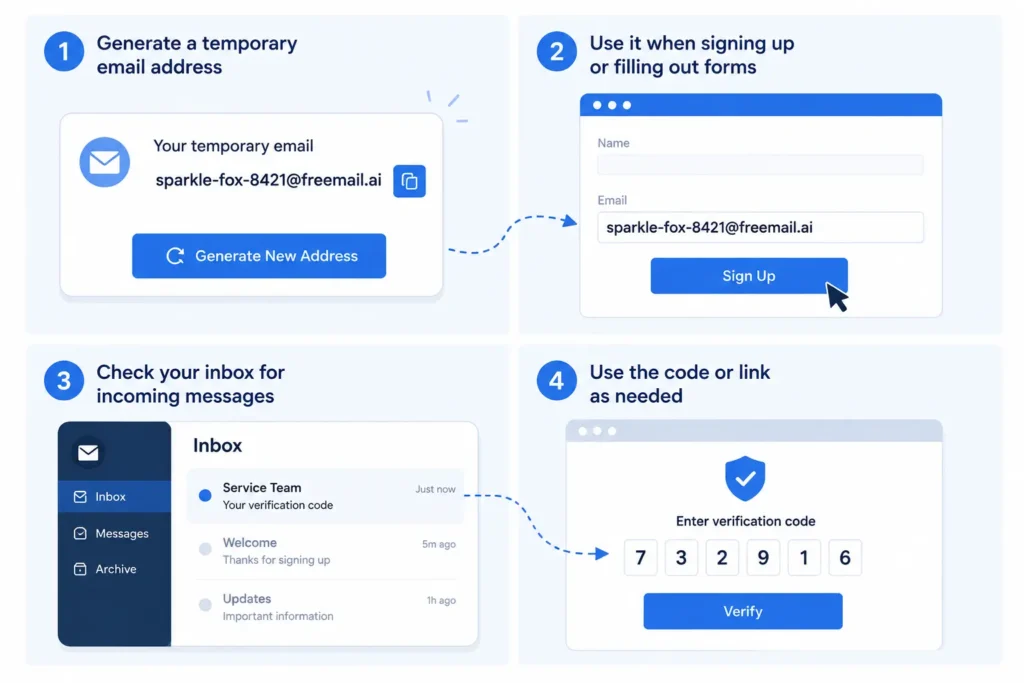
Step 1: Generate a Temporary Email Address
Open a temp mail generator like FreeMail AI. You do not need to sign up or share any personal details. An address appears right away, ready to use. Copy it and keep the page open in your browser tab.
Step 2: Enter the Address on Instagram’s Sign Up Page
Go to Instagram and start creating a new account. When it asks for an email address, paste your disposable email address into the field. Fill out the rest of the form with your name, username, password, and date of birth.
Step 3: Return to Your Inbox for the Code
Go back to your temp mail tab. Instagram usually sends a six digit verification code within a minute or two. Refresh the inbox if it does not show up right away.
Step 4: Enter the Code and Finish Your Profile
Copy the code from your temp inbox and paste it into Instagram’s confirmation screen. Once it is accepted, your account is verified. Add a profile photo and a short bio if you want, and your account is ready to use.
Why Instagram Might Reject Your Temp Email
Instagram checks the sending domain against blocklists of known disposable email providers. It may also look for missing SPF, DKIM, or DMARC records, the same authentication signals mentioned earlier. A domain that fails these checks is more likely to be rejected, or its messages may be blocked before they ever reach your inbox.
This kind of filtering has gotten stricter. Independent trackers now list more than 160,000 known disposable email domains, and that number grows every day. One study found that nearly half of all high risk disposable domains last less than seven days before they get flagged and blocked. That is why a temp mail address that worked last week might fail today.
If your address gets rejected, try these fixes:
- Generate a new address from a different domain
- Wait a minute and refresh your inbox in case the code is just delayed
- Double check that you copied the address correctly, with no extra spaces or typos
- Choose a temp mail service that rotates its domains often
Is Temp Mail Safe for Instagram?
Using a disposable email does not get your Instagram account flagged by itself. Instagram looks at behavior, not the type of email you used to sign up. The real risk is losing access to your account later. If your temp inbox expires and you forget your password, there is no way to reset it.
Instagram’s systems focus on how an account acts once it is live. Following too many people too fast, posting the same content over and over, or running automated activity are the kinds of things that get an account restricted. The email type used at sign up plays no part in that.
The bigger risk sits with account recovery. Instagram is a common target for account takeovers. Data tracked by Statista shows that Facebook alone, Instagram’s sister platform under Meta, took action on 1.1 billion fake accounts in the last quarter of 2025. Separate research found that Instagram accounts make up 31 percent of all social media account hacks, more than any other platform tracked. If your account is ever compromised or locked, Instagram will try to reach you through your registered email. A temp inbox that has already expired cannot help you at that point. This is the same recovery risk covered in our guide to temp mail for TextNow.
Whatever email you choose, turn on two-factor authentication. It adds a login check beyond just a password, and it keeps working even if you later change your email address.
Temp Mail vs Real Email for Instagram: Which Should You Use?
Use this table to decide quickly which type of email fits your situation.
| Situation | Better Choice | Why |
| One time test account | Temporary email | Fast to set up, and no long term recovery is needed |
| Main personal account you plan to keep | Permanent email | You will need password recovery later |
| Business or ad account | Permanent email | Client trust and account recovery both matter |
| Quick anonymous browsing account | Temporary email | No lasting identity link is needed |
| Account that failed with a blocked domain | Permanent email | Higher chance of delivery and fewer future issues |
| Influencer or monetized account | Permanent email | Payouts and identity checks depend on a stable email |
If you plan to keep an account for more than a few weeks, think about switching from temp mail to a permanent email like Gmail or Outlook, or to an email alias. An alias forwards messages to your main inbox while keeping your real address hidden from Instagram. It gives you privacy without losing your recovery option later.
Can You Create Multiple Instagram Accounts with Temp Mail?
Yes. Instagram allows one email per account, so a fresh disposable email address lets you register a new profile each time. This works well for marketers running several campaigns, agencies handling client accounts, or anyone who wants separate personal and testing profiles. Instagram still limits how many accounts you can create from the same device in a short time, no matter what type of email you use.
If you plan to run more than one account, keep a simple record of which temp mail address belongs to which profile. This will save you time if you ever need to log back in or start account recovery. For a longer term setup across several accounts, you might also look at creating multiple email addresses instead of a new temp address for every single profile.
When Not to Use Temp Mail for Instagram
Skip the temp mail route in these cases:
- Your main personal Instagram profile
- A business account tied to your brand or your clients
- A creator or influencer account that earns money
- Any account connected to ad spend
- An account you would be upset to lose
For these accounts, use a real email address you control, or set up an email alias so you can still protect your main inbox without losing access later. Plus addressing is another simple option if your email provider supports it. A similar rule applies if you are weighing temp mail for Facebook or any other account you plan to keep for years. Match the email to how long you plan to keep the account, not the other way around.
The Bottom Line
Match your email to your account. A test account or a quick second profile works fine with a temp inbox. A personal, business, or money making account needs a real email or a lasting alias behind it.
If you just need a quick address for Instagram verification, you can generate a free temporary email address right now with FreeMail AI. And if you decide to keep the account later, set up an email alias so you keep your privacy without losing access down the road. The same approach works for other sign ups too, including temp mail for Facebook or temp mail for Claude AI when you just need a quick, disposable account for testing.
Frequently Asked Questions
Does Instagram accept temp mail?
Usually yes, but not always. Instagram checks the email domain against blocklists and authentication records. If one address gets rejected, try a different domain.
Can I recover my Instagram account if I used a temp email?
Not reliably. Once your temp inbox expires, any recovery email sent to it goes nowhere. Switch to a permanent email before you need to reset your password.
Will Instagram ban an account created with a temp email?
No. A disposable email does not trigger a ban by itself. Instagram looks at account behavior, like spam or fake activity, rather than the type of email used to sign up.
How many Instagram accounts can I create with temp mail?
There is no fixed limit tied to the email itself. Each account just needs its own address. Instagram separately limits how many accounts you can create from one device in a short time.
What if my Instagram verification email is not received?
The most common reasons are a blocked domain, a short delivery delay, or a typo in the address. Refresh your inbox, check the address closely, and try a new domain if it still fails.
Can I use temp mail for an Instagram business account?
You can, but it is not a good idea. Business and creator accounts depend on stable email access for security checks and payouts, so a real email serves you better here.
Is it legal to use temp mail for Instagram?
Yes. A disposable email address is legal to use and does not break Instagram’s Terms of Use by itself. Problems only come from what the account is later used for, such as spam or harassment, not from the email type.