

Lovable AI is a vibe coding tool built for people who have never written a line of code.
If you have ever wanted to build a web app but had no idea how to code, you are not alone. Most app ideas never get built because hiring a developer is expensive and learning to code takes months. Lovable AI promises to change that by letting you describe your app in plain English and watching it come to life automatically.
This is not a surface-level overview. After building four separate projects inside the platform and spending over 100 hours testing it as a genuine non-coder, here is everything you need to know before you start.
What Is Lovable AI (Loveable.Dev)?
Lovable AI is a vibe coding platform found at lovable.dev that allows non-coders to build full-stack web applications, websites, and software tools entirely through prompting. You describe what you want to build in plain English, and the platform generates working code automatically.
The homepage is clean and minimal. There is no complicated onboarding. You simply type a prompt and the platform starts building. For example, typing “Create a leaderboard web app where users can join, submit their scores, and see rankings updated in real time” produces a working framework within about a minute.
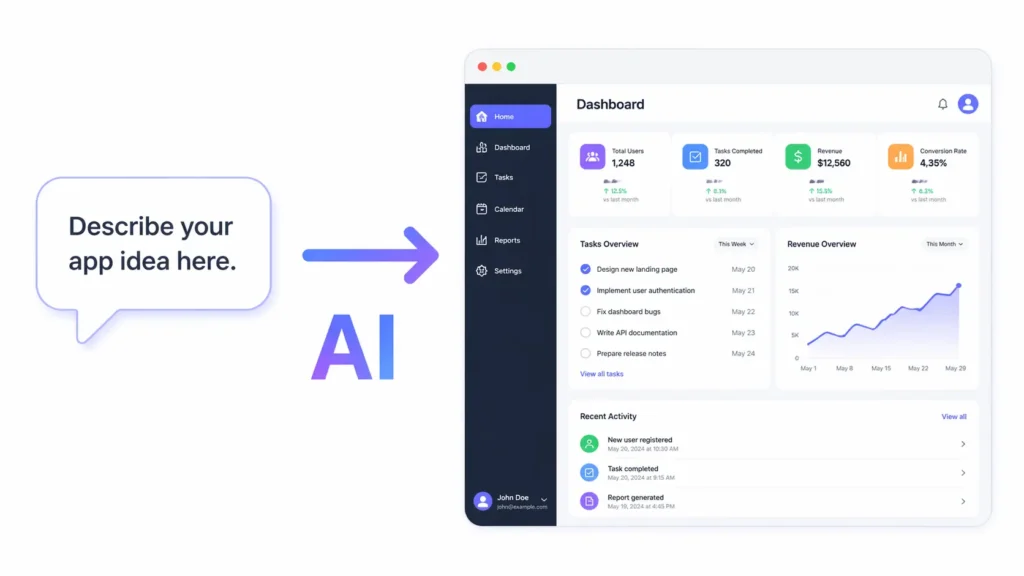
What makes Lovable AI stand out from generic AI coding assistants is that it does not just write code snippets. It builds the complete application including layout, logic, database connections, and deployment, all from a single description. The generated design is often cleaner and more polished than what many traditional freelance developers produce, which says a lot about how far this no-code app builder has come.
How Does the Vibe Coding Process Actually Work?
Vibe coding, also called prompt programming, is the practice of building software by describing what you want rather than writing the code yourself. Lovable AI is currently one of the strongest tools in this space.
Here is a step-by-step walkthrough of how to use it from scratch:
Step 1: Go to lovable.dev
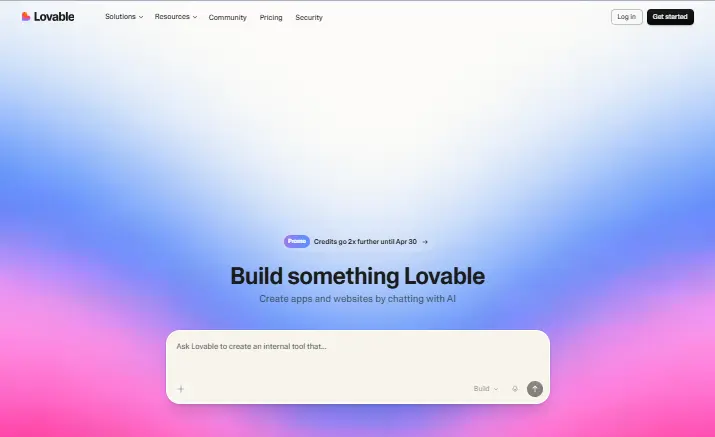
You can start using the platform without creating an account. The interface loads immediately and presents you with a prompt box.
Step 2: Prepare your idea or content
Decide what you want to build. It could be a financial calculator, an email campaign planner, a directory website, or a simple dashboard. If you have an existing Google Sheet or document, you can use it as a foundation by pasting a shareable link directly into your prompt.
Step 3: Write your prompt
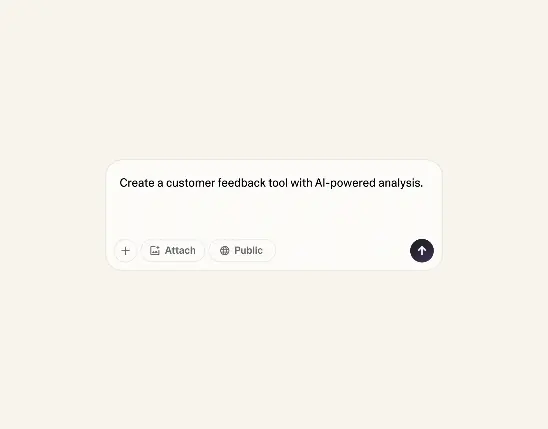
Type a clear description of the app you want. The more specific you are, the better the output. For example: “I want to make a simple web app that lets email marketers plan campaigns and estimate profitability. Use this spreadsheet as your foundation.” Then paste your Google Sheet link into the same message.
Step 4: Review the generated app
Within seconds to a few minutes, Lovable generates a live preview of your application. You can see the full layout, interactive components, and basic functionality right inside the dashboard.
Step 5: Refine using Chat Mode
Use the Chat Mode interface to request changes conversationally. Want a different color scheme? A new button? An added column? Just describe it in plain English and the AI applies the change instantly.
Step 6: Add affiliate links or custom content
If you are monetizing the app with affiliate links, describe where you want them placed in the chat. Lovable will insert them appropriately into the relevant sections of your app.
Step 7: Customize visuals
Adjust colors, fonts, and layout elements by typing your preferences in the side panel. For very specific edits, click the Edit button in the bottom left of the chat, select the exact element on screen, and describe the change you want.
Step 8: Publish your app
Click Publish to make your app live. You can use a free lovable.app subdomain or connect a custom domain you already own.
Step 9: Track and iterate
Use the built-in analytics to monitor site visits and user engagement. Gather real feedback and return to Chat Mode to improve the app over time.
What Lovable AI Does Exceptionally Well
After extensive testing, several strengths stand out consistently:
Frontend generation is outstanding. Lovable AI builds visual interfaces, animations, responsive layouts, and component designs faster and more accurately than most human freelancers working at the same budget level. For landing pages, dashboards, directories, and portfolio sites, the output quality is genuinely impressive.
Speed of prototyping is unmatched. Going from a vague idea to a working, live-preview application in under five minutes is not an exaggeration. For founders who want to validate ideas quickly, this changes the economics of building entirely.
GitHub integration is professional grade. The platform reads your actual repository structure rather than guessing at it. It generates real pull requests that a developer can review and extend, which means Lovable AI output is not a dead end. It is a starting point a real team can build on.
The interface is genuinely beginner friendly. There is no learning curve to get started. The platform guides you visually and conversationally, making it one of the most accessible no-code development platforms currently available.
Lovable 2.0 improvements are meaningful. The versioning system with bookmarks lets you save checkpoints and roll back instantly if an experiment breaks your app. Visual editing allows you to click directly on any element and modify it without writing a prompt. Agent processing sessions now run for up to 15 minutes, enabling far more complex builds in a single session.
Where Lovable AI Struggles: The Honest Limitations
Progress in Lovable AI starts fast but finishing a complex app can take forever, and sometimes it does not happen at all without outside help.
The platform is powerful for frontend generation but becomes significantly more difficult when your project requires:
- User login systems and account management
- Admin panels and backend dashboards
- Complex third-party API integrations
- Payment processing
- Data storage tied to individual users
- Advanced caching or server-side logic
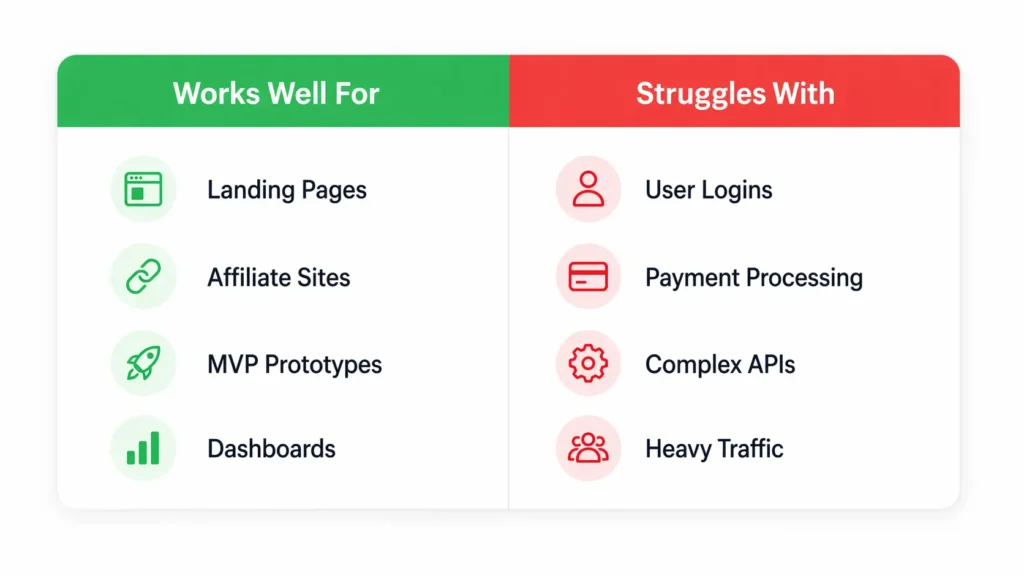
These things are technically possible inside Lovable AI but they require more prompt precision, more debugging time, and often more technical understanding than a true non-coder will have. The experience of building a simple directory site is completely different from building a SaaS product with user authentication.
One experienced user and reviewer described this pattern clearly after building four projects: early momentum is exciting, but hitting API access requirements or complex backend needs often means either abandoning the feature or hiring a traditional developer anyway.
Performance under heavy load is another documented limitation. During high-traffic usage periods, code generation slows noticeably. For production applications serving many concurrent users, additional infrastructure planning is required beyond what Lovable provides out of the box.
Output quality depends heavily on prompt clarity. Vague prompts produce vague results. Non-coders who describe their idea too loosely will spend more time iterating than building. Writing clear, specific, structured prompts is a skill that takes time to develop even if it does not require coding knowledge.
How to Get Real Value From Lovable AI Right Now
The most practical approach to Lovable AI is to use it for projects that stay within its strengths and avoid getting pulled into feature creep that pushes you into its weak zones.
Projects that work extremely well:
- Affiliate marketing microsites and tool directories
- Lead capture landing pages with form submission
- Simple data display tools without user accounts
- Portfolio sites and personal project showcases
- MVP demonstrations for investor pitches
- Content-driven web apps that do not require user authentication
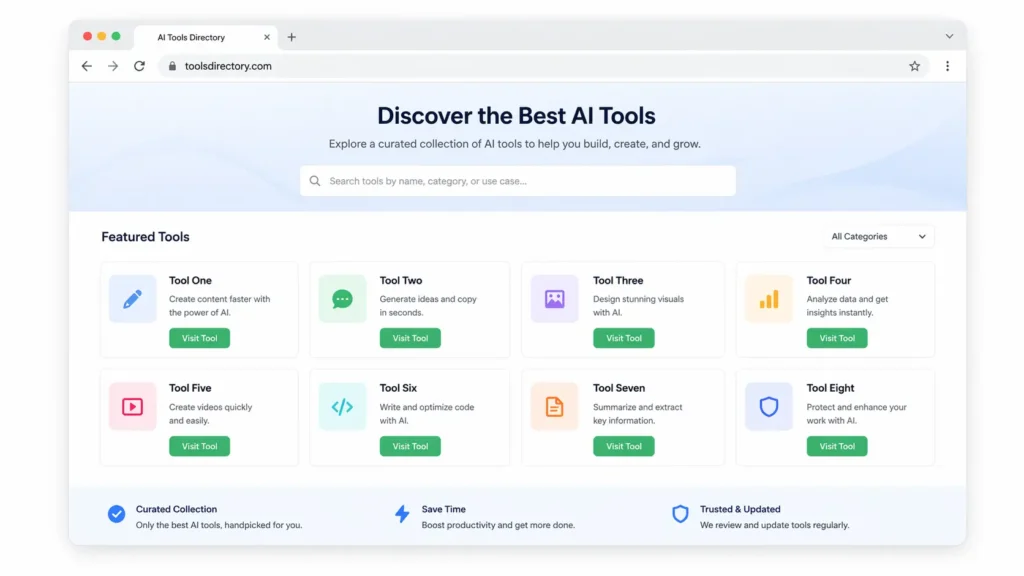
One real example from a published user review: a basic web page hosting a database of third-party business tools, monetized with affiliate links, was built with Lovable AI and was already generating commissions within the first week of launching. No developer was hired. No complex backend was needed. The project stayed inside Lovable’s strengths and delivered measurable results quickly.
For anything requiring logins, payments, or complex APIs, the smarter approach is to build the frontend and prototype in Lovable AI and then hire a developer specifically for the backend layer. This hybrid approach dramatically reduces the total cost compared to hiring a developer for the full project from scratch.
Lovable AI Pricing: Full Plan Breakdown
Lovable AI uses a credit-based model where each prompt, edit, or generation action consumes credits. Here is the complete current pricing structure:
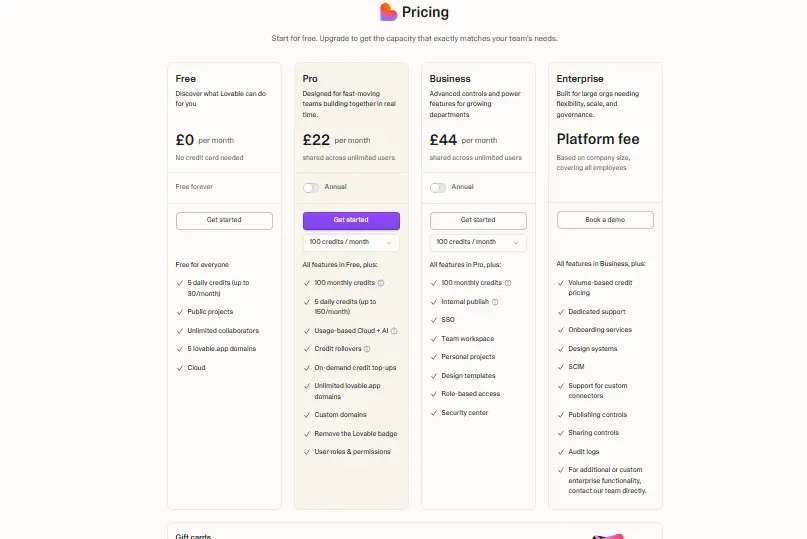
| Plan | Price | Monthly Credits | Daily Limit | Key Features |
|---|---|---|---|---|
| Free | $0/month | 30 credits/month | 5 credits/day | Public projects, 5 lovable.app domains, unlimited collaborators |
| Pro | $25/month (annual) | 150 credits/month | 5 daily plus rollover | Credit rollovers, custom domains, remove Lovable badge, user roles |
| Business | $50/month (annual) | 100 base credits | Flexible | SSO, team workspace, role-based access, design templates, security center |
| Enterprise | Custom | Volume-based | Custom | Dedicated support, SCIM, audit logs, onboarding, design systems |
All paid plans are shared across unlimited users, which makes the Pro plan excellent value for small teams.
The free plan is genuinely usable for exploration and basic projects. No credit card is required to start. For active builders publishing real projects, Pro at $25 per month is the most logical upgrade given the credit rollovers and custom domain support.
Note: Always verify current pricing at lovable.dev/pricing before making a decision, as credit amounts and plan features on fast-growing platforms can update without notice.
Lovable AI vs Bolt.new vs Cursor: Which Should You Use?
| Feature | Lovable AI | Bolt.new | Cursor |
|---|---|---|---|
| Best for | Non-developers, founders | Rapid throwaway prototypes | Experienced developers |
| Coding required | No | Minimal | Yes (partial) |
| GitHub integration | Yes, full repo context | Limited | Yes |
| Visual editing | Yes (v2.0) | No | No |
| Full-stack capability | Yes | Partial | Yes |
| Free plan | Yes | Yes | Yes |
| Best use case | MVPs, real projects | Quick experiments | Professional dev work |
Lovable AI sits in a unique middle position. Bolt.new is better for throwaway experiments where you just want to see something quickly. Cursor is better for developers who want AI assistance while retaining full code control. Lovable AI is the strongest option for non-coders who want to build real, deployable projects and potentially hand off the code to a developer for further refinement.
What Real Users Say About Lovable AI
Across major review platforms, Lovable AI holds a 4.7 out of 5 star average rating. The most consistent praise centers on the speed of initial app generation, the quality of the visual output, and the Chat Mode iteration experience.
The most consistent criticism mirrors the findings above: the daily message limit on the free plan creates frustration for active builders, and complex backend requirements introduce a steep difficulty curve that catches non-coders off guard.
The general consensus from users who have spent serious time with the platform is that Lovable AI is not a replacement for developers in every scenario. It is a replacement for developers in a specific and growing range of scenarios, particularly frontend-heavy, content-driven, and prototype-focused projects.
Is Lovable AI Worth It?
Yes, with the right expectations. Lovable AI is one of the most capable no-code app builders available in 2026 for non-technical users who want to build real, functional, and deployable web applications without writing code.
It is worth it if you need to:
- Validate a startup idea quickly without hiring a developer
- Build and launch affiliate sites, directories, or marketing tools fast
- Create a working prototype to show investors or clients
- Produce professional-looking frontend applications at low cost
It is less worth it if you need:
- Complex user authentication and account management systems
- Payment processing built entirely inside the platform
- High-traffic production apps with heavy server-side requirements
- Full enterprise-grade customization without any developer involvement
The platform’s credit-based free plan removes any financial barrier to trying it. Spending a few hours testing it with a real project idea will tell you more than any review, including this one.
One Last Practical Tip Before You Sign Up
Lovable AI and most AI tools require an email address to create an account. This usually results in onboarding emails, product newsletters, and promotional campaigns landing in your inbox for months. Before you start testing any new AI tool, consider using a temporary email address to keep your real inbox clean. You can generate a free disposable email instantly at freemail.ai with no registration required. When you decide the tool is worth keeping, signing up with your real email takes seconds.
Frequently Asked Questions About Lovable AI
Does Lovable AI require any coding knowledge?
No coding knowledge is required to get started. You describe your app in plain English and the platform generates the code automatically. Users who write clearer and more specific prompts tend to get better results, but no technical background is needed to begin.
Can I export the code that Lovable AI generates?
Yes. Lovable AI integrates with GitHub and allows you to export your full generated codebase at any time. This means you are never locked into the platform. A developer can take the exported code and continue building on it using standard tools and frameworks independently.
What happens when I run out of daily credits?
Once you use your 5 free daily credits, you need to either wait until the next day for them to reset or upgrade to a paid plan for more. You can still view, preview, and share your already-built apps after your daily credits are exhausted.
Is Lovable AI the same as GPT Engineer?
Yes. Lovable AI was previously known as GPT Engineer before rebranding to Lovable at lovable.dev. The core functionality of AI-driven app generation from natural language prompts was retained, while the interface, feature set, and plan structure were significantly expanded.
How does Lovable AI handle errors and bugs?
Lovable AI includes a built-in debugging tool that analyzes errors automatically. The Try to Fix button reviews logs and suggests corrections. In Chat Mode, you can ask for a project summary and review previous solutions to troubleshoot persistent issues. For complex bugs that the AI cannot resolve, reverting to a saved version checkpoint and rebuilding incrementally is the recommended approach.
Can I use Lovable AI to make money?
Yes. Many users monetize Lovable AI projects through affiliate links on tool directories and resource sites, selling the finished apps as products or client deliverables, and using prototypes to pitch and close investment or freelance contracts. One documented example saw a simple affiliate directory site generating commissions within the first week of launching.
Do I need a credit card to try Lovable AI?
No credit card is required to start on the free plan. You only need an email address to create an account and begin building immediately.