

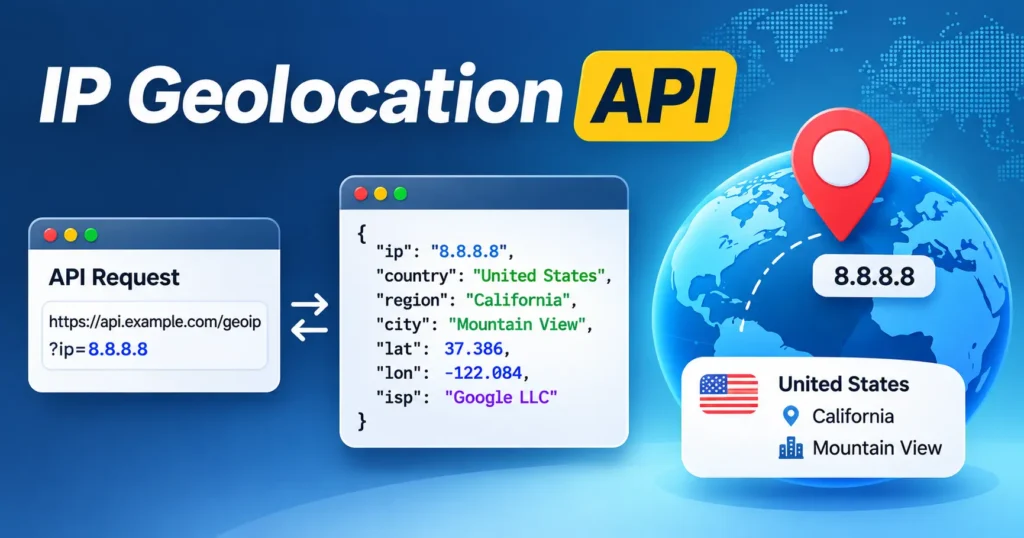
An IP geolocation API turns an IP address into location and network details like country, city, coordinates, ISP, and timezone. Many also flag VPNs and proxies. The right pick depends on the free tier size, HTTPS support, accuracy, and whether you need security data. Country level accuracy is strong (about 95 to 99 percent). City level is much weaker. Compare the free limits and pricing before you commit, and know that no tool can find a street address from an IP alone.
You want to add location data to your app, and you need to pick a tool fast. This guide gives you a clear ip geolocation api comparison. We look at the top options by free tier, accuracy, pricing, and VPN detection, then tell you which one fits your job. An ip geolocation api (also called an ip to location api or geoip api) takes an IP address and returns where that visitor likely sits, plus their ISP and network info. By the end, you will know which one to try first and where these tools fall short.
The best IP geolocation APIs at a glance
Here is a side by side look at well known providers. Prices and free limits change often, so treat these as a rough starting point and check the current plan before you build.
| Provider | Free tier | Entry paid price | VPN/proxy detection | City accuracy | HTTPS on free |
| ipwhois.io | ~1,000/mo | ~$19.99/mo | Included | ~78% | Yes |
| ipinfo | ~50,000/mo | ~$49/mo | Paid add on | ~80% | Yes |
| Abstract API | ~1,000/mo | ~$19/mo | Paid add on | ~72% | Yes |
| ipstack (APILayer) | ~100/mo | ~$12.99/mo | Paid add on | ~75% | Yes |
| ip-api.com | 45 req/min, keyless | ~€13/mo | Paid add on | ~70% | No (HTTP only) |
| IP2Location | ~50,000/mo or database | ~$49/mo | Paid add on | ~75% | Yes |
| DB-IP | Free database or small API tier | Quote based | Limited | ~75% | Yes |
| MaxMind GeoIP2 | GeoLite2 database | ~$24/mo database | Paid data | ~85% (self hosted) | Self hosted |
A few names worth knowing beyond the table: APILayer runs ipstack and ipapi.com, and IPQualityScore (IPQS) leans hard into fraud and proxy data. MaxMind is the dataset many other tools quietly build on, through its GeoIP2 and free GeoLite2 files.
Which IP geolocation API is best for most developers?
For most developers, the best ip geolocation api balances a usable free tier, HTTPS, and clean docs. Tools with big free limits suit testing. Tools that bundle VPN and proxy flags suit fraud work. There is no single winner, so match the tool to your call volume, your accuracy needs, and whether you need security signals.
Here are simple picks by job:
- Best free tier: ipgeolocation.io and ipinfo both offer large monthly limits, so they are a good free ip geolocation api starting point for real projects.
- Best for fraud and VPN/proxy detection: IPQualityScore and ipgeolocation.io include strong proxy, VPN, and threat intelligence signals.
- Most accurate ip geolocation api at country level: MaxMind, IP2Location, and DB-IP all score high on country data, with MaxMind often used as the base others compare against.
- Best keyless quick start: ip-api.com needs no sign up for small, non commercial tests, though the free plan is HTTP only, so do not call it from a browser in production.
- Best self hosted option: The MaxMind database (an .mmdb file) lets you run a local IP address lookup with no per call fee.
How accurate is IP geolocation, really?
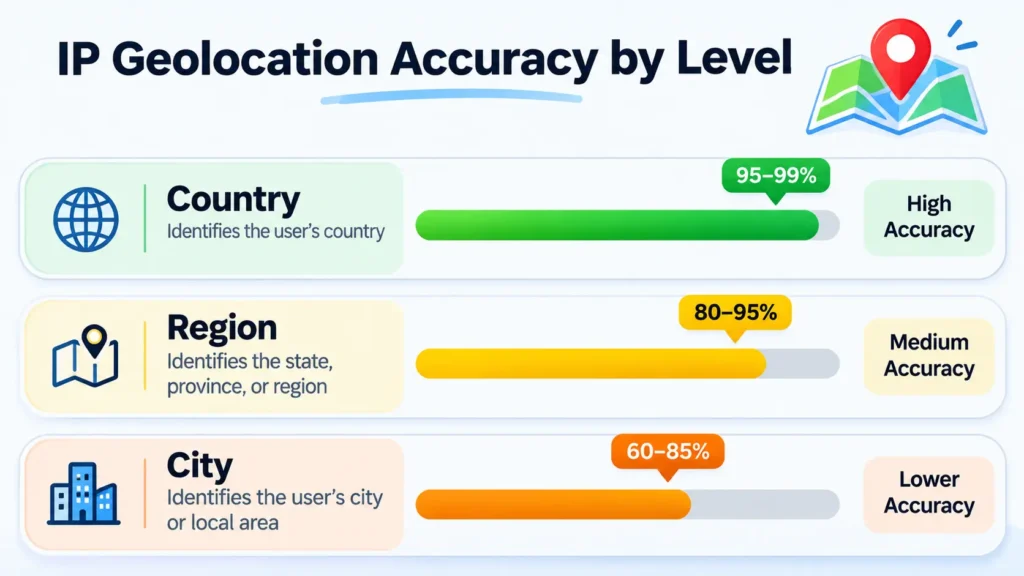
IP geolocation is very accurate at the country level, around 95 to 99 percent, but it drops to about 50 to 80 percent at the city level. It was never built to find a street address. VPNs, proxies, and mobile carrier routing all lower the result, so treat IP location as a smart guess and one clue among many, not proof.
Why the gap? An IP maps to a network or an ISP point, not to a house. A user in a small town might show up as the nearest big city. City data gets better in large cities and worse in rural spots. Anyone who claims street level accuracy from an IP alone is overselling. For tighter precision you need GPS, Wi-Fi positioning, or the browser location prompt with user consent.
One more honest note: in open tests, common free tools rarely pass 80 percent at the city level. So pick the right accuracy for the task. Country and region data is reliable. City and postal data is a soft signal. Picking an IP geolocation API on accuracy alone, without checking the level you actually need, is a common mistake.
What data does an IP geolocation API return?
A typical ip geolocation api returns country, region, city, postal code, latitude/longitude, timezone, ISP, and ASN (the network owner ID). Many add connection type plus VPN, proxy, and threat flags. The exact fields and the accuracy change by provider and by plan, so check which data points are free versus paid before you build.
Common fields you will see in a JSON (or sometimes XML) response:
- Country, region, and city
- Latitude/longitude and timezone
- ISP and ASN (network and owner)
- Connection type (home, mobile, hosting)
- VPN/proxy detection and a threat score on higher plans
- IPv4 and IPv6 support (note that IPv6 data is often less accurate for now)
Some tools also offer reverse IP lookup, which starts from a domain or host and finds related IPs. And many teams use this data for content localization, like setting the right language, currency, or store for each visitor.
API or local database: do you even need an API?
Not always. You have two main ways to look up an IP.
A hosted REST API keeps the data fresh for you and takes little setup. You send a request, you get back JSON. The trade off is network delay on each call and a dependency on someone else’s service, plus rate limits on the free plan.
A local database, like a MaxMind .mmdb file, lives on your own server. Lookups run in microseconds, cost nothing per call, and keep the data private. The trade off is that you must download and update the file on a schedule, or the data goes stale.
Rule of thumb: pick the API for easy, always current data and lower volume. Pick the self hosted database for high, steady volume or for privacy sensitive work. The GeoIP data behind both paths comes from the same kind of mapping, built on blocks that Regional Internet Registries (RIRs) hand out to networks, which is why no method is perfect.
How is IP geolocation used for fraud prevention?
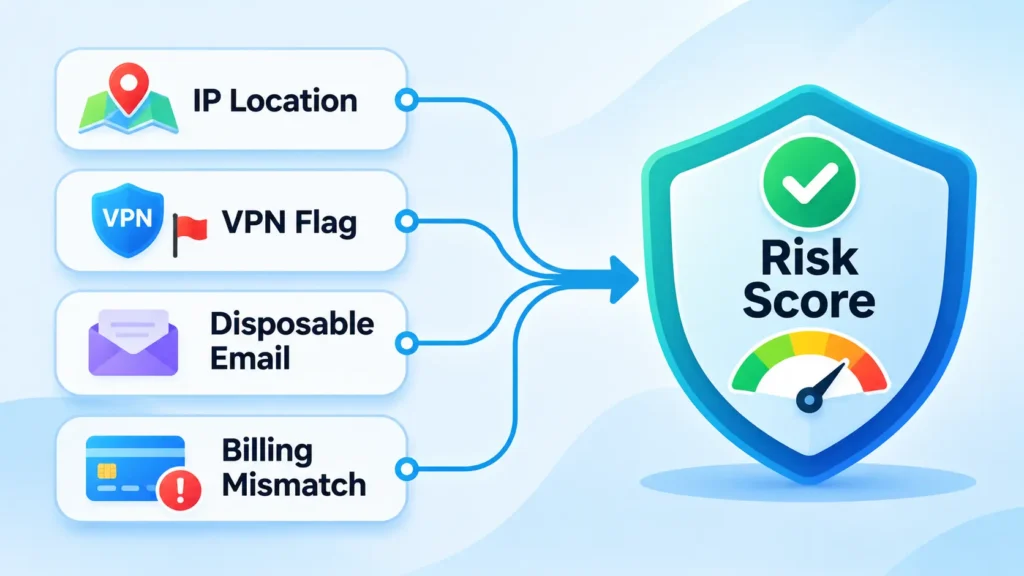
IP geolocation helps flag risky activity, like a mismatch between a billing address and the IP, traffic from an unexpected country, or a connection through a known proxy or VPN. It works best next to other clues inside a risk score, not as a standalone block.
The stakes are real. In 2024, the FBI’s Internet Crime Complaint Center (IC3) reported a record $16.6 billion lost to internet crime, up 33 percent in one year, with cyber enabled fraud making up about 83 percent of that total. On the bot side, the 2025 Imperva/Thales Bad Bot Report found that automated traffic reached 51 percent of all web traffic, bad bots hit 37 percent, and 44 percent of advanced bot traffic aimed straight at APIs. Fraud detection is now the single biggest use of IP location tools.
Here is where email signals and IP signals work well together. Say a new sign up shows a billing city in Texas, an IP in another country, and a throwaway email address. That mix looks shaky. A disposable email checker spots the fake inbox, while an ip geolocation api adds the location and VPN clue. You can also fold in an email spam score to round out the picture. Stacked together, these give your bot detection and fraud prevention a much stronger read than any one check alone.
Is it legal to use an IP geolocation API?
Using an ip geolocation api is legal in most places. But in some regions, like the European Union under GDPR, an IP address can count as personal data. That means you may need a lawful basis to process it, clear notice to users, and sensible limits on how long you store it. Always check your local rules and your provider’s terms before you process IPs at scale.
For everyday uses, like setting a visitor’s language or blocking repeat trial abuse, you are on safe ground. The care comes with scale and storage. Keep what you need, say what you collect, and delete old records on a plan.
How to call an IP geolocation API (quick example)
Most tools use a simple REST API. You send an HTTP GET request with the IP, and you read the JSON that comes back. Here is the shape of a basic call, in a provider neutral form:
# Look up one IP
curl "https://api.example.com/v1/8.8.8.8?apikey=YOUR_KEY"
import requests
def get_location(ip):
url = f"https://api.example.com/v1/{ip}?apikey=YOUR_KEY"
data = requests.get(url).json()
return {
"country": data["country"],
"city": data["city"],
"lat": data["latitude"],
"lon": data["longitude"],
}
print(get_location("8.8.8.8"))Swap in your chosen provider’s endpoint and key. Only ask for city or postal data when you truly need it, since country level checks are faster and more reliable.
The bottom line
Start with your real need. For country and region data, almost any good tool works, and a free ip geolocation api is plenty. For fraud work, pick one with VPN, proxy, and threat intelligence built in. For steady high volume, a self hosted MaxMind database can beat per call pricing. And set your accuracy hopes right: IP location is great at country, fair at city, and never street level.
IP data is strongest as one signal in a stack. Pair it with email checks and a free temporary email workflow to screen risky sign ups, and you get a much clearer read than any single check can give. Test two or three options on the same set of IPs, watch the free limits and HTTPS rules, and go with the one that fits your budget and your accuracy needs.
FAQ
Is there a free IP geolocation api?
Yes. Several providers offer a free tier, from keyless tools with per minute rate limits to free plans with tens of thousands of lookups a month. Free plans often skip HTTPS or security fields, so confirm the limits and data before you rely on one in production.
What is the most accurate ip geolocation api?
At the country level, leading tools like MaxMind, IP2Location, and DB-IP all score about 95 to 99 percent. City level accuracy varies more and rarely beats 80 percent. The most accurate choice depends on the regions and the precision you need.
Can an ip geolocation api detect a VPN or proxy?
Some can. Tools with a security module flag proxies, VPNs, Tor, and hosting IPs, though detection is not perfect. VPN/proxy detection is often a paid add on, not a free tier feature.
How much does an ip geolocation api cost?
Entry paid plans often start around $10 to $25 a month for tens of thousands of lookups, and scale up with volume. Security and bulk add ons raise the price, so compare the ip geolocation api pricing at the volume you expect, not just the headline number.
Should I use an API or a MaxMind database?
Use a hosted API for fresh data with little setup and lower volume. Use a self hosted MaxMind database for fast local lookups, no per call cost, and more privacy, if you can keep the file updated.
How do I get an IP’s location in Python?
Send an HTTP GET request to your provider’s endpoint with the IP, then read the JSON for fields like country, city, and coordinates. Most tools give copy and paste examples in their docs.