

No. Outlook.com is not a disposable email domain. It is a permanent, free email service from Microsoft Corporation with over 400 million active users. Accounts require full registration and never expire. Every major email validation service classifies Outlook.com as trusted and non-disposable, separate from throwaway services like Mailinator or Guerrilla Mail.
You may have seen the phrase “disposable email domain” and wondered where Outlook.com falls. Maybe a website signup form rejected your @outlook.com address. Maybe you are building a form and want to know if you should block it. Either way, this article gives you a straight answer and explains why the confusion comes up in the first place.
This article covers what disposable email actually means, how Outlook.com compares, and what website owners should do to detect throwaway email addresses correctly.
Is Outlook.com a Disposable Email Domain?
No. Outlook.com is not a disposable email domain, a temporary email service, or a throwaway inbox. It is Microsoft Corporation’s free, permanent email platform with over 400 million active users worldwide.
Outlook.com started as Hotmail, which Microsoft bought in 1997. It became Outlook.com in 2012 and has grown into one of the largest free email providers on the planet. The service runs on Microsoft Exchange Online, the same enterprise-grade infrastructure that powers Microsoft 365 for businesses.
When you check Outlook.com with a professional email validation API, the results are clear. The Check-Mail API gives it a risk score of just 5 out of 100 and returns this result:
“domain”: “outlook.com”
“text”: “Looks okay”
“reason”: “Whitelisted”
“risk”: 5
“is_disposable”: false
“is_public_free”: true
“block”: false
Reputable email validation services, including BulkEmailChecker, ZeroBounce, and NeverBounce, all place Outlook.com in the “free but legitimate” category. None of them flag it as a throwaway or temporary email service.
What Is a Disposable Email Domain, Exactly?
A disposable email domain is a service that creates anonymous inboxes on demand, with no account required and a very short lifespan. You visit the site, get a random email address, use it once to grab a verification link, and the inbox disappears. No name. No password. No strings attached.
These services go by many names: temp mail, burner email, throwaway email, or fake email generator. Well-known examples include:
- Mailinator (mailinator.com) – inbox lasts about one hour
- Guerrilla Mail – inboxes last one hour; operates 20+ domains
- 10 Minute Mail – inbox lasts exactly ten minutes
- YOPmail – inboxes last up to eight days
- Temp Mail – operates over 50 separate domains
Four things define a true disposable email service:
- No registration needed. Anyone who knows the address can read the inbox.
- Short inbox lifespan. It expires in minutes to a few days, then it is gone.
- No identity attached. No real name, phone number, or recovery email is linked.
- Built for anonymity. The point is to avoid spam or skip a signup requirement.
The scale of this ecosystem is large. As of 2026, actively maintained developer blocklists track between 74,000 and over 108,000 known disposable email domains. New ones appear every week to avoid being caught by spam registration prevention tools. Outlook.com is not part of this ecosystem at all.
Outlook.com vs. Disposable Email: The Key Differences
The table below puts the two side by side across the features that matter most.
| Feature | Outlook.com | Disposable Email (e.g., Mailinator) |
| Account required | Yes, full Microsoft account with identity verification | No, open inbox with no login |
| Inbox lifespan | Permanent, no expiry date | 10 minutes to a few days |
| Identity attached | Yes, name, phone number, and recovery options | No, fully anonymous |
| Password recovery | Yes, phone, backup email, authenticator app | Not possible once expired |
| Accepted by websites | Accepted on every reputable platform | Blocked on most signup forms |
| Email validation API result | is_disposable: false, risk score: 5/100 | is_disposable: true, risk score: 90+/100 |
| Good for important accounts | Yes, banks, subscriptions, recovery emails | No, inbox may disappear before you need it |
| Connected ecosystem | Microsoft 365, OneDrive, Teams, Xbox, LinkedIn | Receive-only, no features, no integrations |
Outlook.com is a full communication platform backed by Microsoft Exchange Online. A disposable email service is a stripped-down, anonymous tool built for single-use. They are not in the same category, and they are not treated as the same category by any professional email list hygiene system.
Why Do People Confuse Outlook.com With a Disposable Email Service?
The confusion comes up often, and it almost always traces back to What Do Email Validation Tools Actually Say?one of three causes.
Copycat Domains That Mimic Outlook’s Name
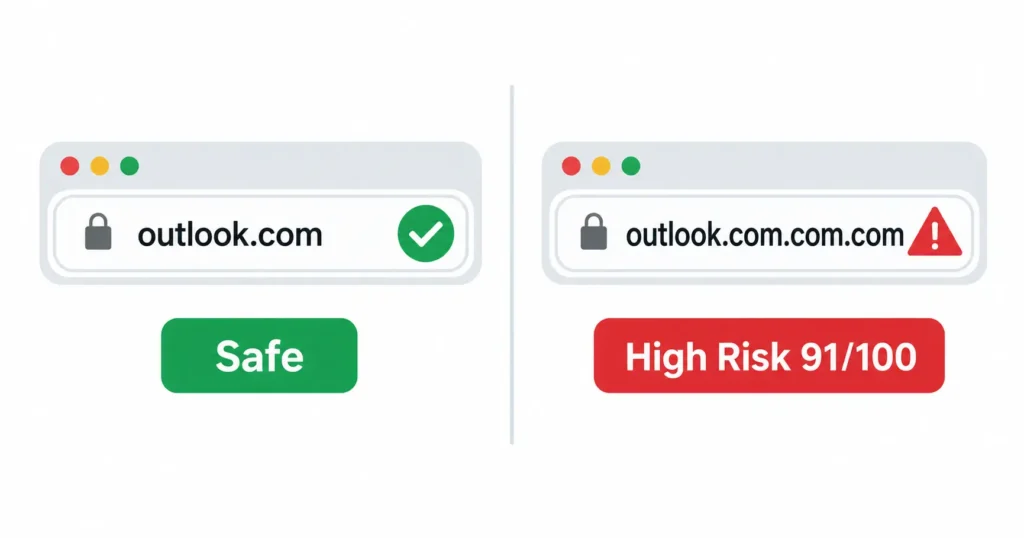
Some fraudulent services register domain names that borrow the Outlook brand. Domains like outlook.com.com, outlook.com.com.com, and outlook.com.co.co.com.com.com are real disposable email services. They carry risk scores of 91 out of 100 on email domain checkers and are flagged as high-risk throwaway inboxes.
These copycat domains have zero connection to Microsoft Corporation. They copy the Outlook name to look trustworthy, but they are anonymous throwaway services with no account system and no security.
When someone checks one of these fake domains and sees “disposable,” they sometimes assume the label applies to the real Outlook.com too. It does not. The real outlook.com and a copycat like outlook.com.com.com are completely different things.
The “Free Means Disposable” Mistake
Some people assume that because Outlook.com costs nothing, it must be a throwaway service. That is a common misunderstanding.
Outlook.com, Gmail, and Yahoo Mail are all free. They are also all permanent. Professional email validation tools separate these two concepts on purpose. A free email domain is one you can get without paying money. A disposable email domain gives you an anonymous inbox that expires. Free email and disposable email are not the same thing.
MSN Mail, Live.com, and Hotmail addresses all run on the same Microsoft account system as Outlook.com. None of them are disposable. The is_public_free flag in validation APIs means “this is a free provider.” It does not mean “this is a burner email.”
Errors in Low-Quality Validation Tools
Not all email validation tools are built with the same care. Some poorly maintained disposable email blocklists do make mistakes. They incorrectly flag legitimate free providers including Outlook.com.
If your @outlook.com address was ever rejected on a signup form, the most likely cause is that the site uses a low-quality validation library. That is a problem with that tool, not with your email address. High-quality services like BulkEmailChecker, NeverBounce, ZeroBounce, and IPQualityScore all correctly classify Outlook.com as trusted and non-disposable.
What Do Email Validation Tools Actually Say About Outlook.com?
When you check Outlook.com against a professional email validation API, the result is always the same: it is not disposable, it is not blocked, and it is not a fake signup risk.
The key is understanding the two flags that every serious validation API returns:
| Flag | What It Means | Outlook.com Result | What to Do |
| is_disposable | Temporary or throwaway domain | false | Do NOT block Outlook.com |
| is_public_free | Free email provider, but permanent | true | Allow signups from this domain |
The is_disposable flag is the one that matters for spam registration prevention. Outlook.com returns false for that flag. Always.
Note for developers: If your signup form blocks any domain where is_public_free is true, you will also block Gmail, Yahoo Mail, Hotmail, and hundreds of other trusted free email providers. That cuts off the majority of real consumer inboxes. Block on is_disposable only, not on is_public_free.
BulkEmailChecker, NeverBounce, ZeroBounce, and IPQualityScore all classify Outlook.com under “free but legitimate” in their disposable email blocklist systems, completely separate from throwaway domains like Mailinator or Guerrilla Mail.
Should Website Owners Block Outlook.com in Signup Forms?
No. Blocking Outlook.com from your signup form would cut off a large share of real, legitimate users.
Outlook.com holds around 4.38 percent of the global email client market. With over 4 billion email users worldwide, that is hundreds of millions of real people. Blocking the domain by mistake would hurt your conversions and frustrate genuine users with no benefit to your email list hygiene.
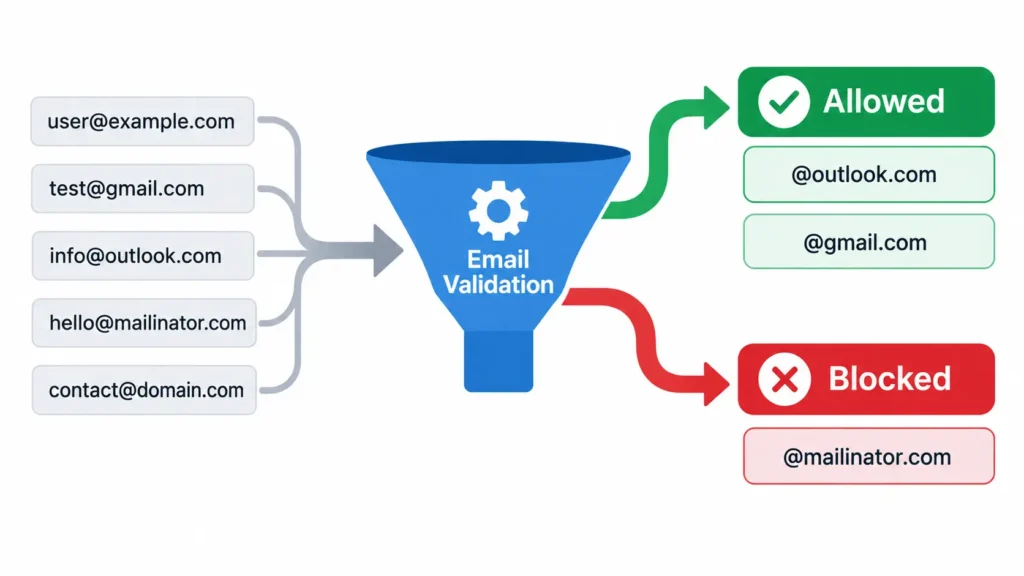
Here is how to handle disposable email detection correctly:
- Use a real-time email validation API. Good options include ZeroBounce, NeverBounce, BulkEmailChecker, and IPQualityScore. These maintain actively updated lists of known throwaway domains.
- Block only on the is_disposable flag. If a domain returns is_disposable: true, block the signup. Outlook.com will never trigger this flag in any correctly built system.
- Allow all is_public_free domains. These are free email providers but not throwaway services. Outlook.com, Gmail, and Yahoo Mail all fall here.
- Layer with other signals. Disposable email detection works best alongside rate limiting, IP reputation data, and behavior analysis. It is not a complete solution on its own.
One extra nuance worth knowing: services like Apple Hide My Email, Firefox Relay, and SimpleLogin create forwarding alias addresses. These protect a user’s real inbox by routing mail through a random alias. They behave somewhat like disposable emails, but they are a separate category. Most of them forward messages to a real, permanent inbox. They are not the same as a 10-minute throwaway.
Some sites block free email providers entirely as a policy choice. They want business email addresses only. That has nothing to do with whether a domain is disposable. Outlook.com is a permanent, trusted email service. It is not a throwaway. If a site blocks it, that is a site policy decision, not an email quality issue.
Good email list hygiene means keeping your list free of fake signups, bounced addresses, and throwaway inboxes. Understanding the line between free email providers and real disposable email domains is the foundation of that work. Tools like the ones freemail.ai uses for email marketing campaigns depend on this distinction every day.
Frequently Asked Questions
Is Outlook.com a disposable email domain?
No. Outlook.com is Microsoft Corporation’s permanent, free email service with over 400 million active users. Accounts require full registration and persist indefinitely with full recovery options. Every major email validation tool classifies it as trusted and non-disposable, with a risk score of just 5 out of 100.
Why did a website reject my Outlook.com email address?
Most likely the site uses a blanket block on all free email providers instead of a proper disposable-domain filter. Some sites also rely on poorly maintained validation tools that make errors. A correctly built email validation system uses the is_disposable flag only and will never block Outlook.com.
Is Hotmail a disposable email domain?
No. Hotmail is not a disposable email domain. Hotmail became Outlook.com after Microsoft bought it in 1997. Today, @hotmail.com, @live.com, and @outlook.com addresses all run on the same Microsoft account system. All are permanent, non-disposable, and treated as trusted by email validation APIs.
Can I use Outlook.com for bank accounts and password resets?
Yes. Outlook.com supports full account recovery through phone verification, a backup email address, and Microsoft Authenticator. It is completely safe for banks, subscription services, and any account where you need long-term access and reliable password reset delivery.
How many disposable email domains actually exist?
Actively maintained developer blocklists tracked between 74,000 and over 108,000 disposable email domains as of 2026. New domains appear every week to avoid being caught by blocklists. Services like Temp Mail alone operate over 50 domains. Outlook.com has no connection to this ecosystem.
Is Gmail also a disposable email domain?
No. Gmail is a permanent free email provider, just like Outlook.com. Email validation APIs return is_disposable: false for Gmail. Free email and disposable email are two separate categories. Gmail and Outlook.com both sit firmly in the free-but-permanent category.
What are real examples of disposable email domains?
Common throwaway email services include Mailinator (mailinator.com), Guerrilla Mail, 10 Minute Mail, YOPmail, and Temp Mail. These give out anonymous inboxes that expire in minutes to days with no registration required. All are flagged as disposable by IPQualityScore, BulkEmailChecker, ZeroBounce, NeverBounce, and similar tools.
What to Do Next
- If you are an Outlook.com user: Your @outlook.com address is trusted everywhere. Use it for any important account, signup, or subscription with confidence. If a site rejects it, that site has a misconfigured validation setup.
- If you run a signup form: Use a maintained disposable email detection API and block only on the is_disposable flag. Never block on is_public_free. You will stop fake signups without turning away real users.
- If you send email campaigns: Clean email list hygiene starts with understanding the difference between free email providers and real disposable domains. Accurate deliverability depends on it. Explore how freemail.ai helps businesses build and maintain high-quality email lists for better campaign results.