

TL;DR
Temp mail for Gmail can mean several different things. It might refer to a Gmail alias, a disposable email service, or a third-party service offering Gmail-style addresses. Gmail supports plus aliases like name+tag@gmail.com, but these still route messages to your normal inbox. If you need a separate inbox that expires after use, a disposable email service is the tool you actually want.
Introduction
Looking for a temp mail for Gmail usually means one of two things. You either want a temporary version of your Gmail address, or you want a separate throwaway inbox that has nothing to do with your real account.
The problem is that these are not the same thing.
This article explains what temp mail for Gmail actually means, covers Gmail’s built-in options like plus addressing and dot variations, compares them with true disposable email, and helps you pick the right option for your situation.
What Does “Temp Mail for Gmail” Mean?
The phrase temp mail for Gmail gets used in a few different ways, and that causes a lot of confusion.
Some people mean they want a temporary Gmail address that expires. Others mean they want a Gmail alias to sort incoming messages. Some people are looking for a third-party service that provides Gmail-style temporary addresses.
Here is what each of those actually looks like:
- Temporary Gmail: Gmail does not offer a self-expiring inbox by default.
- Gmail alias: A variation of your existing address that routes to the same inbox.
- Disposable email: A completely separate inbox, usually from a third-party service, that expires after use.
- Gmail-style temp service: A temporary disposable inbox address that looks similar to a Gmail address but is run by a third party.
Understanding which one you need makes the rest of this much simpler.
Most people searching for “temp Gmail” or “Gmail temporary email” fall into the same category. They want to protect their real Gmail address and get a throwaway inbox for a quick signup.
Does Gmail Have a True Temporary Email Address?
No. Gmail does not offer a built-in temporary inbox that expires on its own.
What Gmail does support is plus addressing and dot variations. These let you change how your address looks, but all messages still arrive in your existing Gmail inbox.
Google’s own documentation confirms that a plus alias like name+shopping@gmail.com delivers messages straight to your original account. The Gmail dot trick works the same way. Dotted versions of a personal Gmail address all belong to the same account.
There is no separate, temporary Gmail inbox hidden inside your settings.
Gmail aliases are useful for filtering and organizing messages. But they are not the same as a disposable email address. They are not temporary Gmail addresses in any meaningful sense.
Google Workspace also notes that Gmail aliases are not Google Accounts and cannot be used to sign into Google services as separate users.
If you want a separate inbox that actually expires, a disposable email service is what you need.
What Is the Difference Between Gmail Alias and Temp Mail?
This is where most people get confused. A Gmail alias and a temporary email address look similar on the surface but work very differently.
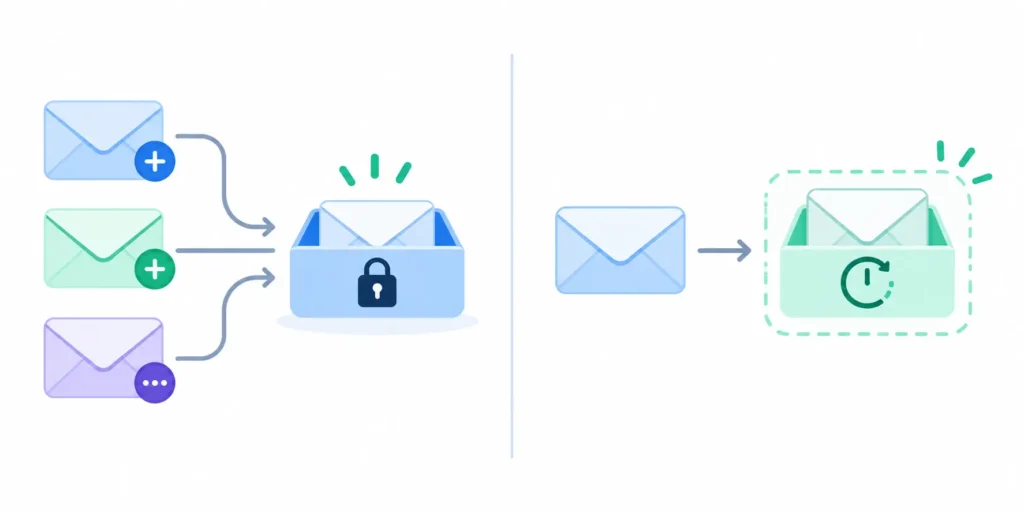
Here is a simple comparison:
| Feature | Gmail Alias | Temp Mail |
| Separate inbox | No | Usually yes |
| Temporary | No | Yes |
| Connected to main account | Yes | Usually no |
| Good for filtering | Yes | No |
| Good for one-time signup | Sometimes | Yes |
| Account recovery | Available through main Gmail | Usually unavailable after expiry |
A Gmail alias stays connected to your real Gmail account forever. If someone sends a message to name+shopping@gmail.com, it lands in your regular Gmail inbox.
A temporary email gives you a completely separate disposable inbox. That inbox usually expires after a set period of time.
The key difference is simple. A Gmail alias does not hide your account or give you a fresh inbox. Temp mail gives you a throwaway inbox that disappears.
If you only need to sort messages, a Gmail alias works fine. If you want to protect your real Gmail from spam or sign up for something without sharing your actual address, temp mail is the better choice.
For more on how plus addressing works, check out the full Temp Mail Plus guide.
How Does Gmail Plus Addressing Work?
Gmail plus addressing lets you add a plus sign and any word after your username.
For example:
- name@gmail.com is your real address
- name+shopping@gmail.com routes to the same inbox
- name+testing@gmail.com also routes to the same inbox
You can create as many of these variations as you like. Google notes that Gmail can use up to 99 different send-from addresses.
The main value is in filtering. You can set up a Gmail filter to automatically label, archive, or move messages sent to a specific plus alias. This helps keep your inbox clean without creating a separate email account.
But there are real limits.
A plus alias cannot sign into a Google Account as a separate user. It is not a new Gmail account. It is just a tag attached to your existing one.
Also, some websites do not accept the plus sign in email fields. A few registration forms reject name+tag@gmail.com as an invalid address format.
Google’s username creation documentation also confirms that the plus sign cannot be used when creating a new Gmail username. So a plus alias is always an alias, not a new account.
What Is the Gmail Dot Trick?
The Gmail dot trick refers to placing dots anywhere inside your Gmail username.
For example:
- johnsmith@gmail.com
- john.smith@gmail.com
- j.o.h.n.s.m.i.t.h@gmail.com
Gmail treats all of these as the same personal Gmail address. Messages sent to any variation land in the same inbox.
This is sometimes called Gmail dot notation. Like plus addressing, it does not create a temporary or disposable inbox. The dots change how the address looks but not where messages go.
Some people use the dot trick to sign up for the same service multiple times. This works on platforms that check for exact address matches. But it is not a privacy tool and it is not true temporary Gmail.
Adding dots does not separate your inbox, does not expire the address, and does not hide your Google Account.
For a deeper look, the Gmail Dot Trick 2026 guide covers exactly how this works and when it has practical use.
How Do You Use Temp Mail for Gmail Signups?
Using temp mail for a one-time signup or Gmail verification is simple. The full process takes about a minute.
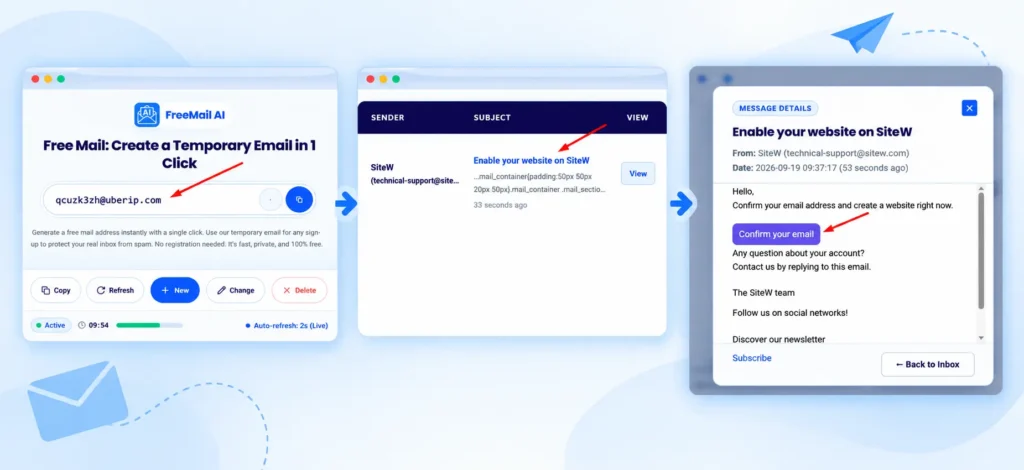
Here is how it works step by step:
- Go to a temporary email service like FreeMail.ai.
- A disposable email address is generated for you automatically. No registration needed.
- Copy the temporary address.
- Open the website or app where you want to sign up.
- Paste the temporary email address into the email field.
- Submit the form.
- Go back to your temporary inbox tab.
- Wait for the verification email to arrive.
- Open the message and copy the OTP or click the confirmation link.
- Complete the signup process on the original site.
Keep the temporary inbox tab open the whole time. Some inboxes refresh automatically. Others need a manual refresh.
One important point: do not use a temporary email address for any account you want to keep long-term. If the inbox expires before you need a password reset, you will be locked out with no way back in.
Need a separate inbox for a one-time signup or verification? FreeMail.ai lets you generate a temporary email address instantly, without creating another Gmail account. You can also visit the temp email with inbox page to see how the live inbox works.
When Should You Use Temp Mail Instead of Your Gmail Address?
Not every situation calls for a disposable inbox. Some tasks are better suited to your real Gmail address.
Use this table as a quick reference:
| Situation | Recommended Option |
| One-time download | Temp mail |
| Short free trial | Temp mail |
| Testing a signup form | Temp mail |
| Accessing a free tool without committing | Temp mail |
| Newsletter you want to filter | Gmail alias |
| Work email communication | Permanent email |
| Banking | Permanent secure email |
| Password recovery for any account | Permanent email |
| Long-term subscription | Permanent email |
| Government or healthcare accounts | Permanent email |
The general rule is easy to remember. If you only need the inbox once, use a throwaway email address. If you need to access that account again later, use your real address.
For more situations where a temporary email for verification makes sense, this temporary email for verification guide walks through common examples.
Is Temp Mail Safe for Gmail Verification Codes?
Temp mail can work well for low-risk verifications, but there are limits worth knowing before you use it.
Some temporary inboxes are public. That means anyone who knows or guesses your temporary address can open it and read your messages. NIST defines phishing as attempts to obtain sensitive data through deceptive communications. A public inbox can remove one layer of protection you might not want to give up.
Here are the main risks to think about:
- Inbox expiration: If the inbox closes before you finish, you lose access to the OTP or confirmation link.
- Public visibility: Some temp mail services display all incoming messages in a shared inbox.
- No account recovery: Once the inbox expires, any account tied to it becomes very hard to recover.
- Sensitive data exposure: Never use a temporary inbox to receive financial, medical, or identification-related messages.
The FTC warns that companies may share or sell email addresses depending on their own data practices. Using a temporary address for one-time signups reduces the personal information you hand over. But it does not make you fully anonymous.
For low-risk tasks like accessing a free download, testing a feature, or using temporary email for AI tools, temp mail is a practical choice. For anything sensitive, use a permanent email address you control.
What Should You Never Use Temp Mail For?
Some accounts are too important for a disposable inbox. Losing access to the temporary address can lock you out for good.
Never use temp mail for:
- Banking or financial services
- Healthcare portals or medical records
- Government account signups
- Primary social media accounts
- Important work or business accounts
- Any account where you will need future password recovery
- Long-term subscriptions you plan to keep
- Accounts tied to real purchases or transactions
If there is any chance you will need to log back into the account, use a permanent email address. The risk of losing inbox access after expiration is not worth it.
For a broader look at managing multiple addresses safely, this disposable Gmail guide covers the trade-offs in detail.
Why Do Some Websites Block Temp Mail?
Many websites automatically reject disposable email addresses. There are a few clear reasons why.
Fake account prevention. Disposable inboxes make it easy to create multiple accounts on platforms that allow only one per person. Sites block known temp-mail domains to prevent this kind of abuse.
Fraud controls. Some services flag temporary addresses as higher-risk. Disposable inboxes are often used to bypass trial limits, age verification steps, or promotional offer restrictions.
Spam and list quality. Platforms that send newsletters or marketing emails want confirmed, long-term addresses. Temporary inboxes inflate their lists with email addresses that expire shortly after signup.
Websites use disposable-domain blocklists to filter out known providers. If your temporary address gets rejected, the site has recognized the domain as a disposable email provider.
This is not something to work around. If a service specifically blocks temp mail, it is because they have a reason to require a real account.
Temp Mail vs Gmail Alias vs Second Gmail Account
Still deciding which option fits your needs? Here is a final side-by-side comparison:
| Option | Best Use | Main Limitation |
| Temp mail | One-time tasks, signups, verification codes | Inbox expires, no recovery |
| Gmail + alias | Filtering and tracking incoming mail | Still linked to your real Gmail account |
| Gmail dot variation | Minor address variation for the same inbox | Same Gmail inbox receives all mail |
| Second Gmail account | Separate long-term identity | Requires creating and managing another account |
| Email alias service | Long-term masked address | Usually requires account setup and maintenance |
There is no single right answer for every situation. The right choice depends on how long you need the inbox, whether you need account recovery, and whether you want the inbox linked to your real Gmail address.
For step-by-step help with multiple address options, the guide on creating multiple email addresses covers several approaches in plain terms.
Conclusion
Temp mail for Gmail covers a few different things, and the terminology is easy to mix up.
Gmail itself offers alias options through plus addressing and dot variations. Neither creates a separate or temporary inbox. All messages return to your original Gmail account. Google’s own documentation makes this clear.
If you want a throwaway email address for one-time signups, free trials, or quick verification codes, a disposable email service gives you what a Gmail alias cannot: a separate inbox that actually expires. Need a temporary inbox right now? Generate a free disposable email address at FreeMail.ai and use it for your next signup without sharing your real Gmail address.
Frequently Asked Questions
Is there a temporary Gmail address?
A standard Gmail account does not include a self-expiring temporary inbox. Gmail supports address variations through plus aliases and dotted usernames, but these route all messages to the existing Gmail account. If you need a true temporary Gmail address that expires, a separate disposable email service is what you are looking for.
Can I use temp mail for Gmail verification?
Yes, a temporary inbox can receive verification messages as long as the website accepts the address. Keep the inbox open until the entire verification process is done. Temp mail should only be used for low-risk, short-term tasks because the inbox will expire.
Does a Gmail plus alias create a new email account?
No. A plus alias like name+test@gmail.com routes messages to your original Gmail inbox. It is not a separate Gmail account and cannot be used to sign into Google services as a different user.
Are Gmail dot variations temporary emails?
No. Gmail treats all dotted versions of a personal Gmail address as the same address. Adding or removing dots does not create a new inbox or make the address temporary in any way.
Can I use temp mail for banking?
No. A temporary address is a poor choice for banking or any important financial account. If the inbox expires before you need a password reset email, you may be locked out permanently with no way to recover access.
Why do websites reject temporary email addresses?
Some websites block known disposable-email domains as part of their systems for preventing fake accounts, abuse, and fraud. If a site rejects your temporary address, it has identified the domain as belonging to a disposable email provider.