

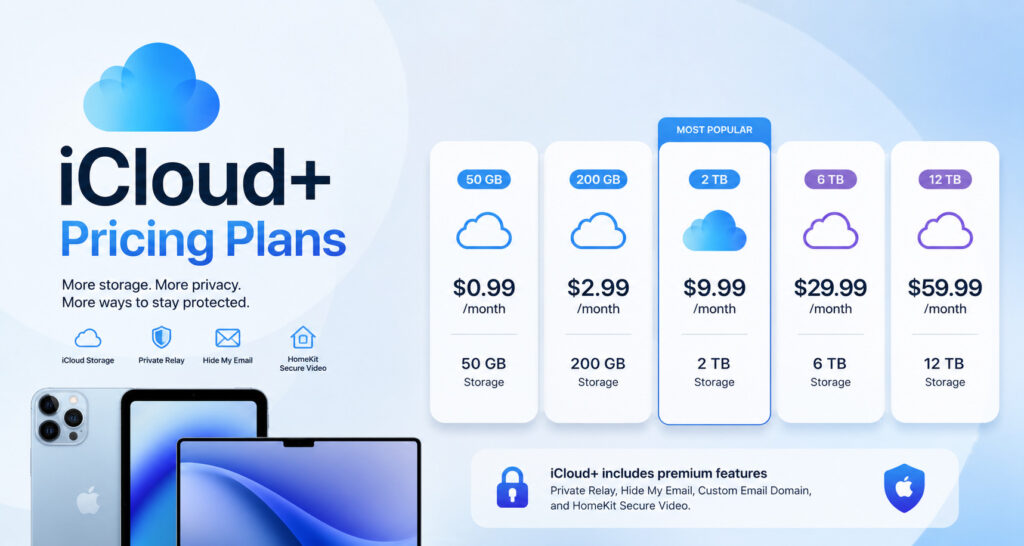
iCloud+ pricing plans include five paid storage tiers in the United States. The tiers are 50 GB for $0.99 a month, 200 GB for $2.99 a month, 2 TB for $9.99 a month, 6 TB for $29.99 a month, and 12 TB for $59.99 a month. Every paid iCloud+ plan unlocks the same core features. These include iCloud Private Relay, Hide My Email, and Custom Email Domain setup. The 200 GB tier and higher also support Family Sharing, so users can share storage across an iPhone, iPad, Mac, or Apple Watch. Apple only offers iCloud+ storage plans on a monthly subscription. There is no yearly or annual discount option for any tier.
Keeping your photos, videos, and device backups safe takes more than just an Apple ID. It takes the right amount of cloud storage for how you actually use your devices. Understanding iCloud+ pricing plans helps you match your budget to your storage needs, whether you use one iPhone or a full lineup of Apple devices at home.
This guide breaks down every iCloud+ storage plan in simple terms. You will see the exact monthly cost for each tier, from the small 50 GB plan up to the large 12 TB plan. You will also learn what each paid plan unlocks, including iCloud Private Relay, Hide My Email, and Custom Email Domain setup. Along the way, we will cover which tiers support Family Sharing, how iCloud+ storage compares across price points, and simple rules to help you pick the best plan for your own Apple ecosystem.
Complete Breakdown of iCloud+ Pricing Plans
Apple keeps its iCloud+ pricing plans simple. There are five paid storage tiers. Each tier costs a set price every month. As the storage size goes up, the price goes up too. But the core premium features stay the same across every paid plan.
The table below shows the full iCloud storage tiers cost, plus what each plan includes.
| iCloud+ Storage Tier | Monthly Price (US) | Family Sharing | HomeKit Secure Video Cameras | Premium Features Included |
| 50 GB | $0.99 | No | 1 Camera | Private Relay, Hide My Email, Custom Email Domain |
| 200 GB | $2.99 | Yes (up to 5 people) | Up to 5 Cameras | Private Relay, Hide My Email, Custom Email Domain |
| 2 TB | $9.99 | Yes (up to 5 people) | Unlimited Cameras | Private Relay, Hide My Email, Custom Email Domain |
| 6 TB | $29.99 | Yes (up to 5 people) | Unlimited Cameras | Private Relay, Hide My Email, Custom Email Domain |
| 12 TB | $59.99 | Yes (up to 5 people) | Unlimited Cameras | Private Relay, Hide My Email, Custom Email Domain |
A few things stand out in this breakdown. First, the iCloud 50GB price sits at just under a dollar a month, making it the easiest entry point for a single Apple ID. Second, once you move up to 200 GB or higher, Apple unlocks Family Sharing. This lets you share one storage pool with up to five other people, so a whole household can back up an iPhone, iPad, Mac, or Apple Watch from a single plan.
HomeKit Secure Video support also grows with each tier. The 50 GB plan only supports one connected camera, which may not be enough for a full smart home setup. Every tier from 200 GB and up removes that limit or expands it, giving more room for home security footage.
Every paid tier, no matter the price, unlocks the same three core privacy and productivity tools: iCloud Private Relay, Hide My Email, and Custom Email Domain setup. This means the real choice between iCloud+ pricing plans usually comes down to storage size and Family Sharing needs, not missing features on the cheaper end.
Regions Covered: North America, South America, Latin America, and the Caribbean
Bahamas2,3 (USD)
- 50 GB: $0.99
- 200 GB: $2.99
- 2 TB: $10.99
- 6 TB: $32.99
- 12 TB: $64.99
Barbados2,3 (USD)
- 50 GB: $0.99
- 200 GB: $3.49
- 2 TB: $11.99
- 6 TB: $34.99
- 12 TB: $69.99
Brazil (BRL)
- 50 GB: R$ 5.90
- 200 GB: R$ 19.90
- 2 TB: R$ 66.90
- 6 TB: R$ 199.90
- 12 TB: R$ 399.90
Canada (CAD)
- 50 GB: $1.29
- 200 GB: $3.99
- 2 TB: $12.99
- 6 TB: $39.99
- 12 TB: $79.99
Chile3 (CLP)
- 50 GB: $990
- 200 GB: $3290
- 2 TB: $10990
- 6 TB: $32990
- 12 TB: $64990
Colombia (COP)
- 50 GB: $3900
- 200 GB: $12900
- 2 TB: $44900
- 6 TB: $129900
- 12 TB: $269900
Mexico (MXN)
- 50 GB: $17
- 200 GB: $49
- 2 TB: $179
- 6 TB: $499
- 12 TB: $999
Peru3 (PEN)
- 50 GB: S/.3.90
- 200 GB: S/.12.90
- 2 TB: S/.42.90
- 6 TB: S/.129.90
- 12 TB: S/.259.90
Suriname2,3 (USD)
- 50 GB: $0.99
- 200 GB: $3.49
- 2 TB: $11.99
- 6 TB: $34.99
- 12 TB: $69.99
United States4 (USD)
- 50 GB: $0.99
- 200 GB: $2.99
- 2 TB: $9.99
- 6 TB: $29.99
- 12 TB: $59.99
Europe, the Middle East, and Africa
Albania2,3 (USD)
- 50 GB: $1.19
- 200 GB: $3.59
- 2 TB: $11.99
- 6 TB: $34.99
- 12 TB: $69.99
Armenia2,3 (USD)
- 50 GB: $1.19
- 200 GB: $3.49
- 2 TB: $11.99
- 6 TB: $34.99
- 12 TB: $69.99
Azerbaijan2,3 (USD)
- 50 GB: $0.99
- 200 GB: $3.49
- 2 TB: $11.99
- 6 TB: $34.99
- 12 TB: $69.99
Bahrain2,3 (USD)
- 50 GB: $0.99
- 200 GB: $2.99
- 2 TB: $10.99
- 6 TB: $32.99
- 12 TB: $64.99
Belarus2,3 (USD)
- 50 GB: $1.19
- 200 GB: $3.49
- 2 TB: $11.99
- 6 TB: $34.99
- 12 TB: $69.99
Benin2,3 (USD)
- 50 GB: $0.99
- 200 GB: $3.49
- 2 TB: $11.99
- 6 TB: $34.99
- 12 TB: $69.99
Bulgaria3 (BGN)
- 50 GB: 1.99 лв
- 200 GB: 5.99 лв
- 2 TB: 20.99 лв
- 6 TB: 64.99 лв
- 12 TB: 129.99 лв
Cameroon2,3 (USD)
- 50 GB: $0.99
- 200 GB: $3.49
- 2 TB: $11.99
- 6 TB: $34.99
- 12 TB: $69.99
Croatia3 (Euro)
- 50 GB: 0.99 €
- 200 GB: 2.99 €
- 2 TB: 9.99 €
- 6 TB: 29.99 €
- 12 TB: 59.99 €
Czechia3 (CZK)
- 50 GB: 25 Kč
- 200 GB: 79 Kč
- 2 TB: 249 Kč
- 6 TB: 749 Kč
- 12 TB: 1490 Kč
Denmark3 (DKK)
- 50 GB: 9 kr
- 200 GB: 25 kr
- 2 TB: 89 kr
- 6 TB: 269 kr
- 12 TB: 549 kr
Egypt3 (EGP)
- 50 GB: £49.99
- 200 GB: £179.99
- 2 TB: £599.99
- 6 TB: £1799.99
- 12 TB: £3599.99
Euro3 (Euro)
- 50 GB: 0.99 €
- 200 GB: 2.99 €
- 2 TB: 9.99 €
- 6 TB: 29.99 €
- 12 TB: 59.99 €
Georgia2,3 (USD)
- 50 GB: $0.99
- 200 GB: $3.49
- 2 TB: $11.99
- 6 TB: $34.99
- 12 TB: $69.99
Ghana2,3 (USD)
- 50 GB: $0.99
- 200 GB: $3.49
- 2 TB: $11.99
- 6 TB: $34.99
- 12 TB: $69.99
Hungary3 (HUF)
- 50 GB: 399 Ft
- 200 GB: 1290 Ft
- 2 TB: 4490 Ft
- 6 TB: 12990 Ft
- 12 TB: 26990 Ft
Iceland2,3 (USD)
- 50 GB: $1.19
- 200 GB: $3.69
- 2 TB: $11.99
- 6 TB: $34.99
- 12 TB: $69.99
Israel (ILS)
- 50 GB: ₪3.90
- 200 GB: ₪11.90
- 2 TB: ₪39.90
- 6 TB: ₪119.90
- 12 TB: ₪239.90
Ivory Coast2,3 (USD)
- 50 GB: $0.99
- 200 GB: $3.49
- 2 TB: $11.99
- 6 TB: $34.99
- 12 TB: $69.99
Kenya2,3 (USD)
- 50 GB: $0.99
- 200 GB: $3.49
- 2 TB: $11.99
- 6 TB: $34.99
- 12 TB: $69.99
Mauritius2,3 (USD)
- 50 GB: $1.19
- 200 GB: $3.49
- 2 TB: $11.99
- 6 TB: $34.99
- 12 TB: $69.99
Moldova2,3 (USD)
- 50 GB: $0.99
- 200 GB: $3.49
- 2 TB: $11.99
- 6 TB: $34.99
- 12 TB: $69.99
Nigeria3 (NGN)
- 50 GB: ₦1300
- 200 GB: ₦4500
- 2 TB: ₦14900
- 6 TB: ₦39900
- 12 TB: ₦66900
Norway3 (NOK)
- 50 GB: 12 kr
- 200 GB: 39 kr
- 2 TB: 129 kr
- 6 TB: 399 kr
- 12 TB: 799 kr
Pakistan (PKR)
- 50 GB: Rs200
- 200 GB: Rs800
- 2 TB: Rs2500
- 6 TB: Rs8900
- 12 TB: Rs17900
Poland3 (PLN)
- 50 GB: 4.99 zł
- 200 GB: 14.99 zł
- 2 TB: 49.99 zł
- 6 TB: 149.99 zł
- 12 TB: 299.99 zł
Qatar (QAR)
- 50 GB: 3.69﷼
- 200 GB: 10.99﷼
- 2 TB: 36.99﷼
- 6 TB: 109.99﷼
- 12 TB: 219.99﷼
Republic of Congo2,3 (USD)
- 50 GB: $1.19
- 200 GB: $3.49
- 2 TB: $11.99
- 6 TB: $34.99
- 12 TB: $69.99
Romania3 (RON)
- 50 GB: 4.99 lei
- 200 GB: 14.99 lei
- 2 TB: 49.99 lei
- 6 TB: 149.99 lei
- 12 TB: 299.99 lei
Russia3 (RUB)
- 50 GB: 59 p.
- 200 GB: 149 p.
- 2 TB: 599 p.
- 6 TB: 3490 p.
- 12 TB: 6990 p.
Saudi Arabia3 (SAR)
- 50 GB: 3.99﷼
- 200 GB: 12.99﷼
- 2 TB: 44.99﷼
- 6 TB: 129.99﷼
- 12 TB: 269.99﷼
Senegal2,3 (USD)
- 50 GB: $0.99
- 200 GB: $3.49
- 2 TB: $11.99
- 6 TB: $34.99
- 12 TB: $69.99
South Africa3 (ZAR)
- 50 GB: R14.99
- 200 GB: R59.99
- 2 TB: R199.99
- 6 TB: R599.99
- 12 TB: R1199.99
Sweden3 (SEK)
- 50 GB: 12 kr
- 200 GB: 39 kr
- 2 TB: 129 kr
- 6 TB: 399 kr
- 12 TB: 799 kr
Switzerland3 (CHF)
- 50 GB: CHF 1
- 200 GB: CHF 3
- 2 TB: CHF 10
- 6 TB: CHF 30
- 12 TB: CHF 60
Tanzania3 (TZS)
- 50 GB: 2500 TSh
- 200 GB: 8900 TSh
- 2 TB: 29900 TSh
- 6 TB: 89900 TSh
- 12 TB: 179900 TSh
Türkiye3 (TRY)
- 50 GB: 49.99 TL
- 200 GB: 169.99 TL
- 2 TB: 549.99 TL
- 6 TB: 1699.99 TL
- 12 TB: 3399.99 TL
Uganda2,3 (USD)
- 50 GB: $0.99
- 200 GB: $3.49
- 2 TB: $11.99
- 6 TB: $34.99
- 12 TB: $69.99
United Arab Emirates3 (AED)
- 50 GB: AED 3.99
- 200 GB: AED 11.99
- 2 TB: AED 39.99
- 6 TB: AED 119.99
- 12 TB: AED 239.99
United Kingdom3 (GBP)
- 50 GB: £0.99
- 200 GB: £2.99
- 2 TB: £8.99
- 6 TB: £26.99
- 12 TB: £54.99
Zambia2,3 (USD)
- 50 GB: $0.99
- 200 GB: $3.49
- 2 TB: $11.99
- 6 TB: $34.99
- 12 TB: $69.99
Zimbabwe2,3 (USD)
- 50 GB: $0.99
- 200 GB: $3.49
- 2 TB: $11.99
- 6 TB: $34.99
- 12 TB: $69.99
Asia Pacific
Australia3 (AUD)
- 50 GB: $1.49
- 200 GB: $4.49
- 2 TB: $14.99
- 6 TB: $44.99
- 12 TB: $89.99
Cambodia2,3 (USD)
- 50 GB: $0.99
- 200 GB: $2.99
- 2 TB: $10.99
- 6 TB: $32.99
- 12 TB: $64.99
China mainland3 (CNY)
- 50 GB: ¥6
- 200 GB: ¥21
- 2 TB: ¥68
- 6 TB:¥198
- 12 TB:¥398
Hong Kong (HKD)
- 50 GB: HK$ 8
- 200 GB: HK$ 23
- 2 TB: HK$ 78
- 6 TB: HK$ 238
- 12 TB: HK$ 468
India3 (INR)
- 50 GB: Rs 75
- 200 GB: Rs 219
- 2 TB: Rs 749
- 6 TB: Rs 2999
- 12 TB: Rs 5900
Indonesia3 (IDR)
- 50 GB: Rp 15000
- 200 GB: Rp 59000
- 2 TB: Rp 199000
- 6 TB: Rp 599000
- 12 TB: Rp 1199000
Japan3 (JPY)
- 50 GB: ¥180
- 200 GB: ¥540
- 2 TB: ¥1800
- 6 TB: ¥5500
- 12 TB: ¥11000
Kazakhstan3 (KZT)
- 50 GB: ₸499
- 200 GB: ₸1490
- 2 TB: ₸4990
- 6 TB: ₸14990
- 12 TB: ₸29990
Kyrgyzstan2,3 (USD)
- 50 GB: $0.99
- 200 GB: $2.99
- 2 TB: $10.99
- 6 TB: $32.99
- 12 TB: $64.99
Laos2,3 (USD)
- 50 GB: $0.99
- 200 GB: $3.29
- 2 TB: $10.99
- 6 TB: $32.99
- 12 TB: $64.99
Malaysia3 (MYR)
- 50 GB: RM3.90
- 200 GB: RM11.90
- 2 TB: RM44.90
- 6 TB: RM129.90
- 12 TB: RM269.90
Nepal2,3 (USD)
- 50 GB: $0.99
- 200 GB: $3.49
- 2 TB: $11.99
- 6 TB: $34.99
- 12 TB: $69.99
New Zealand3 (NZD)
- 50 GB: $1.99
- 200 GB: $5.99
- 2 TB: $19.99
- 6 TB: $59.99
- 12 TB: $119.99
Philippines (PHP)
- 50 GB: ₱59
- 200 GB: ₱199
- 2 TB: ₱699
- 6 TB: ₱1990
- 12 TB: ₱3990
Republic of Korea (KRW)5
- 50 GB: ₩1100
- 200 GB: ₩4400
- 2 TB: ₩14000
- 6 TB: ₩44000
- 12 TB: ₩88000
Singapore3 (SGD)
- 50 GB: S$ 1.48
- 200 GB: S$ 3.98
- 2 TB: S$ 13.98
- 6 TB: S$ 42.98
- 12 TB: S$ 84.98
Taiwan3 (TWD)
- 50 GB: NT$ 30
- 200 GB: NT$ 90
- 2 TB: NT$ 300
- 6 TB: NT$ 900
- 12 TB: NT$ 1790
Tajikistan2,3 (USD)
- 50 GB: $0.99
- 200 GB: $2.99
- 2 TB: $10.99
- 6 TB: $32.99
- 12 TB: $64.99
Thailand3 (THB)
- 50 GB: ฿35
- 200 GB: ฿99
- 2 TB: ฿399
- 6 TB: ฿1190
- 12 TB: ฿2390
Uzbekistan2,3 (USD)
- 50 GB: $0.99
- 200 GB: $2.99
- 2 TB: $10.99
- 6 TB: $32.99
- 12 TB: $64.99
Vietnam3 (VND)
- 50 GB: ₫25000
- 200 GB: ₫89000
- 2 TB: ₫299000
- 6 TB: ₫899000
- 12 TB: ₫1799000
What Features Come with Every iCloud+ Plan?
Every paid iCloud+ tier includes the same four core features. These are iCloud Private Relay for Safari browsing privacy, Hide My Email for creating random email aliases, Custom Email Domain support for a personalized inbox address, and HomeKit Secure Video integration for home cameras. Higher tiers give you more storage and more camera slots. They do not change or upgrade the privacy tools themselves.
Here is what these iCloud+ features explained in simple terms actually do for you day to day.
Safari Private Relay & Hide My Email
iCloud Private Relay works with Safari to help hide your browsing activity from your internet provider and from websites you visit. It sends your web traffic through two separate relays, so no single party can see both who you are and what site you are visiting.
Hide My Email works a bit differently. It lets you create random, made-up email addresses on the spot. These addresses forward messages straight to your real inbox, but they hide your true email from apps, websites, and online forms.
Together, these two tools give you:
- Private web browsing through Safari without exposing your IP address to every site
- Random email aliases that forward mail without sharing your real address
- The ability to delete an alias at any time if a website starts sending spam
- Protection that works across iPhone, iPad, Mac, and Apple Watch
Custom Email Domain & HomeKit Secure Video Limits
Custom Email Domain is one of the more useful iCloud+ features explained less often. It lets you use your own domain name for iCloud Mail instead of the standard @icloud.com address. This is handy for small business owners, freelancers, or anyone who wants a more personal or professional email look.
There is an iCloud+ custom email domain limit worth knowing about. You can add multiple email addresses under one custom domain, and you can share that same domain with family members on your Family Sharing plan. If you want a deeper walkthrough, this guide on configuring custom domain email settings covers the setup steps in more detail.
HomeKit Secure Video is the last core feature, and it scales with your storage tier:
- The 50 GB plan supports 1 connected camera
- The 200 GB plan supports up to 5 connected cameras
- The 2 TB, 6 TB, and 12 TB plans all support unlimited connected cameras
Video from these cameras does not count against your regular iCloud storage, so it will not eat into the space you use for photos, backups, or documents.
How Do You Choose the Right Storage Tier?
Picking the right plan comes down to how you use your Apple devices every day. If you only take photos on one iPhone and check email, you need far less space than a family that records lots of video and backs up several devices.
A common question is how much iCloud storage do I need. The answer depends on your device count, your photo and video habits, and whether you plan to share storage with family members.
50GB vs 200GB vs 2TB: Decision Matrix
Here is a simple breakdown of iCloud 50GB vs 200GB vs 2TB, based on real usage patterns.
Choose 50 GB if you:
- Use just one iPhone or iPad
- Mainly sync photos, contacts, and basic app data
- Want to set up a personal Custom Email Domain without needing much extra space
- Do not plan to share storage with other family members
Choose 200 GB if you:
- Own more than one Apple device, such as an iPhone and a Mac
- Need to back up multiple devices at once
- Want basic Family Sharing for a small household
- Run a few HomeKit Secure Video cameras for home security
Choose 2 TB if you:
- Record a lot of video on your iPhone or Mac
- Need full device backups for a whole family
- Run several HomeKit Secure Video cameras without worrying about storage limits
- Store large photo libraries built up over many years
Choose 6 TB or 12 TB if you:
- Work in content creation, filmmaking, or photography as a job or serious hobby
- Store raw video footage or large media files directly in iCloud Drive
- Manage a multi terabyte media archive across a team or household
- Need the most headroom possible with zero risk of running out of space
For most single users, 200 GB offers the best balance of price and space. For families syncing several devices, 2 TB is often the sweet spot. Only content creators and heavy media users typically need to reach for 6 TB or 12 TB.
Standalone iCloud+ vs. Apple One Bundles: Which Is Cheaper?
Standalone iCloud+ is just cloud storage on its own. You pay one price and you get storage plus the core iCloud+ features. Apple One is different. It bundles iCloud storage together with other Apple services, like Apple Music, Apple TV+, and Apple Arcade, all under one monthly bill.
So which one saves you more money? The answer depends on how many other Apple services you already use. If you only need storage and nothing else, standalone iCloud+ pricing plans are almost always cheaper. But if you already pay for Apple Music or Apple TV+ on their own, an Apple One storage bundle can lower your total monthly cost.

Here is how the current Apple One tiers compare to buying iCloud+ storage on its own.
| Plan Type | Monthly Price (US) | iCloud Storage Included | Other Services Included | Family Sharing |
| iCloud+ Standalone (50 GB) | $0.99 | 50 GB | None | No |
| iCloud+ Standalone (2 TB) | $9.99 | 2 TB | None | Yes (up to 5 people) |
| Apple One Individual | $19.95 | 50 GB | Apple Music, Apple TV+, Apple Arcade | No |
| Apple One Family | $27.95 | 200 GB | Apple Music, Apple TV+, Apple Arcade | Yes (up to 5 people) |
| Apple One Premier | $39.95 | 2 TB | Apple Music, Apple TV+, Apple Arcade, Apple Fitness+, Apple News+ | Yes (up to 5 people) |
Look closely at the numbers and a clear pattern shows up. Apple One Premier costs $39.95 a month and includes 2 TB of storage, along with five other paid services. Buying all of those services on their own, plus a standalone 2 TB iCloud+ plan, would cost quite a bit more each month. This is the real value behind an Apple One storage bundle. It only pays off, though, if your household actually uses most of the included services.
On the other hand, if all you want is storage, the math flips the other way. Paying $9.99 a month for standalone 2 TB iCloud+ is far cheaper than paying $39.95 a month for Apple One Premier, unless you also plan to use Apple Music, Apple TV+, Apple Arcade, Apple Fitness+, and Apple News+.
When weighing Apple One vs iCloud+ standalone cost, ask yourself two simple questions. First, do you already pay for two or more Apple services separately? Second, do you want to share storage and services with family members through Family Sharing? If you answer yes to either question, an Apple One bundle likely saves you money. If you answer no to both, standalone iCloud+ is the simpler and cheaper choice.
iCloud+ Custom Email Domains vs. Dedicated Private Email Tools
A Custom Email Domain lets you send and receive mail using your own domain name, like you@yourname.com, instead of the standard @icloud.com address. It works right inside the Mail app on your iPhone, iPad, or Mac, with no extra login needed. But it is worth knowing how it stacks up against dedicated private email tools built just for domain and alias management.
iCloud custom email domain settings and limits
Setting up a Custom Email Domain takes a bit of technical work. You need to update your domain’s DNS records, including MX records so mail routes to Apple, along with verification and DKIM records for security. Once that is done and Apple verifies your domain, you get:
- Up to 5 custom domains per iCloud+ subscription
- Up to 3 personalized email addresses per domain, per person
- The ability to share a domain with up to 5 other people
- Automatic syncing across Mail, Messages, FaceTime, and Calendar
These iCloud custom email domain settings work well for a single person or a small family who just wants a nicer looking address inside Apple Mail. But the limits can feel tight for larger households or small businesses. A family of six sharing one domain, for example, can quickly run into the three address per person cap.
How dedicated email tools compare
Dedicated private email alternatives are usually built for more flexibility around aliasing, domain sharing, and inbox management. They tend to work across any device or email client, not just Apple’s own apps.
| Feature | iCloud+ Custom Email Domain | Dedicated Private Email Tools |
| Domain limit | Up to 5 domains | Often unlimited or higher limits |
| Addresses per domain | Up to 3 per person | Often unlimited aliases |
| Platform support | Best inside the Apple ecosystem | Works across most devices and mail apps |
| DNS setup | Required, with MX, verification, and DKIM records | Required, but often with simpler guided setup |
| Family or team sharing | Up to 5 people via Family Sharing | Often supports larger teams or groups |
If your needs go beyond what iCloud+ offers, especially around alias limits or team-based email management, it may be worth looking at privacy-focused email management tools like those from Freemail.ai. Tools built specifically for domain and alias handling can offer more room to grow, especially for small businesses or larger families who keep hitting Apple’s per-domain limits.
iCloud+ Custom Email Domain is a solid, simple option if you live inside the Apple ecosystem and only need a light personal setup. For heavier alias needs or multi-device flexibility outside of Apple Mail, a dedicated private email alternative may serve you better.
How to Upgrade, Downgrade, or Change Your iCloud+ Plan
Changing your storage tier is simple. You do not need to cancel anything or start a brand new account. Apple lets you move up or down between plans right from your device settings.
If you want to know how to upgrade iCloud storage plan options, the steps are almost the same no matter which Apple device you use. The main difference is where the settings menu lives.
On iPhone or iPad:
- Open the Settings app.
- Tap your name at the top of the screen to open your Apple ID.
- Tap iCloud.
- Tap Manage Account Storage or Change Storage Plan.
- Choose the new tier you want, then confirm your choice.
- Enter your Apple ID password or use Face ID or Touch ID to finish.
On Mac:
- Open System Settings.
- Click your name at the top of the sidebar to open your Apple ID.
- Click iCloud.
- Click Manage Account Storage or Change Storage Plan.
- Select the new storage tier from the list.
- Confirm the change when prompted.
On Windows (using iCloud for Windows):
- Open the iCloud app on your Windows PC.
- Click Storage.
- Click Change Storage Plan or Manage.
- Pick the new tier you want to switch to.
- Sign in with your Apple ID if asked, then confirm the change.
What happens after you switch:
- Upgrades take effect right away. As soon as you confirm, your new storage limit and any new features are active.
- If you want to downgrade iCloud plan tiers instead, the change does not happen instantly. Your current plan stays active until the end of your current monthly billing period. After that, the lower tier takes over.
- If you downgrade to a plan with less storage than you are currently using, Apple will not delete your files. You will need to free up space or your account may be placed in a read-only state until you are back under your new storage limit.
Switching plans works the same way whether you are managing storage for just yourself or for a Family Sharing group. Only the account owner who set up the original iCloud+ subscription can change the plan tier for the whole family.
Streamline Your Custom Domain & Email Privacy Strategy
iCloud+ pricing plans give you a solid, simple way to handle personal cloud storage, device backups, and basic email privacy. Features like Private Relay, Hide My Email, and Custom Email Domain cover a lot of ground for everyday Apple users. For most people syncing photos, videos, and files across an iPhone, iPad, or Mac, these tools are more than enough.
But your needs might go further than what iCloud+ can offer. If you want deeper control over email aliases, more flexible domain sharing, or private email routing that works smoothly across any device, not just Apple hardware, it may be worth looking outside the Apple ecosystem.
For households or small businesses hitting the limits on custom domains or personalized addresses, you can explore private email management with Freemail.ai. Tools built specifically around alias control and domain handling can offer more flexibility as your email and privacy needs grow.
Frequently Asked Questions About iCloud+ Pricing
1. How much does iCloud+ cost per month in the US?
iCloud+ pricing plans run from $0.99 a month all the way up to $59.99 a month. The 50 GB tier costs $0.99 a month. The 200 GB tier costs $2.99 a month. The 2 TB tier costs $9.99 a month. The 6 TB tier costs $29.99 a month. The 12 TB tier costs $59.99 a month.
2. Is there an annual payment option for iCloud+ pricing plans?
No. Apple only offers monthly billing for standalone iCloud+ storage. There is no yearly plan and no annual discount, no matter which storage tier you choose.
3. Can I share my 50GB iCloud+ plan with family members?
No. Family Sharing for iCloud storage starts at the 200 GB tier, which costs $2.99 a month. The 50 GB plan only works for a single Apple ID and cannot be shared with other family members.
4. What happens to my data if I downgrade my iCloud+ storage plan?
If the files, photos, and backups already stored on your account go over your new, smaller storage limit, iCloud will pause syncing. New photos, files, and device backups will not save until you free up space or your usage drops back under the limit.
5. Does iCloud+ Hide My Email work on non-Apple devices?
Yes. Hide My Email is easiest to set up on an iPhone, iPad, or Mac. But you can still manage your email aliases through any web browser by signing in at iCloud.com, even on a Windows PC or Android device.
6. Are HomeKit Secure Video recordings counted against my iCloud+ storage limit?
No. Video footage from HomeKit Secure Video cameras is encrypted and stored separately for 10 days. This footage does not use up any of your paid iCloud+ storage space, so your photos, backups, and documents stay untouched.