


When Snapchat shows “Copied to clipboard,” it means a piece of content, a link, text, username, or snap code, has been saved to your phone’s temporary clipboard memory. This is a normal, system-level action triggered by your device’s operating system, not a Snapchat-exclusive alert. The content sits in your clipboard until you paste it elsewhere or copy something new. No other Snapchat user can see what you copied, and it is not a security threat by default.
You’re scrolling through Snapchat, tap on a chat link or username, and suddenly a small pop-up reads: “Copied to clipboard.” If your first instinct was to wonder what just happened, you’re not alone. Thousands of users search this every day.
This guide explains exactly what the Snapchat clipboard is, how it works on iPhone and Android, how to enable or disable it, and whether it poses any real privacy risk to you.
What Does “Copied to Clipboard” Mean on Snapchat?
The “Copied to clipboard” notification on Snapchat is simply a confirmation message. It tells you that a piece of content, a link someone sent in chat, a Snapchat username, a snap code, or a copied message, has been successfully stored in your phone’s device clipboard.
Think of the clipboard as a sticky note in your phone’s memory. Whatever you last copied sits there, invisible but ready, until you paste it somewhere, into a browser, a text message, WhatsApp, or another app.
This notification is not a warning. It is not telling you that someone is watching, that your privacy is at risk, or that Snapchat has done something unusual. It is the equivalent of a copy-paste confirmation you would see in any other app.
What can trigger this notification?
- Copying a link sent to you in a Snapchat chat
- Copying a friend’s Snapchat username or profile URL
- Copying a Snap code to share outside the app
- Taking a screenshot of a Snap or Story (the screenshot is copied to clipboard as well)
- Snapchat automatically copying a share link when you tap the external share button
How Does the Snapchat Clipboard Actually Work?
The clipboard is not a Snapchat invention, it is an operating system feature built into every iPhone and Android device. When any app, including Snapchat, triggers a copy action, your phone’s OS stores that content in a temporary memory buffer called the clipboard.
Here is the key distinction most users miss: when Snapchat says “Copied to clipboard,” Snapchat is writing content to your clipboard, it is not reading your clipboard. The data flows one direction: from Snapchat into your device’s clipboard, so you can paste it somewhere else.
That clipboard buffer stores your content as temporary storage only. Once you copy something new, the old item is overwritten and gone.
How It Works on iPhone (iOS)
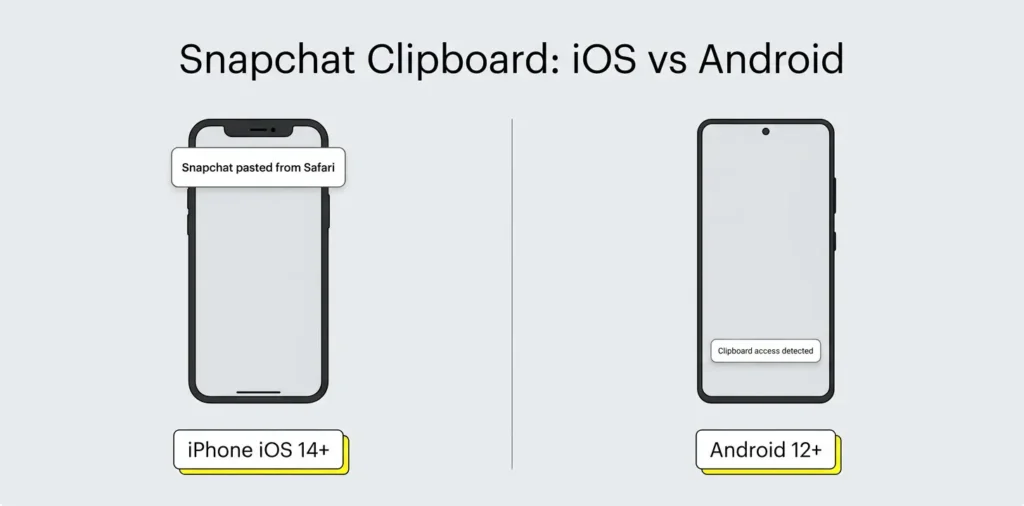
On iPhones running iOS 14 and later, Apple introduced a privacy transparency feature: if any app tries to read your clipboard, you will see a separate system alert saying “[App Name] pasted from [App Name].” This is different from Snapchat’s “Copied to clipboard” toast, the Snapchat message confirms a write action, not a read.
You can manage clipboard permissions for any app in Settings → [App Name] → Clipboard Access.
How It Works on Android
On Android, clipboard behavior varies slightly by manufacturer and OS version. Android 12 and later introduced a clipboard access indicator, a small toast notification appears if an app reads your clipboard in the background. When Snapchat copies a link or content for you, Android confirms this as a standard copy operation with no hidden permissions required for the write action.
On Android, you can view recent clipboard items by long-pressing in any text field and selecting the clipboard icon from the keyboard toolbar.
When Does Snapchat Show the “Copied to Clipboard” Notification?
You will see this notification in five common situations:
- You copy a chat link or message: Long-press any message in Snapchat chat and tap “Copy.” The notification confirms the text is now on your clipboard.
- You copy a profile URL or username: Tapping “Share profile” and selecting “Copy link” triggers the notification.
- You copy a Snap code: When sharing a snap code for others to scan, Snapchat copies it to your clipboard automatically.
- You take a screenshot of a Snap or Story: Snapchat copies the screenshot to your clipboard so you can instantly paste and share it.
- You share a Snap externally: Tapping the external share icon can auto-copy the share link to your clipboard before the share sheet opens.
None of these scenarios involve Snapchat accessing, scanning, or reading anything you copied from another app. The direction is always: Snapchat → your clipboard.
How to Enable (or Disable) Clipboard Access on Snapchat
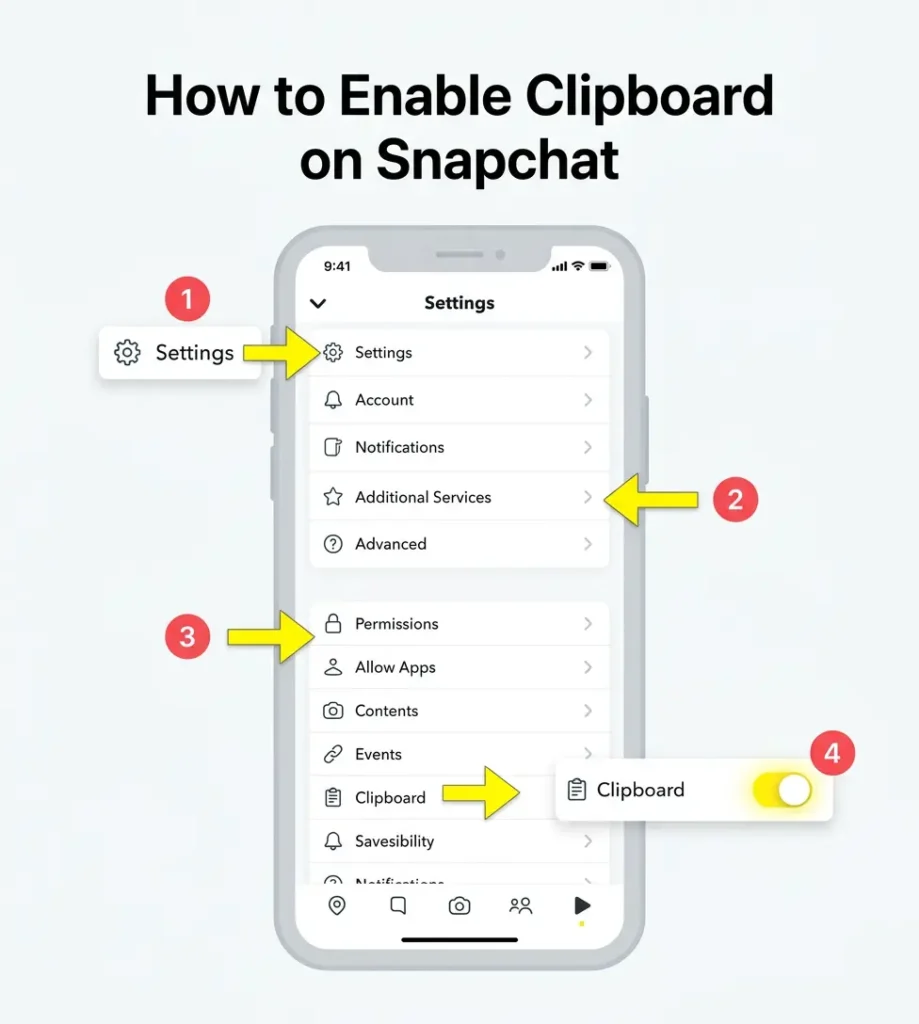
Before you can use the Snapchat clipboard feature to paste external content into Snapchat, you need to grant the app permission. Here is how to do it on both platforms.
Enable Clipboard on iPhone
- Open the Snapchat app and tap your profile icon (top-left corner)
- Tap the Settings gear (top-right corner)
- Scroll down to Additional Services and tap Permissions
- Find Clipboard and tap “Tap to enable”
- Confirm when your iPhone prompts for permission
Enable Clipboard on Android
- Open Snapchat and go to your profile
- Tap Settings → scroll to Additional Services → tap Permissions
- Toggle Clipboard to the on position
Disable Clipboard Access
If you decide you’d rather Snapchat not interact with your clipboard at all, simply reverse these steps and toggle clipboard permission off. On iPhone, you can also go to Settings → Snapchat and adjust clipboard access from there at the system level.
Is the Snapchat Clipboard a Privacy Risk?
This is the question most people are actually asking when they Google “Snapchat clipboard”, and the honest answer is: not by default, but there are nuances worth knowing.
When Snapchat displays “Copied to clipboard,” the app is adding content to your clipboard, it is not reading what is already there. However, the privacy concern is real from a broader perspective: any app with clipboard permission can read anything stored on your clipboard at the OS level.
This means if you copy a password, a private message, or a sensitive link in one app, and then switch to Snapchat (or vice versa), that data could technically be read by apps with broad clipboard access. This is an OS-level behavior, not a Snapchat-specific exploit.
Key privacy points to keep in mind:
- iOS 14+ notifies you if any app reads your clipboard, watch for the “[App] pasted from [App]” banner
- Android 12+ added similar clipboard transparency alerts
- Clear your clipboard after copying sensitive information, copy something harmless (like a space or a random word) to overwrite it
- Snapchat’s own Privacy Policy covers data minimization and user consent for permissions
- Do not store passwords or financial information in your clipboard for extended periods, regardless of which app you are using
The clipboard itself is a convenience feature. Like most digital tools, the risk comes not from the feature itself but from how aware you are of what sits in that temporary buffer.
Can Other Snapchat Users See What You Copied?
No, absolutely not. Your device clipboard is local to your phone. Other Snapchat users receive zero notification when you copy something. Unlike screenshots (which do trigger a notification to the sender in Snapchat), copying content to clipboard is completely silent to everyone else on the platform.
The only parties that could theoretically access your clipboard content are other apps on your own device that have been granted clipboard read permission. No data from your clipboard is sent to Snapchat’s servers as a result of the “Copied to clipboard” action.
This is an important distinction: Snapchat screenshot notifications and clipboard actions are completely separate systems. One notifies senders; the other is entirely private.
Using Clipboard Content: Paste Into Any App
Once Snapchat has copied something to your clipboard, using it is straightforward:
- Switch to your destination app — a browser, WhatsApp, SMS, Notes, or email
- Tap and hold in any text input field
- Select “Paste” from the options that appear
- Your copied Snapchat content, link, username, text, or snap code, appears instantly
On Android, you can also tap the clipboard icon above the keyboard in many apps (like Gboard) to browse recently copied items.
If you copy a Snapchat username or friend link, Snapchat itself may suggest smart actions, like “Add Friend” or “Open in Snapchat” — when it detects a Snapchat-formatted string in your clipboard.
How Does This Relate to Other Snapchat Features?
Snapchat continues to expand its ecosystem of features that change how you interact with friends on the platform. The clipboard is a utility-layer feature — it works quietly in the background to make sharing faster.
If you enjoy exploring Snapchat’s more unique social features, you might find it interesting that the app also uses friendship data in creative ways elsewhere. For instance, Snapchat’s Friend Solar System feature (available to Snapchat+ subscribers) ranks your closest friends as planets orbiting your profile. Understanding how Snapchat planets work can give you a deeper picture of how Snap Inc. uses your interaction data to personalize your experience, including how frequently you share and copy content with specific friends.
Both features, the clipboard utility and the Friend Solar System, reflect Snapchat’s broader design philosophy: making sharing feel faster, more personal, and more connected.
Protect Your Privacy Beyond the Clipboard
Understanding how apps like Snapchat interact with your device data is the first step toward smarter digital hygiene. The clipboard is just one of many touchpoints where your personal information passes through apps, platforms, and temporary memory buffers.
If you take your digital privacy seriously, controlling what apps access, what data you share, and what trails you leave, a free temporary email address from freemail.ai is one of the simplest tools you can add to your privacy toolkit. Sign up for apps and services without exposing your real inbox, and keep your personal data exactly where it belongs: with you.
Frequently Asked Questions
What does “copied to clipboard” mean on Snapchat?
It means a piece of content, a link, message, username, or snap code, was successfully saved to your device’s temporary clipboard memory. It is a confirmation of a copy action, not a warning or an error. You can now paste that content into any app on your phone.
Can anyone else see my Snapchat clipboard?
No. Your clipboard is stored locally on your device. Other Snapchat users receive no notification and cannot access your clipboard content. Only apps installed on your own device with clipboard read permission could technically access it.
Why does Snapchat keep saying “copied to clipboard” automatically?
This usually happens when Snapchat copies a share link for you automatically, for example, when you tap the external share button. It is not an error; the app is trying to make sharing faster by pre-loading the link into your clipboard.
Does Snapchat read my clipboard?
In normal use, no. When Snapchat shows “Copied to clipboard,” it is writing to your clipboard, not reading it. On iOS 14+, you will see a separate banner if any app reads your clipboard. If Snapchat were reading your clipboard, you would see an “[App] pasted from [App]” alert from your iPhone.
How do I turn off clipboard access on Snapchat?
Go to Snapchat Settings → Additional Services → Permissions → Clipboard and toggle it off. On iPhone, you can also manage this from your device settings under Settings → Snapchat.
What can I do with the Snapchat clipboard?
You can copy links, chat messages, usernames, snap codes, and screenshots from Snapchat and paste them into browsers, messaging apps, notes, or any other app. It eliminates the need to retype information and makes cross-app sharing faster.
Is clipboard access safe to allow on Snapchat?
Yes, in general, with awareness. Allowing clipboard access lets Snapchat read and write clipboard data, which is useful for sharing. The risk is not unique to Snapchat: any app with clipboard access can read what is stored there. Avoid copying sensitive information (passwords, financial data) and leaving it on your clipboard for long periods.