
Analyze your email content, verify sender reputation, and predict inbox placement. Use this spam checker to test email spam score before sending campaigns and improve deliverability across Gmail, Outlook, and other providers.
What Is a Spam Checker?
A spam checker is a diagnostic tool that evaluates your email content, technical headers, and sender reputation to predict inbox placement. It mimics the filters used by providers like Google and Microsoft to identify high-risk messages. By scanning your email before you hit send, you can fix issues that usually lead to the junk folder.
Think of a spam checker as a pre-flight inspection for your outreach. When I first started managing high-volume cold sequences, I noticed our open rates plummeted from 40% to 5% in a single week. I hadn’t changed the copy, but our domain reputation had taken a hit because of a misconfigured SPF record. A quick run through a spam checker would have caught that technical glitch before we burnt through our lead list.
These tools look at several layers of your email:
- The Content: Identifying “salesy” triggers or deceptive phrasing.
- The Technicals: Checking if your domain authentication (SPF, DKIM, DMARC) is active.
- The Reputation: Cross-referencing your IP and domain against global blacklists.
You can also analyze your domain credibility using our email reputation checker.

How a Spam Checker Detects High-Risk Emails?
A spam checker detects high-risk emails by scoring your message against a massive database of known spam characteristics and filtering rules. It assigns a numerical value to different elements of your email. If your total score exceeds a certain threshold, the tool flags the email as likely to be blocked or filtered.
The detection process is multi-layered. Filters have become much smarter than they were five years ago. They no longer just look for the word “Free” in a subject line; they look at the relationship between your sender identity and the recipient’s history.
What Happens During Content and Keyword Analysis?
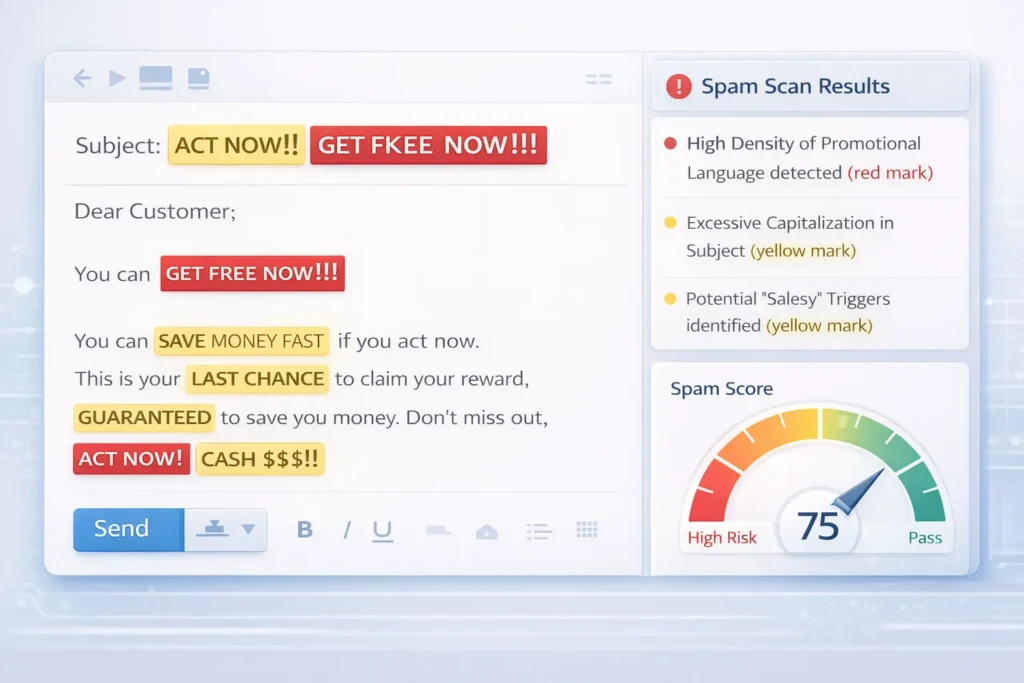
Content analysis involves scanning your subject line and body text for phrases that historical data associates with phishing or unsolicited mail. The tool looks for “spammy” patterns, such as excessive use of dollar signs, all-caps sentences, or high-pressure language like “Act Now” and “Double Your Income.”
I’ve found that even innocent phrases can trigger these filters if used too often. For example, a real estate agent might mention “investment” several times, which is a common keyword in financial scams. A spam checker highlights these density issues so you can swap them for neutral synonyms.
Why Is a Link and Domain Reputation Check Necessary?
This check verifies the safety of every URL in your email. If you link to a domain that is blacklisted or use a known malicious URL shortener, your spam score will spike. Filters hate “hidden” destinations because they are often used to mask malware or phishing sites.
In my experience, using “bit.ly” or similar public shorteners in cold emails is a one-way ticket to the spam folder. Most professional spam checkers will warn you to use branded tracking links or full URLs instead. They also check if your sender domain appears on lists like Spamhaus or Barracuda.
Does Email Formatting and HTML Structure Affect Delivery?
Yes, poor HTML coding or “heavy” email files can trigger spam filters. A spam checker looks for broken tags, invisible text (white text on a white background), and a low text-to-image ratio. If your email is just one large image with no text, filters assume you are trying to hide keywords from their scanners.
A common mistake I see is “bloated” HTML from copying and pasting directly from Microsoft Word or Google Docs. This adds hidden styling code that makes the email file size huge. Keep your code clean and your text-to-image ratio around 60:40 to stay in the clear.
Why Is Authentication Validation (SPF, DKIM, DMARC) Critical?
Authentication validation checks if you have “signed” your emails to prove they really came from you. These protocols—SPF, DKIM, and DMARC—act like a digital passport for your domain. Without them, any mail server receiving your message might think you are a “spoofing” attacker trying to impersonate a legitimate brand.
| Protocol | Purpose | Impact on Score |
| SPF | Lists which IPs are allowed to send mail for your domain. | High |
| DKIM | Adds a digital signature to the email header. | High |
| DMARC | Tells servers what to do if SPF or DKIM fails. | Medium |
If a spam checker shows a “Fail” on any of these, your deliverability will suffer across the board.
Key Factors That Influence Email Spam Score
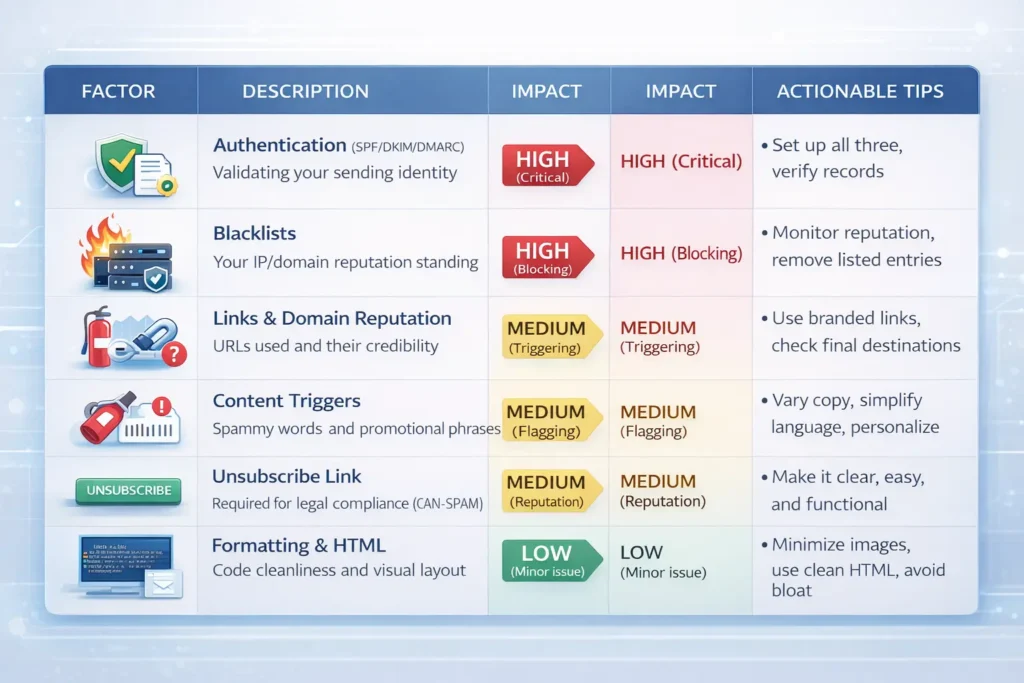
Your email spam score is influenced by your technical setup, the quality of your links, and the reputation of your sending IP. High scores usually result from blacklisted domains or missing authentication. Lower scores are often tied to minor formatting issues or “spammy” keywords that can be easily edited.
Use this table to prioritize your fixes:
| Factor | Description | Impact |
| Authentication | Proper SPF, DKIM, and DMARC configuration. | High |
| Blacklists | Domain or IP appearing on global spam lists. | High |
| Links | Use of suspicious domains or generic URL shorteners. | Medium |
| Content | High density of spam trigger words and symbols. | Medium |
| Formatting | Excessive use of bold, caps, or broken HTML code. | Low |
| Unsubscribe | Absence of a clear way for users to opt-out. | Medium |
Why Businesses Use Spam Checkers?
Businesses use spam checkers to ensure their marketing and transactional messages actually reach their customers’ eyes. Without testing, a company might spend thousands on a campaign that never gets opened. These tools provide a safety net that protects the return on investment for every email sent.
If you are sending 50,000 newsletters, even a 1% increase in deliverability means 500 more people seeing your offer. For sales teams, it means the difference between a meeting and being ignored.
How Does It Help Email Campaign Deliverability?
Spam checkers help campaigns by identifying “inbox blockers” before the bulk send. They allow you to A/B test different subject lines and layouts to see which one has a better chance of passing Gmail’s “Promotions” filter or reaching the “Primary” tab.
I once worked with a SaaS brand that had a 12% open rate. After running their template through a spam checker, we realized their footer had four broken links. Fixing those boosted their open rate to 22% in the next send.
Can It Support Cold Outreach Optimization?
For cold outreach, a spam checker is mandatory. Cold emails are already at a higher risk of being reported as spam. These tools help you keep your “spamminess” low by suggesting you personalize the body and remove aggressive “buy now” calls to action. It ensures your first impression isn’t a filtered one.
Check out our campaign generator or AI sales email generator to build better copy from the start.
Why Is Protecting Sender Reputation a Priority?
Your sender reputation is like a credit score for your domain. Once it’s ruined, it takes months of “warming up” to fix. A spam checker prevents you from sending “trash” mail that gets marked as spam by recipients. If enough people click “Report Spam,” your reputation drops, and even your personal 1-to-1 emails might start failing.
Common Mistakes That Trigger Spam Filters
Many filters are triggered by simple user errors that look like “shady” tactics. Even if your intentions are good, certain habits make you look like a bot to a mail server. Avoiding these mistakes is the fastest way to improve your score.
- Deceptive Subject Lines: Using “Re:” or “Urgent” when it isn’t true. This annoys users and triggers manual spam reports.
- Too Many Links: Including more than three or four links in a short email. It looks like you are trying to “trap” the user into clicking something.
- Image-Only Emails: Sending a single JPG as your entire message. Filters can’t “read” images, so they assume the worst.
- Broken HTML Code: Messy code from bad templates. It suggests the sender is using cheap, automated tools.
- Missing Unsubscribe Link: This is a legal requirement in many regions. If a user can’t find an “Unsubscribe” button, they will hit the “Spam” button instead.
- Large Attachments: Sending files over 1MB to people you haven’t emailed before. This is a common vector for viruses.
Spam Checker vs Email Verification Tools
A spam checker analyzes the quality and deliverability of your message, while an email verification tool checks the validity of the recipient’s address. Use a spam checker to fix your content and an email verifier to clean your list of dead or fake addresses.
| Tool | Primary Purpose | Key Benefit |
| Spam Checker | Tests message content and reputation. | Prevents being filtered as junk. |
| Email Verifier | Validates if an email address exists. | Reduces bounce rates. |
| Antivirus Scanner | Detects malicious attachments or links. | Prevents spreading malware. |
I recommend using both. First, verify your list to remove “hard bounce” addresses. Then, use a spam checker to ensure your content is clean. Combining these steps keeps your sender reputation in the “green” zone.
If you’re worried about temporary addresses, try our disposable email checker or find email address by name tool.
How Developers Use Spam Checker APIs?
Developers use spam checker APIs to build automated testing into their existing email workflows or custom CRM platforms. Instead of manually checking every email, the API scans messages as they are drafted. This allows for real-time feedback within the software the team is already using.
For example, a developer might set up a trigger where any email with a spam score over 5.0 is automatically flagged for review by a manager before it can be sent to a client list. This “automated gatekeeping” prevents accidental reputation damage.
Developers often generate test emails using our Gmail generator before running a full spam analysis. By integrating the API, you can:
- Automate Pre-flight Checks: Scan every transactional email (like password resets) for deliverability.
- Monitor IP Health: Get alerts if your sending IP suddenly lands on a blacklist.
- Validate Dynamic Content: Ensure that personalized tags don’t accidentally break the email’s HTML structure.
How Can You Maintain High Inbox Placement Long-Term?
To maintain high placement, treat your sender reputation as a living asset. Regularly audit your technical headers and purge inactive subscribers from your list. A spam checker acts as your early warning system, catching errors in your HTML or links that could trigger filters and block your messages.
Email standards change every year. What worked for your outreach two years ago might get you blocked today. I have seen massive companies lose 30% of their revenue because they ignored a single “soft fail” on their DMARC record. They thought their content was fine, but the mail servers stopped trusting their identity.
Deliverability is about more than just avoiding “bad” words. It is about consistency. If you suddenly send 10,000 emails after a month of silence, filters will flag you. Use a spam checker to ensure every single send is as clean as possible. This builds a history of “good behavior” that mail providers like Gmail and Outlook reward with better placement.
Final Checklist for Perfect Deliverability
Before you send your next campaign, run through this quick checklist. These steps help ensure your message finds the primary inbox rather than the junk folder.
| Action Item | Why It Matters | Priority |
| Run a Spam Scan | Catches hidden HTML bugs and broken links. | Essential |
| Verify the List | Removes dead addresses that cause hard bounces. | Essential |
| Check Authentication | Confirms SPF and DKIM are active and valid. | High |
| Review the Footer | Ensures a clear unsubscribe link is present. | High |
| Test Image Sizes | Prevents “heavy” emails from being throttled. | Medium |
How Should You Respond to a Poor Spam Score?
If your spam checker returns a low score, do not panic. Use the report to isolate the specific cause. Usually, it is a single factor, like a blacklisted link or a missing header, dragging down the entire message. Fix the high-impact technical issues first. Then, look at your copy and simplify any aggressive sales language.
I often tell my clients that a “Spam” tag is just feedback. It tells you that your technical setup or your message style does not align with what providers want for their users. By listening to those signals, you build a stronger, more profitable relationship with your audience. You aren’t just sending mail; you are delivering value that the system recognizes as safe.
← Back to FreeMail.ai Homepage