

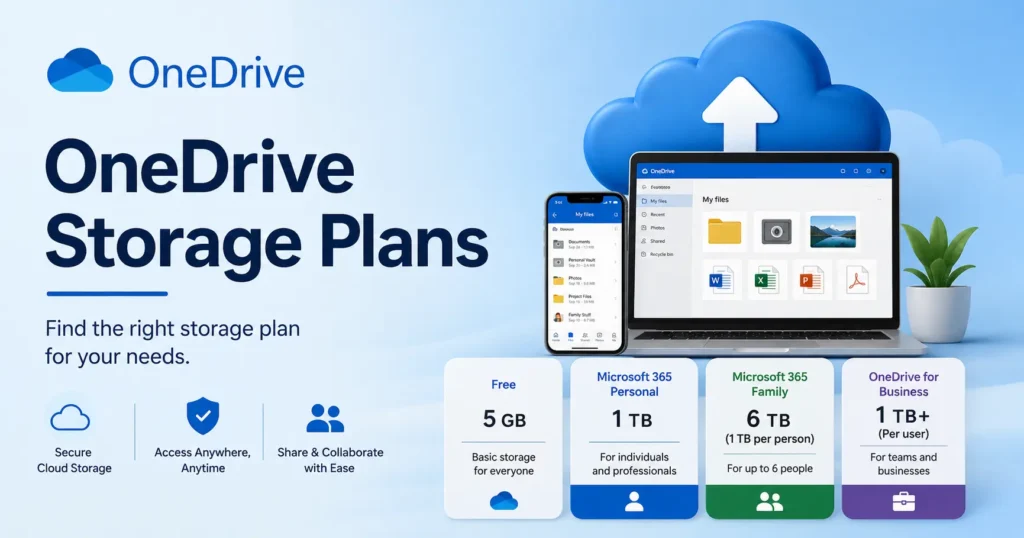
OneDrive has five main storage plans right now. There is a free 5 GB tier, plus Microsoft 365 Basic, Personal, Family, and Premium plans that go up to 6 TB. Business plans start at 1 TB per user. A true standalone OneDrive-only plan does not really exist anymore, since the closest thing is the Basic tier. The best plan for you depends on how many people need storage and whether you also want the Office apps.
Why OneDrive Pricing Looks Different This Year
Microsoft raised its Microsoft 365 subscription prices for Personal and Family plans by a wide margin in January 2025. Personal jumped by around 42%, and Family went up by about 31%. Even with higher prices, the number of paying subscribers kept growing, passing roughly 95 million by mid-2026. Microsoft is also retiring some of its older OneDrive for Business plans in 2026. Put those two changes together, and a lot of the OneDrive pricing pages you find online right now are already out of date.
So how much does OneDrive cost in 2026, all in? This guide walks through every current OneDrive storage plan, from the free 5 GB tier up to full business plans built for teams. By the end, you will know which plan actually fits your situation, without digging through old blog posts or Microsoft’s support forums.
OneDrive Storage Plans at a Glance (2026 Pricing Table)
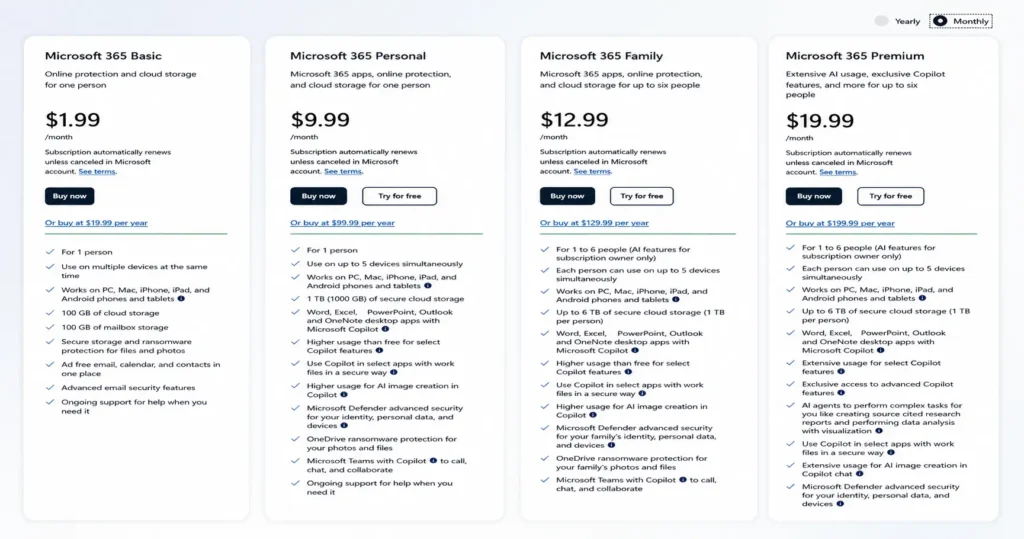
Here are the current Microsoft 365 storage plans and OneDrive storage plans, side by side.
| Plan | Storage | Price | Best For |
| Free | 5 GB | $0 | Light users, basic backups |
| Microsoft 365 Basic | 100 GB | $1.99/month or $19.99/year | Storage only, no Office apps needed |
| Microsoft 365 Personal | 1 TB | $9.99/month or $99.99/year | One person who also wants Office apps |
| Microsoft 365 Family | Up to 6 TB (1 TB per person) | $12.99/month or $129.99/year | Up to 6 people sharing one plan |
| Microsoft 365 Premium | Up to 6 TB (1 TB per person) | $19.99/month or $199.99/year | Families who want more Copilot AI features |
| OneDrive for Business Basic | 1 TB per user | About $6/user/month | Small teams needing storage and email |
| OneDrive for Business Standard | 1 TB per user | About $12.50/user/month | Teams that also need full Office apps |
| OneDrive for Business Premium | 1 TB per user, expandable | About $20 to $22/user/month | Larger businesses needing extra security |
These prices are for the United States. OneDrive storage plans by country can shift a little depending on where you live, so check Microsoft’s own regional pricing page before you buy if you are outside the US.
How Much Free OneDrive Storage Do You Get?
Every Microsoft account comes with 5 GB of free OneDrive storage. That is enough room for basic documents and a small batch of photos, but it fills up fast. A single year of phone photos can eat through 5 GB on its own. Once you hit that limit, new files stop uploading until you clear space or move up to a paid plan. There is no way to expand just the free tier by itself. The next step up is always a paid plan.
Is There a Standalone OneDrive Plan Without Microsoft 365?
Not really, not anymore. Before 2023, Microsoft sold a plain OneDrive storage plan on its own, no Office apps attached. Today, the closest thing is Microsoft 365 Basic. It costs $1.99 a month for 100 GB and skips the desktop Office apps, but it still counts as a full Microsoft 365 subscription rather than a separate OneDrive-only product.
This mix-up shows up often in Microsoft’s own support forums. People ask how to buy “just storage,” and the answer is always the same: Basic is as close as it gets. If you need more than 100 GB, you have to move up to Personal, Family, or Premium, and each of those bundles in the Office apps whether you plan to use them or not.
OneDrive Personal Plans Compared: Basic, Personal, Family, and Premium
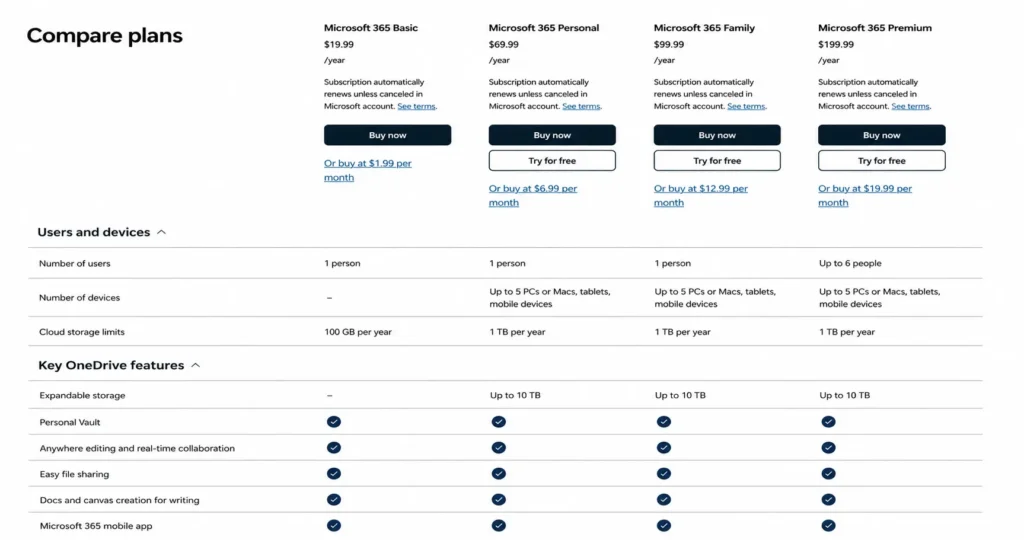
Here’s a comparison of the current Microsoft 365 plans: Basic, Personal, Family, and Premium.
| Feature | Basic | Personal | Family | Premium |
| Storage | 100 GB | 1 TB | Up to 6 TB | Up to 6 TB |
| Office apps | Web and mobile only | Full desktop apps | Full desktop apps | Full desktop apps |
| Copilot AI features | Free version only | Higher usage | Higher usage | Extensive usage |
| Personal Vault | No | Yes | Yes | Yes |
| Ransomware protection | Files and photos | Files and photos | Files and photos | Files and photos |
| Ad-free Outlook | Yes | Yes | Yes | Yes |
Basic is really just storage plus a cleaner Outlook inbox. Personal adds the full Word, Excel, PowerPoint, and Outlook desktop apps, plus higher Copilot AI usage and OneDrive’s ransomware protection for your files and photos. Family spreads that same 1 TB per person across up to six people, each with their own Personal Vault. Premium sits on top with the most Copilot AI features and extra security tools through Microsoft Defender.
If you are testing a few of these plans before you commit to one, it helps to keep new sign-ups off your main inbox. A temporary email address, like the free ones freemail.ai generates in one click, keeps trial confirmations and marketing emails away from your real account while you compare options.
Which OneDrive Plan Is Right for Different Types of Users?
The right plan usually comes down to two things: how many people need space, and whether you also want Office apps. Here is a quick way to match yourself to a plan.
- Casual user with a few documents and photos: Microsoft 365 Basic covers you at 100 GB.
- Photo or video heavy user: Personal or Family, since 1 TB fills up fast once you add video.
- A household sharing storage: the OneDrive family plan gives the cheapest storage per person, at 1 TB each for up to six people.
- Freelancer or solo business owner: Personal works if you just need storage and Office apps, but Business Basic makes more sense if you want a business email address too.
- Small, growing team: Business Standard, since it adds the full desktop Office apps plus SharePoint access for shared team files.
- Larger business with security needs: Business Premium, for the stronger compliance and security tools.
What Are OneDrive for Business Plans?
OneDrive for Business plans are bundled into Microsoft 365 business subscriptions rather than sold on their own. Business Basic starts at about $6 per user each month, with 1 TB of per-user storage. Business Standard runs about $12.50 per user each month and adds the full desktop Office apps. Business Premium costs around $20 to $22 per user each month and layers on stronger security tools.
Storage can grow past that starting 1 TB, up to 5 TB per user on qualifying plans, if an admin requests the extra expandable storage. Microsoft is also retiring its older standalone OneDrive for Business Plan 1 and Plan 2 in 2026. Businesses that relied on those cheaper storage-only options now need a bundled Microsoft 365 plan instead.
This change touches more companies than it might seem. Around 60% of corporate data is stored in the cloud today, up from roughly 30% a decade ago. The cloud storage market itself keeps growing too. MarketsandMarkets expects it to roughly double in size by 2031, and Gartner expects worldwide public cloud spending to keep rising through the rest of the decade. Business storage decisions like this one carry real weight.
How Can You Get More OneDrive Storage Without Upgrading Your Whole Plan?
You do not always need to jump to a bigger tier. Microsoft 365 Personal and Family subscribers can buy a storage add-on, roughly 1 TB more, for about $9.99 a month, without switching to a new plan. Business admins have a similar option. They can request extra per-user storage through the Microsoft 365 admin center, up to the cap set for that business plan. This add-on is an easy fix if you are only a little over your limit and do not want to pay for a whole new tier.
OneDrive Pricing vs. Google Drive and Dropbox
At the entry level, OneDrive and Google Drive charge almost the same amount. Both OneDrive Basic and Google One cost about $1.99 a month for roughly 100 GB. Where they really differ is the free tier. Google Drive’s free plan is more generous than OneDrive’s 5 GB starting point. Apple’s iCloud is another common choice if you are on an iPhone or Mac, though it does not connect to Office apps the way OneDrive does.
This is the core of most onedrive vs google drive storage comparisons: price parity at the low end, but a real gap in free storage and bundled apps. Across all cloud storage users, OneDrive holds close to 39% usage, behind Google Drive’s much larger share and Dropbox’s roughly two-thirds share. That gap has more to do with how many people already use Gmail or Android than with pricing alone. If you are already deep in the Microsoft 365 world, with Word, Excel, and Outlook as daily tools, OneDrive is usually the simpler choice. If you are not tied to Office apps, price will not be the deciding factor, since Google Drive and Dropbox are just as competitive.
Should You Pay for OneDrive Monthly or Annually?
Paying once a year is almost always cheaper. Subscription billing works the same way across every tier: the yearly price usually works out to about two free months compared to paying monthly. Microsoft 365 Personal, for example, costs $9.99 a month, or $99.99 a year, which saves close to $20 over 12 months. Monthly billing still makes sense if you only need the extra storage for a short project or a busy season and plan to cancel once it is done.
Frequently Asked Questions
How much does the OneDrive 1TB plan cost?
One terabyte costs $9.99 a month, or $99.99 a year, through Microsoft 365 Personal. The Basic plan only goes up to 100 GB, so it will not get you to 1 TB on its own.
Can I use OneDrive without buying Microsoft 365?
Yes, up to a point. Every Microsoft account gets 5 GB free. Past that, Microsoft 365 Basic at $1.99 a month is the closest thing to storage-only, but there is no separate plan outside the Microsoft 365 family anymore.
Does OneDrive storage pricing differ by country or region?
Yes. Pricing and plan availability change depending on where you live. Check Microsoft’s official onedrive storage plans by country page for exact local pricing before you subscribe.
What is the difference between OneDrive for Business Plan 1 and Plan 2?
Plan 1 covered basic storage and file sharing at 1 TB per user. Plan 2 added extra compliance tools and more expandable storage. Microsoft has confirmed both are being retired as standalone plans in 2026, so new business customers now need a bundled Microsoft 365 plan instead.
Is OneDrive or Google Drive cheaper?
They are close. Both charge about $1.99 a month for roughly 100 GB at the entry level. Google’s free tier gives you more space to start, but the real cost difference usually comes from the apps bundled around the storage, not the storage price itself.
How much free storage does OneDrive give?
5 GB, automatically, with any Microsoft account. No payment or upgrade needed to get that starting amount.
Can I add extra storage without upgrading my whole OneDrive plan?
Yes. Microsoft 365 Personal and Family subscribers can add about 1 TB more for around $9.99 a month, without switching to a different plan tier.
Picking the Right Plan
Choosing the right OneDrive plan comes down to two questions: how many people need space, and whether you want the Office apps bundled in. Once you answer those, the pricing table above should make the decision quick.
If you are still comparing a few plans or running trials, keep your main inbox clean while you test them. Freemail.ai’s free temporary email tool gives you a throwaway address in one click, so subscription confirmations and marketing offers never touch your real account.