

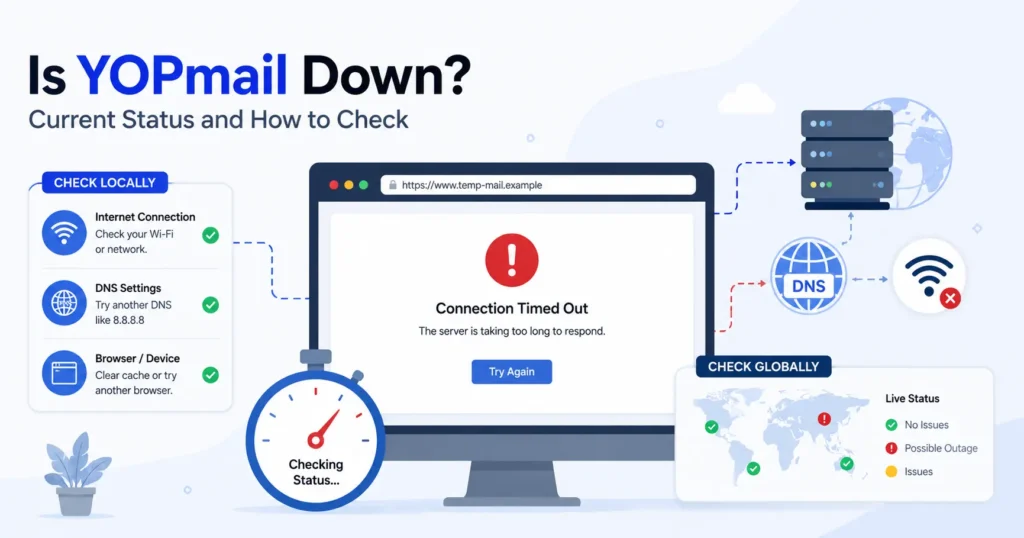
YOPmail availability can change based on time, location, and the feature you are using. Different status monitors may show different results, so check the latest server response before calling it a global outage. If YOPmail is not working, test your browser, DNS, VPN, and internet connection. If the issue is confirmed, consider another temporary email service for time-sensitive verification messages.
Introduction
Is YOPmail down right now? That answer can be hard to confirm because third-party status checks may show different results at the same time. A service may work for some users while others face errors, slow loading, or connection problems. This guide helps you check the current YOPmail availability and understand whether the issue is local or global. You will also learn how to test your browser, DNS, VPN, and network connection. If YOPmail remains unavailable, we will cover other temporary email services you can use for time-sensitive verification messages.
Is YOPmail down right now?
YOPmail is currently loading from the tested connection, based on the latest browser check on August 26, 2026. The earlier connection timeout has cleared, and the YOPmail homepage is now accessible. However, independent status monitors are still reporting that YOPmail may be down, so the overall outage status remains mixed.
This means YOPmail may be recovering, or the problem may be affecting some users, regions, or networks but not others. Check the latest server response and more than one independent monitor before calling the issue fully resolved.
Current YOPmail Status
| Check | Latest result |
|---|---|
| Current status | Working from the tested connection |
| Last checked | August 26, 2026 |
| Browser test | YOPmail homepage loads normally |
| Previous error | ERR_TIMED_OUT, now cleared on the tested connection |
| Independent monitor | Still reports an outage |
| User reports | Recent access and inbox problems reported |
| Outage scope | Mixed or uncertain |
What does this mean?
The latest browser test shows that YOPmail is accessible now, but that does not prove that every user can access it. One independent monitor currently reports YOPmail as down and lists recent reports involving website access and empty inboxes. Another live checker also reports the server as down.
Current conclusion: YOPmail appears to be working from the tested connection, but some users may still be experiencing problems. The safest status is mixed or recovering, rather than “YOPmail is completely down” or “the outage is fully resolved.”oblem from the tested connection, but the available evidence is not enough to confirm a global YOPmail outage.
Is YOPmail down for everyone or just me?
YOPmail may work for some users while failing for others. A direct browser test can succeed even when independent monitors report an outage. Compare another device, network, DNS result, and status monitor to determine whether the problem is local, regional, or wider.
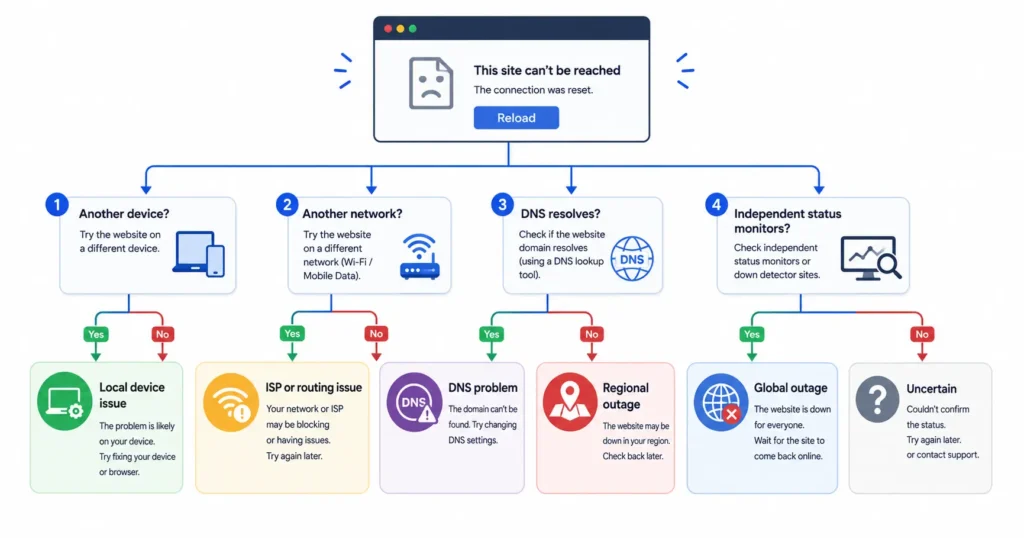
Diagnostic Decision Tree
YOPmail is not loading. What should you check?
1. Does YOPmail work on another device or network?
- Yes: The problem is likely local to your device or network.
- No: Continue to the next check.
2. Does YOPmail work on a different internet connection?
- Yes: Your local network or ISP routing may be causing the problem.
- No: Continue to the next check.
3. Does the YOPmail domain resolve correctly?
- No: You may have a DNS problem. Try another DNS server or restart your network connection.
- Yes: Continue to the next check.
4. Do independent status monitors report problems?
- Yes, across several monitors: A global outage or wider server-side problem is more likely.
- Only some locations report problems: A regional outage may be affecting certain users.
- No: The problem may still be local, temporary, or limited to your ISP or network path.
Quick diagnosis
Fails only on your device:
→ Check your browser, DNS, VPN, and network settings.
Fails on your network but works elsewhere:
→ Check your ISP routing and local network.
Fails in one region but works elsewhere:
→ A regional outage may be possible.
Fails across several networks and locations:
→ A global YOPmail outage is more likely.
Status checks disagree:
→ Treat the outage as uncertain until more evidence is available.
What is causing YOPmail to stop working?
A YOPmail access problem can come from the YOPmail server, DNS resolution, network routing, browser cache, cookies, VPN settings, or a temporary service interruption. The fastest approach is to test simple client-side causes before deciding that YOPmail is globally unavailable.
| Possible cause | What it means | What you can check |
| Server-side outage | The YOPmail server may be having a temporary problem. | Check the latest HTTP response and independent status monitors. |
| DNS or routing issue | Your device may not be finding the YOPmail domain correctly, or your ISP may have a routing problem. | Test DNS resolution and try another network or DNS server. |
| Browser/cache problem | Old cache files or cookies can stop a page from loading correctly. | Clear your browser cache and cookies, then reload YOPmail. |
| VPN or network filtering | A VPN, firewall, ISP filter, or network rule may block or change your connection. | Turn off the VPN for a short test and try another network. |
| Inbox-specific issue | The main service may work while one temporary inbox has a problem. | Test another YOPmail inbox or check whether only one inbox is affected. |
Start with another browser or network. If YOPmail works there, the problem is more likely related to your device, DNS, ISP routing, VPN, or browser settings. If it fails across several networks and devices, a wider service interruption becomes more likely.
How can you check if YOPmail is actually down?
Check YOPmail from another browser or device, test the domain from another network, and compare the result with more than one independent status monitor. A single checker can show a false positive or false negative. When several checks show the same result, the evidence is stronger.
For more background on YOPmail, including how it works, its safety limits, and common reasons websites may block it, see our YOPmail Review 2026.
Steps to Check YOPmail Availability
- Open YOPmail directly.
Visit the YOPmail website and see if the page loads normally. Note any error message or unusual response. - Try a private or incognito window.
Open a private browser window and access YOPmail again. This can help rule out problems caused by stored cookies or cache files. - Test another browser.
Try a different browser. If YOPmail works there, your main browser may have a cache, cookie, extension, or settings problem. - Disable your VPN temporarily.
Turn off your VPN for a short test. A VPN server, IP address, or network filter can sometimes affect website access. - Try mobile data or another network.
Switch from Wi-Fi to mobile data, or use another trusted network. If YOPmail works on the second network, your ISP routing or local network may be involved. - Check independent status monitors.
Compare more than one outage checker or status monitor. Look for recent reports, response tests, and reports from different locations. - Check whether the issue affects website access or only inbox delivery.
The YOPmail website may load even when an inbox or message delivery feature has a problem. Test both website access and the specific inbox function you need.
If YOPmail fails on several devices, browsers, and networks while independent monitors also report problems, a wider service outage becomes more likely.
Why does YOPmail show an empty inbox?
An empty YOPmail inbox does not always mean the whole service is down. The problem may be caused by email delivery, sender restrictions, delayed messages, an incorrect inbox name, or a temporary service issue. First, check whether the YOPmail website loads normally. If the website works but the inbox is empty, focus on the email delivery problem.
YOPmail Empty Inbox Troubleshooting
| Problem | What may be happening | What to check |
| Website works but inbox is empty | The YOPmail service is reachable, but no message has reached the inbox. | Refresh the inbox and wait a few minutes before testing again. |
| Wrong inbox name | You may be checking a different inbox from the one used by the sender. | Confirm the exact temporary email address and inbox name. |
| Sender never delivered | The sender may not have sent the message, or delivery may have failed. | Check the sender address and request the message again if possible. |
| Delayed message | The email may still be processing or waiting for delivery. | Wait briefly, then refresh the YOPmail inbox. |
| Service-side email problem | YOPmail may be working while its email delivery system has a temporary issue. | Check independent status monitors and test with another sender. |
| Verification emails not arriving | Some websites may delay, block, or restrict messages sent to temporary email addresses. | Check the email address, wait for delivery, and try another supported address if needed. |
An empty inbox is different from a complete YOPmail outage. If the website loads but messages do not arrive, the problem may be limited to email delivery or the sender rather than website availability.
What should you do if YOPmail is not loading?
Start with a hard refresh and try a different browser. If that does not help, clear cached site data, disable VPN or browser extensions, and test another network. You can also test DNS to see if the domain is resolving correctly. If YOPmail remains inaccessible across multiple networks and devices, an external outage becomes more likely.
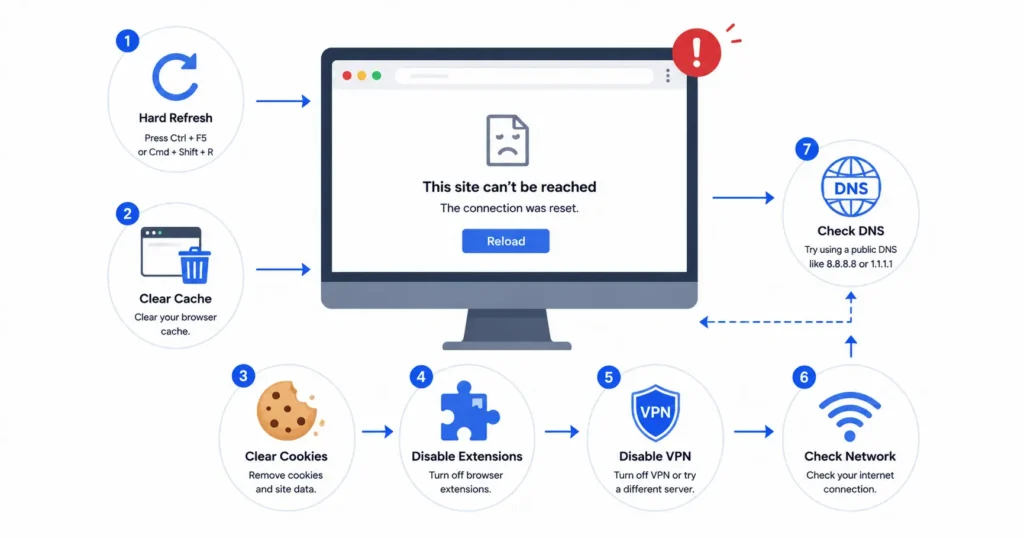
YOPmail Not Loading Checklist
- Hard refresh: Reload the YOPmail page using a hard refresh to get the latest page data.
- Clear cache and cookies: Remove cached site data and cookies for YOPmail, then open the website again.
- Try an incognito window: Use a private or incognito browser window to rule out stored cookies, cache, and some browser settings.
- Disable browser extensions: Temporarily turn off ad blockers, privacy tools, and other extensions that may affect website access.
- Test without a VPN: Disconnect your VPN and try YOPmail again. A VPN connection or IP address may affect access.
- Change your network: Switch from Wi-Fi to mobile data or another trusted network. This can help identify an ISP routing or local network problem.
- Test DNS: Check whether the YOPmail domain resolves correctly. A DNS problem can prevent your browser from finding the website.
- Wait and recheck: If the basic checks do not help, wait a short time and test again. A temporary service interruption may resolve on its own.
If YOPmail works after one of these steps, the problem was likely related to your browser, device, DNS, VPN, network, or ISP connection. If it fails everywhere, a wider service outage is more likely.
What can you use if YOPmail is down?
If YOPmail is unavailable, you can use another temporary email service for a short-term task. This can be useful when you need to receive a one-time verification email or keep your primary inbox private.
If the goal is simply to receive a one-time verification email or keep a primary inbox private, a temporary-email service can be used while YOPmail is unavailable.
For another option, see FreeMail.ai.
You can also learn more about using temporary email for verification in Temporary Email for Verification.
When choosing an alternative, check whether it can receive the type of message you need and whether the inbox is available when you need it.
Is it safe to use a temporary email when YOPmail is down?
Temporary email can be useful for low-risk, one-time signups when YOPmail is unavailable. However, it should not replace a permanent email address for banking, account recovery, work, or other important accounts. Avoid adding sensitive personal information to a disposable inbox, especially when the inbox does not have strong authentication.
When temporary email can help
A temporary email address can be useful when you need to receive a one-time verification email, test a website, or keep your primary inbox private. It can also reduce unwanted messages from services that you do not plan to use for a long time.
Caution
Do not use a temporary email address for:
- Banking or financial accounts
- Password recovery or account recovery
- Work or school accounts
- Important personal accounts
- Long-term accounts that you may need to access later
- Messages containing sensitive personal information
Disposable inboxes may have limited privacy or security controls. Some temporary email services also do not provide the same account protection as a permanent email provider. Use a permanent email address when you need reliable access, recovery options, or long-term account security.
YOPmail status: what to check before assuming an outage
Before assuming YOPmail is down, check a few basic signs. These tests can help you tell the difference between a server outage, browser problem, DNS issue, network problem, and an inbox-specific issue.
| Check | What it tells you |
| Website opens | Shows basic YOPmail availability |
| HTTP response | Shows how the server responds to your request |
| Another browser | Helps identify a browser, cache, cookie, or extension issue |
| Another network | Helps identify an ISP or routing issue |
| DNS resolution | Shows whether the YOPmail domain can be found correctly |
| Independent monitor | Provides broader evidence of a possible outage |
| Inbox test | Helps identify an email delivery or inbox-specific issue |
No single check can always confirm a YOPmail outage. Comparing several results gives you a clearer picture. If the website, HTTP response, DNS resolution, and inbox all fail across different networks, a wider service problem becomes more likely.
Frequently Asked Questions
Is YOPmail down for everyone?
YOPmail may not be down for everyone. The latest direct browser test showed the homepage loading from the tested connection, while an independent status monitor still reports YOPmail as down. The issue may be regional, network-specific, or part of a wider outage.
Why is YOPmail not working?
Possible causes include a server outage, DNS problem, browser cache, VPN, browser extension, ISP routing, or an email delivery problem. Test the service from another browser and network first.
Why is my YOPmail inbox empty?
The email may not have arrived yet, the sender may block disposable email addresses, or the inbox may have a delivery problem. Confirm the address and wait before requesting another message.
What should I do if YOPmail is down?
Check the service from another network and compare independent status reports. If the outage is confirmed, wait for recovery or use another temporary email provider for a low-risk task.
Is YOPmail safe?
YOPmail is designed for disposable email, so it should not be treated like a secure long-term mailbox. Do not use it for banking, sensitive information, important account recovery, or other accounts you need to keep.
What is a YOPmail alternative?
A YOPmail alternative is another service that provides temporary or disposable email. The right choice depends on your task. For a short-term verification or signup, a temporary email service such as FreeMail.ai can be an option.
Need a temporary email while YOPmail is unavailable?
If you have already checked your browser and network and YOPmail still does not work, you do not always have to wait.
For a low-risk signup or one-time verification, try FreeMail.ai and create a temporary email address.
Use a permanent email account instead when the account contains sensitive information or needs long-term recovery.