

TeraBox may be safe enough for low-risk files if you use a strong password, limit file sharing, and keep another backup. However, you should be careful with private files, important documents, passwords, bank records, medical information, and confidential work data.
TeraBox says it uses encryption to protect files. It also says uploads and downloads use HTTPS protection. However, users should still check the latest privacy policy, account settings, and security details before uploading sensitive files.
What Is TeraBox?
TeraBox is a cloud storage service. It lets users upload, save, share, and access files online.
People may use it for:
- Photos
- Videos
- Documents
- School files
- Work files
- Phone backups
- Large downloads
TeraBox is known for offering a large amount of free storage. The company has promoted up to 1 TB of free cloud storage for users.
This can sound useful. However, free storage alone does not tell you if a service is safe for private files. You also need to think about cloud storage security, data privacy, file encryption, sharing settings, and account recovery.
Is TeraBox Safe to Use?
TeraBox can be safe to use for some files, especially low-risk files such as public videos, non-private photos, school worksheets, or backup copies of files you already store elsewhere.
Still, TeraBox should not be your only place for important data. You should not upload highly sensitive documents without taking extra steps to protect them.
A simple answer is this:
| File Type | Is TeraBox Safe Enough? | What You Should Do |
| Public videos and downloads | Usually lower risk | Keep your account protected |
| Non-private photos | Usually lower risk | Avoid public sharing links |
| School files | Often okay | Remove personal details when possible |
| Work documents | Use caution | Check company rules first |
| Family photos | Use caution | Keep another backup copy |
| Tax records | Higher risk | Encrypt before uploading |
| Passport or ID scans | Higher risk | Avoid uploading unless encrypted |
| Bank statements | Higher risk | Use local encryption and another backup |
| Password files | Not recommended | Use a password manager instead |
| Medical documents | Higher risk | Use strong privacy tools and local encryption |
The main point is simple. TeraBox may be safe for normal files. It may not be the best place for your most sensitive documents.
This is why the question is not only, “Is TeraBox safe?” The better question is, “Is TeraBox safe for the type of file I want to upload?”
What Does TeraBox Say About Security?
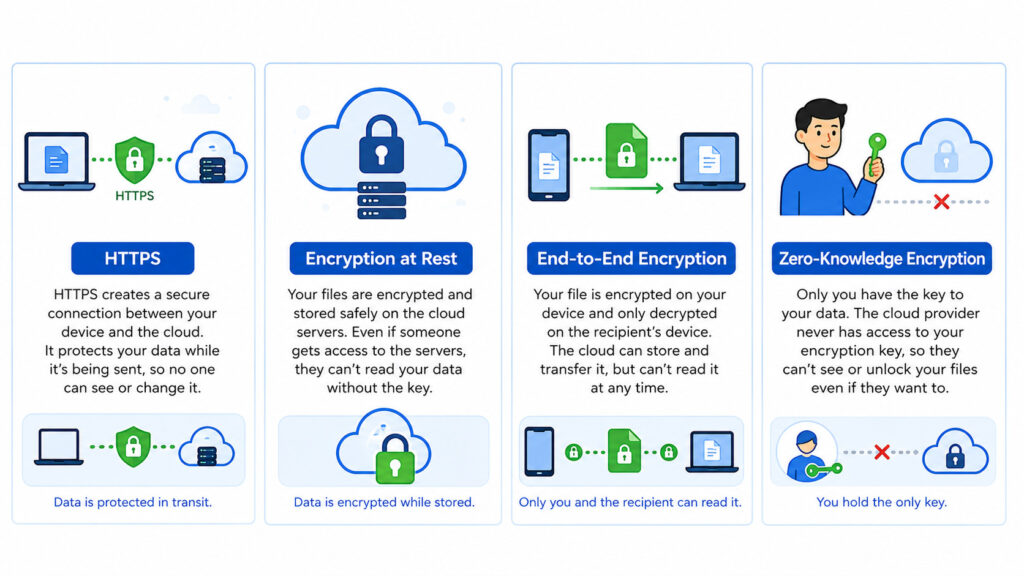
TeraBox says it uses security tools to protect user files. Its public posts mention client-side encryption, a zero-knowledge approach, and HTTPS protection during uploads and downloads.
These terms can sound confusing. Here is what they mean in simple words.
| Security Term | Simple Meaning |
| HTTPS | Helps protect files while they move between your device and the cloud service |
| Encryption in transit | Protects data while it is being uploaded or downloaded |
| Encryption at rest | Protects files while they are stored on servers |
| Client-side encryption | Encrypts files on your device before or during upload |
| End-to-end encryption | Files are protected so only approved users should be able to read them |
| Zero-knowledge encryption | The provider may not have the key needed to read your files |
| Two-factor authentication | Adds an extra sign-in step after your password |
TeraBox says files are protected with encryption and claims a zero-knowledge approach to user data. It also says HTTPS helps protect file transfers from being intercepted.
However, users should understand that company statements are not the same as a full independent security audit.
Before you upload important files, review the latest:
- Privacy policy
- Terms of service
- Encryption details
- Sharing settings
- Account recovery rules
- Two-factor authentication options
- Third-party security audit information
A good rule is to trust security features, but also verify them.
What Are the Main TeraBox Privacy Risks?
The main TeraBox privacy risks are not only about hacking. Many problems happen when users share too much, use weak passwords, lose account access, or upload files that need stronger protection.
Privacy Transparency
TeraBox gives information about its security features. Still, public descriptions about zero-knowledge encryption and privacy protections may not always be easy for everyday users to understand.
One independent 2026 review said users should look closely at encryption claims, compliance transparency, privacy details, and public security audit information before trusting TeraBox with highly sensitive files.
This does not mean TeraBox is automatically unsafe. It means you should not assume that every cloud service protects data in the same way.
For example, a service may encrypt files while they are uploaded. That is useful. But it does not always mean the provider cannot access file content.
If privacy is very important to you, look for clear answers to these questions:
- Who controls the encryption key?
- Can the provider read my files?
- Does the service use end-to-end encryption?
- Does the service use zero-knowledge encryption?
- Can I protect a shared link with a password?
- Can I stop a shared link later?
- What happens if I lose my password?
- Is there a public third-party security audit?
Public Share Links
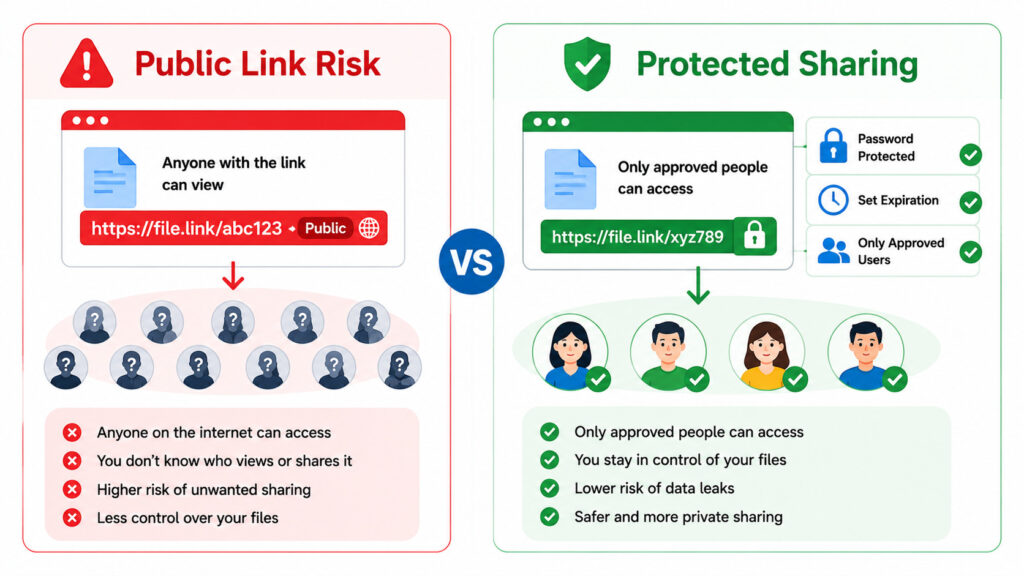
A public share link can create a privacy problem even when your account has a strong password.
For example, you may upload a document and send its link to one person. That person may forward the link to someone else. If the link has no password or expiration date, more people may be able to open the file.
Before sharing a file, check:
- Who can open the link
- Whether the link needs a password
- Whether the link has an expiration date
- Whether the file can be downloaded
- Whether you can remove access later
- Whether the file contains private information
Do not use public links for IDs, bank files, medical files, passwords, or confidential work documents.
Account Security
A cloud storage account is only as safe as its login details.
If someone gets your password, they may be able to view, download, delete, or share your files. This is why account security matters as much as file encryption.
The U.S. Cybersecurity and Infrastructure Security Agency recommends strong passwords and multifactor authentication to help protect online accounts.
Use these basic safety steps:
- Create a long, unique password
- Do not reuse your email password
- Use a password manager
- Turn on two-factor authentication if available
- Do not share your login code with anyone
- Check account activity often
- Sign out from shared computers
- Update your recovery email and phone number
Is TeraBox Safe for Photos, Videos, and Documents?
TeraBox may be safe for ordinary photos, videos, and documents when you use good account security. But not all files have the same risk.
Low-Risk Files
Low-risk files are files that would not cause major harm if someone else saw them.
Examples include:
- Public videos
- Downloaded movies
- Non-private photos
- School worksheets
- Public project files
- Music files
- General reading documents
- Duplicate backups of non-sensitive files
You can store these files with lower concern. Still, use a strong password and avoid public links.
Medium-Risk Files
Medium-risk files may contain personal details, but they are not as serious as banking or identity documents.
Examples include:
- Family photos
- Private videos
- Resume files
- Personal letters
- Work drafts
- Client notes
- School projects with your name
- Home documents
For these files, use extra care. Do not share open links. Keep a second backup. Review who has access.
High-Risk Files
High-risk files can cause serious harm if they are exposed.
Examples include:
- Passport scans
- National ID cards
- Driver’s license images
- Tax documents
- Bank statements
- Medical records
- Password files
- Private legal documents
- Confidential work files
- Customer information
- Business contracts
- Security codes
Avoid uploading these files unless you encrypt them locally first. Local encryption means you protect the file on your device before sending it to cloud storage.
You should also keep another backup in a secure place.
Does TeraBox Have End-to-End Encryption?
TeraBox has said that it uses client-side encryption and a zero-knowledge approach. However, third-party coverage has raised questions about how clearly the zero-knowledge protection is explained and verified.
This means users should be careful before assuming that TeraBox has the same privacy model as every end-to-end encrypted cloud service.
What Is End-to-End Encryption?
End-to-end encryption means a file is protected before it leaves your device. In a strong end-to-end encryption setup, only you and the people you choose should be able to read the file.
This can be useful for:
- Private photos
- Legal files
- Financial records
- Personal documents
- Sensitive work files
What Is Zero-Knowledge Encryption?
Zero-knowledge encryption means the cloud provider may not know your encryption key or password.
This can give users more privacy. However, it can also create a problem. If you forget your password, the provider may not be able to recover your files.
Why Does This Matter?
Some cloud storage services focus on easy collaboration. Others focus on strong privacy.
A service with many team tools may make it easy to share files, leave comments, and work together. A privacy-first service may limit some of those features to protect user data.
Before choosing TeraBox for private files, check the current technical details. Do not rely only on a short marketing claim.
How Can You Make a TeraBox Account Safer?
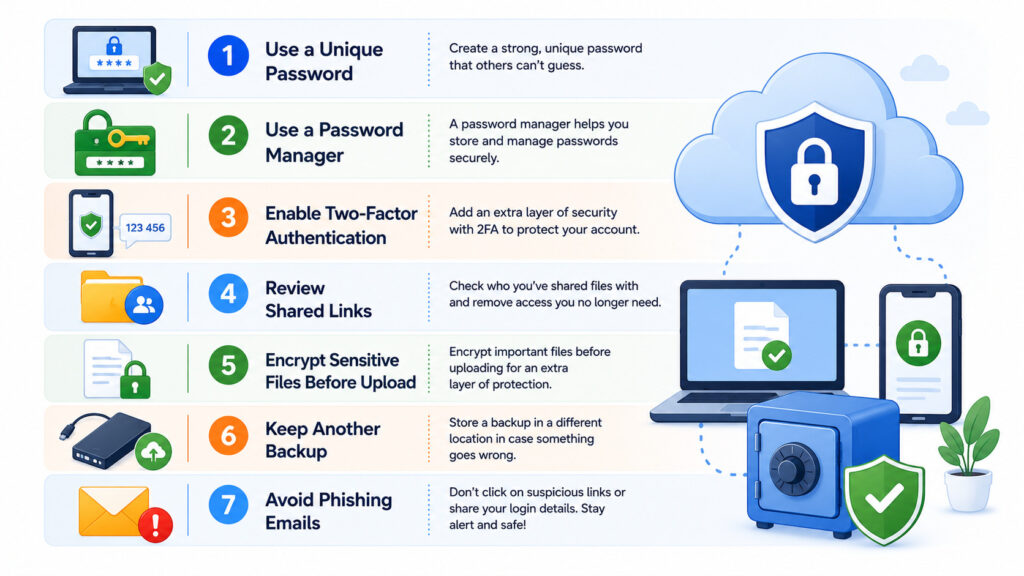
You can lower risk by following a few simple steps.
1. Use a Strong Password
Your password should be long and unique.
Do not use simple passwords such as:
- 12345678
- password
- Your name
- Your birthday
- Your phone number
A better password uses many words, numbers, and symbols. A password manager can create and save strong passwords for you.
2. Turn On Two-Factor Authentication
Two-factor authentication adds another step when you sign in.
For example, after entering your password, you may need to enter a code from your phone. This makes it harder for someone to enter your account with only your password.
Check TeraBox account settings to see if multi-factor authentication or two-factor authentication is available for your account.
3. Review Shared Files
Check your shared folders and public links often.
Remove links you no longer need. Stop access for people who no longer need the file. Do not leave private links open forever.
4. Encrypt Sensitive Files Before Uploading
If you need to upload an important document, encrypt it locally first.
This means you add a password to the file before it reaches the cloud.
For example, you can create a password-protected archive or use trusted local encryption software. Keep the password in a secure password manager, not in the same cloud folder.
5. Keep Another Backup
Do not make TeraBox your only backup.
Keep important files in at least one more place, such as:
- An external hard drive
- A secure USB drive
- Another cloud storage provider
- A private encrypted backup
A backup helps if you lose account access, delete files by mistake, or face a service problem.
6. Use Safe Devices
Do not sign in on public computers if possible.
Keep your phone and computer updated. Use screen locks. Avoid downloading unknown files or browser extensions.
7. Watch for Phishing Emails
Scammers may send fake emails that look like cloud storage alerts.
They may say:
- Your storage is full
- Your account will be deleted
- Someone signed in
- Click here to verify your files
- Update your payment details
Do not click strange links. Open TeraBox from the official website or app instead.
Should You Use a Temporary Email for TeraBox?
A temporary email can help protect your main inbox from spam, marketing messages, and unwanted sign-up emails.
FreeMail AI lets users create a temporary email address quickly without registration. A temporary address can be useful when you are testing a service, trying a free tool, or signing up for a short-term offer.
However, a temporary email does not protect your uploaded files.
It also does not replace:
- A strong password
- Two-factor authentication
- Local encryption
- Safe sharing settings
- A recovery email
- A backup plan
You should be extra careful with temporary email when creating a cloud storage account.
Cloud storage accounts may send:
- Password reset links
- Login alerts
- Security codes
- Billing notices
- File-sharing notices
- Account recovery messages
If you use a temporary email that disappears, you may lose access to your account later.
Use a temporary email only when you understand the limits. FreeMail AI explains that temporary emails are not stored permanently and may not work with every website.
If you only need a quick sign-up address, you can use disposable mail for quick verification. For important cloud accounts, use an email address that you can access later.
What Are Safer TeraBox Alternatives for Sensitive Files?
If you need stronger privacy for sensitive files, compare cloud storage services carefully.
Do not choose a service only because it gives more free storage. Look at its security model, privacy policy, sharing tools, backup features, and account recovery rules.
Some users compare TeraBox alternatives such as:
- Proton Drive
- Sync.com
- MEGA
- Google Drive
- Dropbox
- Microsoft OneDrive
- Nextcloud
Each option has different strengths.
| Type of Need | What to Look For |
| Private personal files | End-to-end encryption or zero-knowledge encryption |
| Team documents | Shared folders, permissions, comments, and version history |
| Microsoft Office work | Microsoft 365 and OneDrive support |
| Google Docs work | Google Workspace and Google Drive support |
| Large backups | Storage capacity, recovery options, and file-size limits |
| Self-hosted control | A tool such as Nextcloud with technical support |
| Secure sharing | Password-protected links, expiration dates, and access controls |
Proton Drive, Sync.com, and some other privacy-focused services are often considered by users who want stronger encryption and privacy features. Google Drive and OneDrive are often chosen for convenience, documents, and ecosystem support.
Do not assume that one service is safer for every person. The best option depends on your file type, privacy needs, device setup, and ability to manage security settings.
Is TeraBox Safe for Free Storage?
TeraBox offers a large free storage amount, which is why many users are interested in it.
But a free plan is not automatically unsafe, and a paid plan is not automatically safe.
When using free cloud storage, ask these questions:
- Does the service explain how files are encrypted?
- Can I use two-factor authentication?
- Can I control public links?
- Can I recover deleted files?
- Can I export my files later?
- What happens if I lose my password?
- What data does the service collect?
- Are there ads or tracking features?
- Can I remove my account and files?
- Do I have another backup?
Free storage can be useful for lower-risk files. It is not a reason to ignore privacy and security.
Can TeraBox Be Your Only Backup?
No. TeraBox should not be your only backup for important files.
Cloud storage can fail in many ways. You may forget your password. Your account could be locked. You may delete files by mistake. A shared link may expose a file. A device problem may stop you from accessing your account.
Use a simple backup rule:
- Keep one copy on your main device
- Keep one copy in cloud storage
- Keep one copy in another safe location
For example, you may store photos on your laptop, upload a copy to TeraBox, and save another copy on an external hard drive.
This gives you more protection.
Final Verdict: When Is TeraBox Safe Enough?
TeraBox may be safe enough for low-risk cloud storage when you use good security habits. It can be useful for ordinary photos, videos, school files, public downloads, and backup copies.
However, do not trust any cloud account blindly. Be more careful with private files, identity documents, bank records, health files, passwords, legal papers, and confidential work documents.
The safest approach is simple:
- Use a strong unique password
- Turn on two-factor authentication if available
- Avoid public file links
- Review sharing permissions
- Encrypt sensitive files before uploading
- Keep another backup
- Check current privacy and encryption details before storing important data
If you want to try a new service without sharing your main inbox, you can generate a temporary email address. For cloud accounts that hold important files, always use an email address you can access later for password recovery and security alerts.
Frequently Asked Questions
Is TeraBox safe for photos?
TeraBox may be safe for normal photos if you use a strong password, control sharing links, and keep another backup. For highly private photos, encrypt files locally before uploading them.
Is TeraBox safe for important documents?
TeraBox should not be your only storage place for important documents. For tax papers, IDs, banking files, health records, or confidential work documents, use local encryption and keep a second backup.
Can TeraBox see my files?
TeraBox says it uses client-side encryption and a zero-knowledge approach. However, public information about its privacy model should be checked carefully before uploading sensitive files.
Does TeraBox use end-to-end encryption?
TeraBox has made claims about client-side encryption and zero-knowledge privacy. Third-party coverage has raised questions about how clear those protections are. Review the latest TeraBox security details before trusting it with sensitive files.
Is TeraBox free 1 TB safe?
The free 1 TB offer may be useful for ordinary files, but storage size does not prove privacy or security. Use strong account protection, avoid public links, and do not upload highly sensitive documents without local encryption.
Should I use a temporary email for TeraBox?
A temporary email can protect your main inbox from spam during a quick sign-up. However, do not use it if you need long-term account recovery, password reset access, or security alerts for important files.
What is the safest way to use TeraBox?
Use a unique password, enable two-factor authentication if available, limit public sharing, encrypt sensitive files before upload, and keep another backup. Independent safety guidance also recommends reviewing permissions and avoiding highly sensitive files when privacy details are unclear.