

TL;DR: “Temp mail plus” refers to two different things: TempMail.Plus, a disposable email service that generates short-lived inboxes, and plus addressing, an email standard that lets you add a +tag to any address (like yourname+signup@gmail.com) to filter or track messages. Both protect your inbox from spam. This guide explains how plus addressing works, when temp mail is the better choice, and how using both together gives you maximum privacy online.
When you search for “temp mail plus,” you might be looking for the TempMail.Plus website, a popular disposable email tool, or you might be trying to understand what the plus sign (+) actually does in an email address. Both are valid questions, and both have genuinely useful answers.
The confusion is common. Millions of people use temp mail and plus addressing every day without fully understanding how each one works, where each one falls short, and why combining them is actually a smart privacy strategy. By the end of this guide, you will know exactly what “plus” means in the context of temp mail, how to use plus addressing step by step, and when to reach for a disposable inbox like freemail.ai instead.
What Does “Temp Mail Plus” Actually Mean?
The phrase “temp mail plus” covers two separate concepts that people frequently mix up.
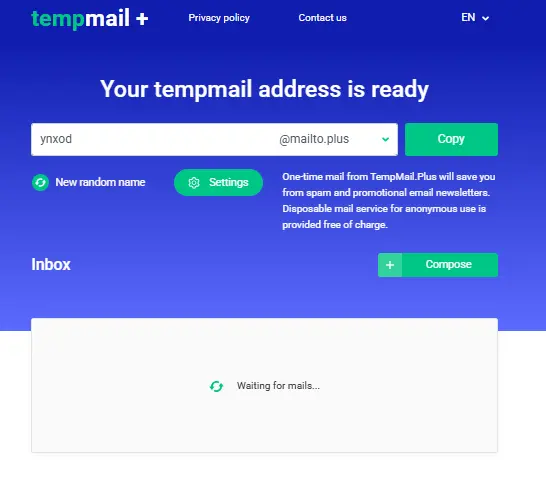
The first is a website: TempMail.Plus (tempmail.plus) is a disposable email service that generates a temporary inbox storing emails for a short period, typically around 10 minutes, though the lifetime can be adjusted in settings. You visit the site, get an address, use it for a signup or verification, and walk away. The inbox self-destructs.
The second is a feature: plus addressing, sometimes called sub-addressing or email tagging. This is a built-in email standard, not a tool or website, that lets you modify any existing email address by adding a +label before the @ symbol. For example, yourname+shopping@gmail.com still delivers to yourname@gmail.com, but the tag lets you filter, sort, and track which service sent what.
Understanding which one you actually need is the key to using either one effectively. The rest of this guide unpacks both.
What Is Plus Addressing in Email?
Plus addressing (also called sub-addressing or email tagging) is a standard that lets you add a +label after your email username to create trackable variants of the same address, without creating a new account or registering anything.
The syntax, defined under RFC 5233 and referenced in the SMTP specification RFC 5321, follows a simple pattern:
textlocalpart + tag @ domain.comSo john@gmail.com becomes john+newsletters@gmail.com, or john+shopping@gmail.com, or john+freetrials@gmail.com, all delivered to the same inbox. The tag is completely arbitrary; you choose it yourself, and it can be anything without spaces.
This feature is supported natively by major email providers including:
- Gmail / Google Workspace: fully supported, has been for years
- Outlook.com / Microsoft Exchange Online: supported since late 2020
- Yahoo Mail: supported
- Apple iCloud Mail: supported
The key benefit is organization and tracking. If yourname+amazon@gmail.com suddenly starts receiving spam from unrelated senders, you know exactly which service sold or leaked your data. You can then create a Gmail filter to auto-label, archive, or delete all mail sent to that tagged address.
How Does Plus Addressing Work Step by Step?
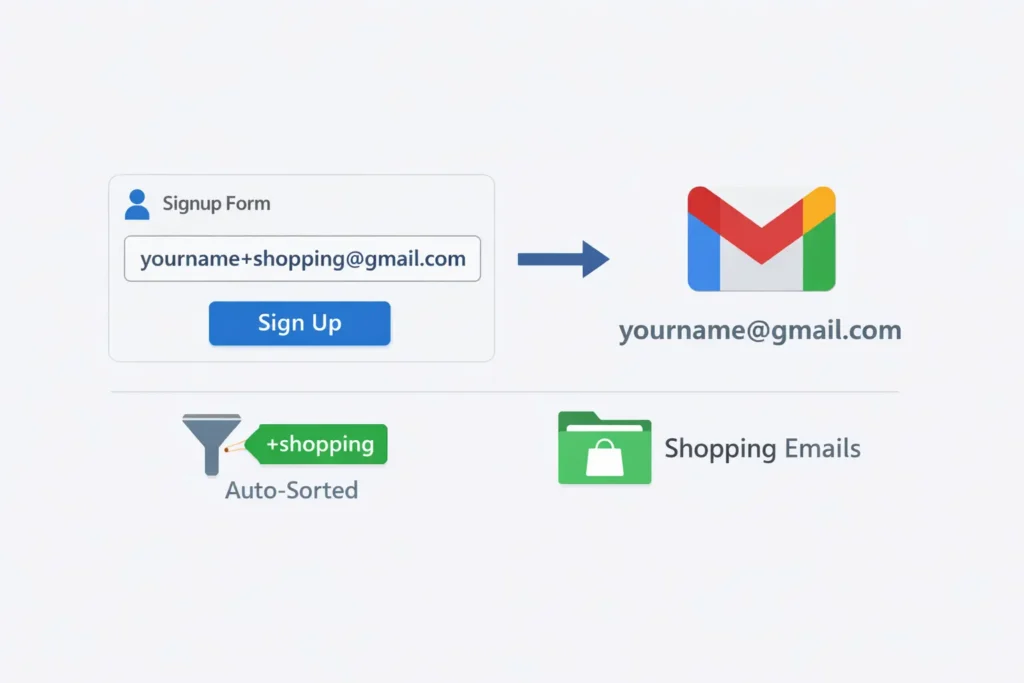
Using plus addressing requires zero setup, zero new accounts, and zero cost. Here is how to start in three minutes:
Step 1: Pick your base email address.
Use any existing email that supports plus addressing — for example, yourname@gmail.com.
Step 2: Add a +tag before the @ symbol.
Choose a label relevant to what you are signing up for. For online shopping: yourname+shopping@gmail.com. For a newsletter: yourname+news@gmail.com. For a free trial: yourname+trial@gmail.com.
Step 3: Use the tagged address when signing up.
Enter it exactly as typed. The service receives it, sends confirmation emails to it, and all messages arrive in your normal inbox.
Step 4: Set up inbox filter rules.
In Gmail, go to Settings → Filters and Blocked Addresses → Create a new filter. In the “To” field, type the tagged address. You can then auto-label, archive, or mark as read — keeping your main inbox clean.
Step 5: If abuse happens, filter it out completely.
If a service you tagged starts sending spam, create a filter to auto-delete every email addressed to that +tag. Your real inbox stays clean without unsubscribing or changing your main address.
What to Do When Plus Addressing Is Blocked
Here is the frustrating reality: many websites intentionally strip or reject + addresses. Some do it to prevent users from creating multiple accounts with variations of one email. Others do it because their validation code was written poorly and treats the + as an invalid character.
If a website rejects your tagged address, do not use your real email. Use a completely disposable temp mail address instead. Services like temp gmail generate a fresh, unconnected address instantly, no registration, no personal information required. The temp address has no link to your real identity at all, making it far more effective in these situations than a plus-tagged variant of your main email.
Temp Mail vs. Plus Addressing: What’s the Difference?
Both tools protect your inbox, but they work in completely different ways. Choosing between them depends on what you actually need from a given signup.
| Feature | Temp Mail | Plus Addressing | Email Alias |
| Anonymous? | ✅ Fully, no connection to real identity | ❌ No, still your real base address | ✅ Partially |
| Separate inbox? | ✅ Yes, completely separate | ❌ No, delivers to your main inbox | ✅ Yes |
| Reusable? | ❌ Expires after a set time | ✅ Yes, permanent | ✅ Yes |
| Works when + is blocked? | ✅ Yes — different address entirely | ❌ Often rejected | ✅ Usually |
| Setup required? | ❌ None | ❌ None | ✅ Minimal |
| Can send emails from it? | ❌ Receive-only | ❌ Receive-only | ✅ Often yes |
| Best for | One-time signups, full anonymity | Organized filtering on real account | Long-term privacy with flexibility |
The core distinction: plus addressing creates a trackable variant of your real email. Everything still flows into your real inbox. Temp mail creates a completely separate address with no connection to your identity, and it disappears when you are done.
When Should You Use Temp Mail Instead?
Choose temp mail when:
- You need full anonymity — your real identity must not be tied to the signup at all
- The website blocks + addresses
- It is a one-time action — a download, a coupon code, an OTP, a software trial
- You want zero long-term email relationship with the service
- You are worried the service has a history of data leaks or spam
Choose plus addressing when:
- You intend to keep the account and want to receive ongoing emails
- You want to track which service was the source of any spam
- You need inbox organization across multiple subscriptions
- Your priority is filtering, not anonymity
How to Use Temp Mail and Plus Addressing Together
Here is where privacy gets genuinely powerful: you do not have to choose one or the other. Using both, in the right sequence, gives you layered protection that neither alone can match.
The strategy looks like this:
- For an initial signup you are unsure about — use a temp mail address from freemail.ai. Zero personal exposure. If the service turns out to be spammy or untrustworthy, you walk away with nothing compromised.
- If the service turns out to be legitimate — and you want to keep the account — update your email to a plus-tagged version of your real address: yourname+servicename@gmail.com. Now you can track their emails, filter them, and cut them off if needed.
- For services you already trust but want to organize — skip temp mail entirely and go straight to plus addressing. Use a tag that clearly identifies the source: yourname+netflix@gmail.com, yourname+github@gmail.com, yourname+semrush@gmail.com.
This layered approach is what privacy guides for 2026 recommend: match the level of protection to the level of trust. For unknown or one-time interactions, temp mail is your first line of defense. For ongoing but trackable relationships, plus addressing keeps your inbox structured without sacrificing your main address.
A practical use case: you want to grab a free trial of a SaaS tool you have never used before. Generate a disposable address on freemail.ai, complete the trial signup, and access the product. If the service starts sending aggressively after the trial, nothing happened to your real inbox. If you decide to subscribe, update your account email to yourname+toolname@gmail.com going forward.
Some trials also require SMS confirmation. In that case, pair your disposable email with a verification phone number by eSIM Plus so neither your inbox nor your real phone number is tied to the signup.
anchor: verification phone number by eSIM Plus.
Does TempMail.Plus Support Plus Addressing?
This is one of the most common points of confusion — and worth answering directly.
TempMail.Plus (tempmail.plus) is a disposable email service. It generates temporary inboxes that store incoming messages for a short period — around 10 minutes by default, with an option to extend via settings. It does not implement plus addressing in the RFC 5233/5321 sense. You cannot append +tags to a TempMail.Plus address and expect them to route or filter in any organized way; it simply generates a standalone disposable inbox.
In other words:
- TempMail.Plus = a website that gives you a throwaway inbox
- Plus addressing = an email standard built into Gmail, Outlook, Yahoo, and others
They are completely different things that happen to share the word “plus.”
If you are looking for a simple, no-registration disposable email address, both TempMail.Plus and freemail.ai do the job. If you are looking to implement plus addressing for inbox organization and spam tracking, you need to use that feature through your existing permanent email provider — not a temp mail service.
FAQ
What is the plus sign in an email address?
The + symbol in an email address is used for plus addressing, also called sub-addressing. It lets you create variations like yourname+tag@gmail.com that still deliver to yourname@gmail.com. It is a standard email feature defined under RFC 5233 and is supported by Gmail, Outlook, Yahoo, and many other providers. The tag after the + can be anything you choose.
Does Gmail support plus addressing?
Yes, Gmail has supported plus addressing for years and it requires no setup. Any email sent to yourname+anything@gmail.com arrives in your yourname@gmail.com inbox automatically. You can then create filters in Gmail settings to automatically sort, label, or archive messages based on the +tag used.
Can I use a plus sign with a temp mail address?
Most temp mail services generate standard disposable addresses without native plus addressing support. TempMail.Plus, for example, creates standalone throwaway inboxes — not plus-addressed variants. If you need plus-style filtering, apply it to your permanent email. If you need full anonymity, use a disposable temp mail address instead. They serve different purposes.
Why do some websites block plus addresses?
Some websites strip or reject +tag addresses to prevent users from registering multiple accounts using variants of one email, or simply because their email validation code was written to exclude the + character. When this happens, a disposable temp mail address from a service like freemail.ai is the more reliable alternative — it generates a completely separate address with no connection to your real identity.
What is the difference between an email alias and plus addressing?
An email alias is a fully separate forwarding address that can often be both sent from and received on. Plus addressing creates a tagged variant of your existing address that is receive-only. Aliases offer more flexibility — including the ability to reply without revealing your base address — but they typically require minimal account setup. Plus addressing requires nothing at all.
Is it safe to use temp mail for important account signups?
Temp mail is designed for short-term, non-critical use — signups where privacy matters more than longevity. For accounts you intend to keep long-term — banking, professional tools, subscriptions tied to billing — use a permanent email or a plus-tagged address. Temp mail inboxes expire and cannot be recovered, so any account tied to one becomes inaccessible once the address disappears.
What happens if I forget which temp mail address I used for a signup?
If your temp mail inbox has expired, you will lose access to any account verification or password recovery linked to it. This is one of the most common pitfalls of using disposable email carelessly. Always note the temp address you used for any signup you might want to recover, or update the account’s email to a permanent address before the temp inbox expires.
Protect Your Real Inbox, Start with a Free Temp Email
Whether you are testing a new service, grabbing a free trial, or just tired of your inbox filling up with newsletters you never asked for, a disposable email address is the fastest fix. Generate a free temporary email on freemail.ai, no registration, no personal details, and no spam that follows you home. Combine it with plus addressing on your permanent account, and your inbox stays exactly the way you want it: clean, organized, and fully under your control.