

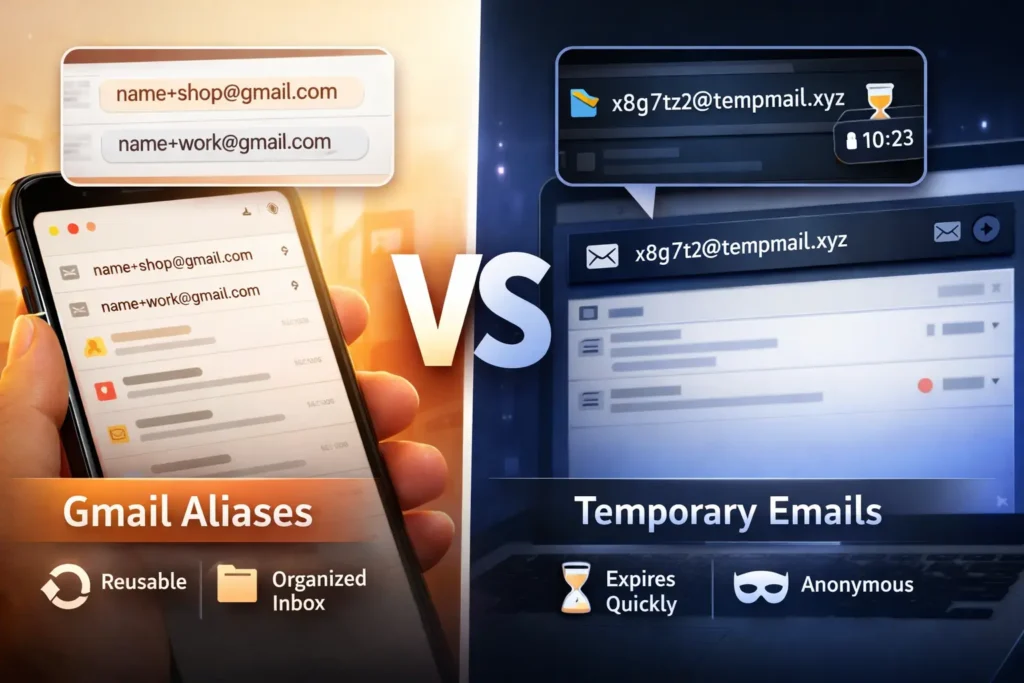
Choosing between a Gmail alias vs temporary email depends on whether you want to organize your inbox or completely hide your identity online. Both tools help reduce spam and manage sign-ups, but they work in very different ways. A Gmail alias keeps all messages connected to your main account, allowing you to track where emails come from and organize them with filters. A temporary email, on the other hand, creates a disposable inbox that disappears after a short time, making it ideal for one-time signups and verification codes.
As concerns around data privacy, email tracking, and marketing spam continue to grow in 2026, many users rely on these two methods to control how their email address is shared online. Understanding the difference between Gmail aliases and temporary email addresses helps you choose the right option for privacy protection, inbox organization, free trials, and anonymous sign-ups.
What is a Gmail alias?
A Gmail alias is a modified version of your primary email address that directs messages to your main inbox. You create one by adding a plus sign and a word after your username, like name+news@gmail.com. This helps you track who sells your data and lets you filter incoming mail easily.
Google allows two main types of aliases. The first is the “plus” address. You can add any word after your name. The second is the “dot” address. Google ignores dots in your username. So, j.o.h.n@gmail.com is the same as john@gmail.com. Both deliver mail to the same place.
These are not separate accounts. They are just different “tags” for your existing one. When you sign up for a newsletter with an alias, you can set a rule in Gmail. That rule can tell the app to archive those emails automatically. This keeps your main view clean while still saving the info for later.
Aliases are permanent. If you give a store your alias, they can email you forever. You have to manually block them or delete the filter to stop the mail. This makes them good for brands you trust but want to keep organized. They are less helpful for avoiding total privacy leaks.
| Feature | Gmail Alias | Temporary Email |
| Account Type | Your real account | A separate, fake account |
| Inbox | Your main Gmail inbox | A web-based burner inbox |
| Duration | Permanent | Short-lived (minutes/hours) |
| Setup | Just type it in | Generate on a site |
| Tracking | Shows your real username | Totally anonymous |
What is a temporary email address?
A temporary email address is a disposable, short-term inbox used to receive one-time messages or verification codes. Services like FreeMail generate these random addresses instantly. They allow you to access content or trials without revealing your real identity. Most of these addresses vanish after a few hours.
These tools are often called “burner” emails. You use them when you don’t trust a website. If a site demands an email to show you a price or a file, you give them a temporary one. You get your file, and the site gets an address that will soon be dead.
The inbox is usually web-based. You don’t need a password or a login. You just stay on the provider’s page and wait for the mail to show up. It is the fastest way to bypass “email walls.” Since the address expires, you never have to deal with future marketing spam from that site.
Most temporary services are free. They make money through ads on their site. Because they are public, you should never use them for personal talk. Anyone who knows the address might be able to see the mail. They are strictly for low-stakes signups and quick tests.
Gmail Alias vs. Temporary Email: Comparison Table
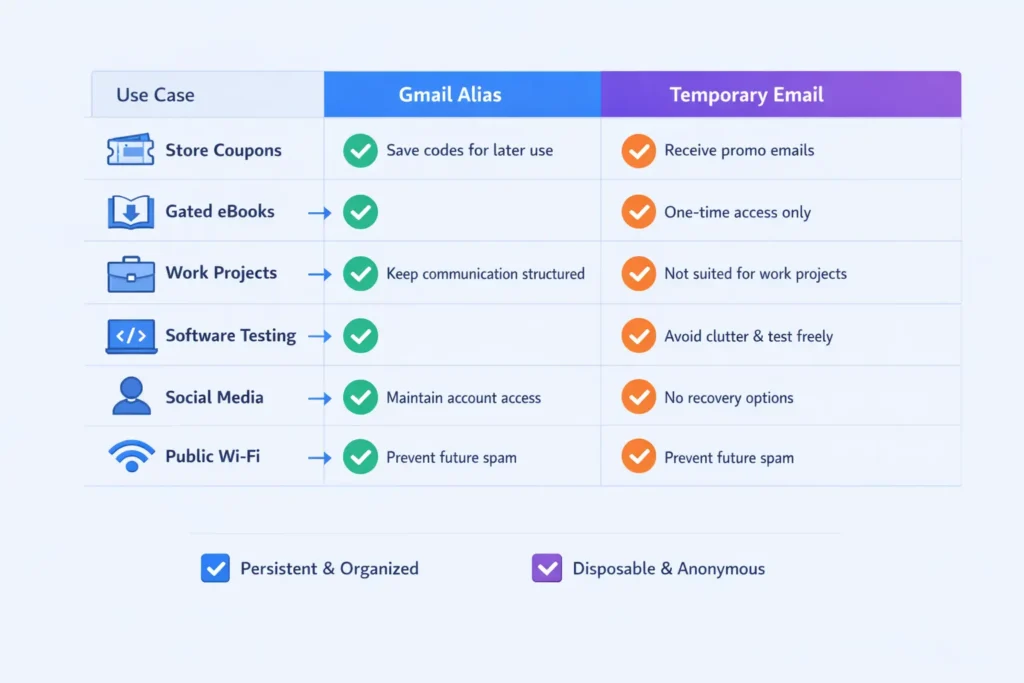
| Use Case | Best Choice | Why? |
| Store Coupons | Gmail Alias | You might want the code next month. |
| Gated eBooks | Temporary Email | You only need the file once. |
| Work Projects | Gmail Alias | Keeps project mail together. |
| Software Testing | Temporary Email | Prevents data noise in dev. |
| Social Media | Gmail Alias | Allows for account recovery. |
| Public Wi-Fi | Temporary Email | Stops future marketing from the cafe. |
Which is better for privacy?
A temporary email address is better for privacy because it disconnects your real identity from the website you visit. Gmail aliases still contain your actual username, which trackers can easily link back to you. Burner emails provide a total wall between your data and the company’s marketing database.
If you use johnsmith+site@gmail.com, a smart bot knows your real email is johnsmith@gmail.com. They just strip the plus sign. This means they can still find your social media profiles or other accounts. It does not hide who you are. It only tells you which site leaked your mail.
Burner emails use random strings like x7y9z2@temporarydomain.com. There is zero link to your name, phone number, or location. This is true anonymity. In a world of data breaches, this is the safest way to browse. If the site gets hacked, the hackers only get a useless, expired address.
- Aliases: Reveal your username.
- Temporary Email: Hides your username.
- Aliases: Linked to your Google profile.
- Temporary Email: No profile exists.
- Aliases: Permanent footprint.
- Temporary Email: Vanishes forever.
How do you use Gmail aliases for organization?
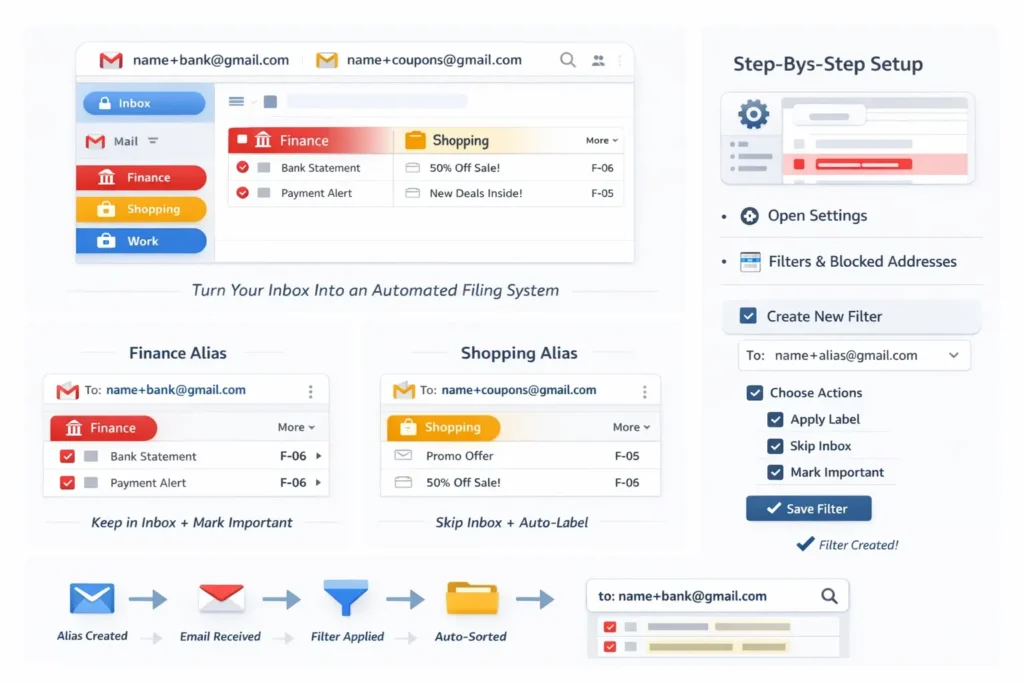
Use Gmail aliases for organization by creating specific tags for different parts of your life, such as shopping, finance, or work. You then create “Filters” in your Gmail settings to catch these tags. These filters can automatically apply labels, skip the inbox, or mark mail as important.
For example, use name+bank@gmail.com for all money tasks. Set a filter so every mail to that address gets a bright red “Finance” label. It should never skip the inbox. Now, use name+coupons@gmail.com for store flyers. Set that filter to “Skip Inbox” and “Apply Label: Shopping.”
This turns your inbox into an automated filing system. You don’t have to move emails manually. They land exactly where they belong. This is the best way to manage a high volume of mail without feeling overwhelmed. It also makes searching much faster. You can search to:name+bank to find every bank statement instantly.
- Go to Settings: Open Gmail on a computer.
- Filters and Blocked Addresses: Click the tab.
- Create a New Filter: Type your alias in the “To” field.
- Choose Actions: Select “Apply Label” or “Archive it.”
- Save: Click “Create Filter.”
Can websites block temporary email addresses?
Websites can block temporary email addresses by checking your domain against a “blacklist” of known burner services. Many SaaS companies and stores do this to prevent people from using multiple free trials. They want real, permanent leads for their marketing lists, so they reject “throwaway” domains.
This is a constant battle. Burner services buy new domains every week. Sites update their lists every day. If you see an error like “Please use a valid email,” the site has found your provider. You will need to switch to a different service or a newer domain.
Some sites use “MX record” checks. They see if the email server is a real one or just a temp mail script. High-quality burner tools can bypass this by mimicking real corporate mail servers. If you really need to get in, look for a provider that offers “Private Domains” or newer, less common extensions like .io or .tech.
Why do companies hate burner emails?
Companies hate them because they cost money. It costs a brand to acquire a new user. If that user provides a fake email, the brand loses its “Return on Investment.” They cannot send ads or nurture the lead. For a business, a burner email is a ghost. It takes the service but gives nothing back in return.
Is a Gmail alias safe for security?
A Gmail alias is safe for security because it is backed by Google’s massive defense system. You still get the benefits of spam protection and phishing detection. However, because it points to your real account, it does not stop a hacker from trying to brute-force your main password.
The alias itself is just a pointer. It doesn’t have its own password. The security level is exactly the same as your main account. If you have “Two-Factor Authentication” on, you are very safe. The main risk is that the alias tells people what your real username is.
If a hacker knows your username, they are halfway to getting in. They just need your password. This is why you should never use an alias for high-security sites like your bank or a crypto exchange. For those, use your plain email and keep it as private as possible. Use aliases for things that don’t matter much.
- Pros: Top-tier spam filtering.
- Pros: No separate password to remember.
- Cons: Reveals your real login ID.
- Cons: If you get banned from a site, they know your main email.
Why choose a temporary email for free trials?
Choose a temporary email for free trials to avoid being charged or spammed after the trial period ends. Many sites require an email to give you a “7-day pass.” If you forget to cancel, they have your info. A burner email ensures they can’t bug you once the time is up.
Most people use these for streaming sites or design tools. You want to see if the tool is good before you pay. The site wants your data so they can pressure you to buy. A temporary address lets you test the product on your own terms. It puts the power back in your hands.
Do burner emails work with credit cards?
Burner emails work with credit cards, but the site can still track you through your payment info. Even if your email is fake, your card number is real. If you want a truly “secret” trial, you need a virtual credit card too. Without that, the email only stops the spam, not the tracking.
Are there “Long-term” temporary emails?
Some sites offer “Long-term” temp mail. These addresses last for a week or a month. These are great for trials that need a few days of use. You can return to the site, see the inbox, and get a second or third verification code if the site sends them.
How to manage multiple aliases in Gmail?
Manage multiple Gmail aliases by using the “Send mail as” feature in your settings. This allows you to not only receive mail at an alias but also reply from it. This is great for small business owners or freelancers who want to look professional without paying for multiple accounts.
When you hit “Reply,” Gmail can be set to “Reply from the same address the message was sent to.” This means if someone writes to support+me@gmail.com, your reply comes from that same address. The recipient never sees your private, personal email. It keeps your brand look consistent.
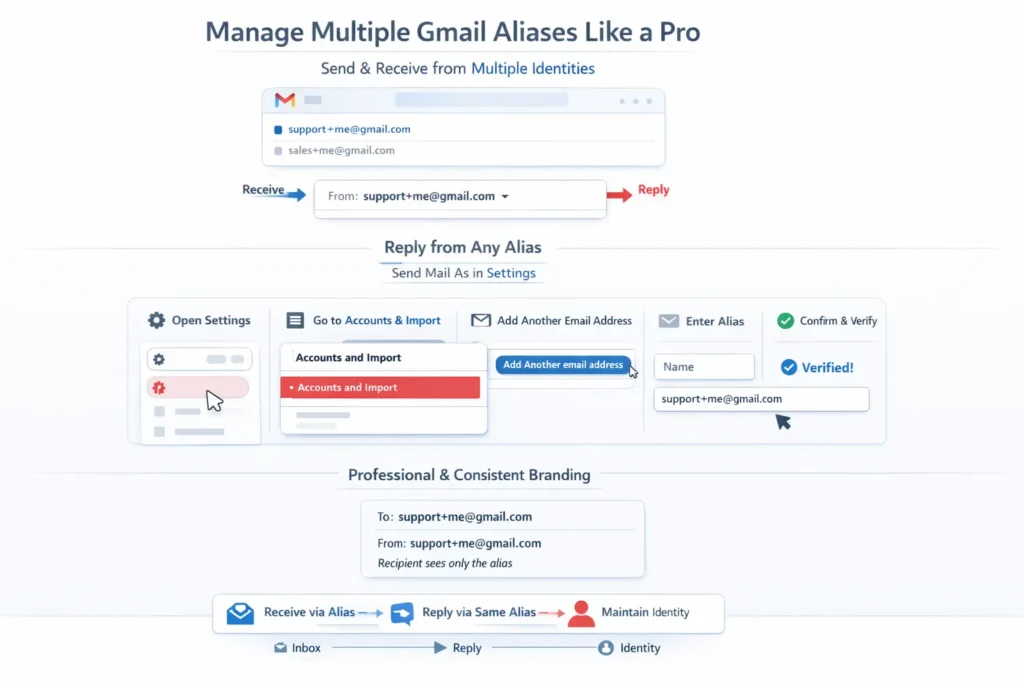
- Settings: Go to the “Accounts and Import” tab.
- Send mail as: Click “Add another email address.”
- Enter Alias: Type in your name and the alias address.
- Confirm: Follow the steps to verify (usually automatic for Gmail).
- Set Default: Choose to always reply from the sent-to address.
What is the “Dot” trick in Gmail?
The “Dot” trick is a feature where Gmail ignores any periods placed in your username. For example, h.a.s.a.n.u.r@gmail.com is identical to hasanur@gmail.com. You can use this to sign up for multiple accounts on the same website, as most sites see these as different addresses.
This is a powerful hack for sites that only allow one free account per email. You can sign up with h.a.s.a.n.u.r@, then ha.sanur@, then hasan.ur@. Every single one of those verification emails will land in your main inbox. It is a quick way to scale your use of a platform without needing new accounts.
However, some modern sites are catching on. Their systems now strip out dots before checking the database. If a site is “dot-aware,” this trick won’t work. But for most smaller sites or older forums, it is a perfect way to manage multiple profiles.
myname@gmail.comm.y.n.a.m.e@gmail.comm.yname@gmail.commy.name@gmail.com- (All go to the same place!)
Why is FreeMail.ai popular in 2026?
FreeMail is popular because it offers a “No-Click” experience for getting a temporary email address. It loads fast and doesn’t track your location. Users like it because it handles modern HTML emails well, showing buttons and images clearly without the risk of viruses.
In 2026, people are tired of complex tools. They want something that works the second they open the page. FreeMail.ai delivers on this. It also stays ahead of the blacklists by rotating its domains every few days. This makes it very reliable for bypassing blocks on popular retail and software sites.
The service is also mobile-friendly. Most people do their browsing on a phone now. A site that is easy to use on a small screen is a big win. You can copy the address with a single tap and switch back to your app. It makes the “Verification Loop” much less painful.
When should you avoid temporary emails?
Avoid temporary emails for anything that involves your money, your health, or your long-term identity. If you lose the password to a site and you used a burner email, you can never get back in. The “Forgot Password” link will go to a dead inbox that no longer exists.
You should also avoid them for social media accounts you care about. If Facebook or X thinks your account is a bot, they will ask you to verify your email. If your email was a 10-minute burner, your account is gone. Use your real Gmail or a permanent alias for these sites.
- Banking: Risk of losing access to funds.
- Medical: Private data on public servers. Any service handling health information should rely on HIPAA-compliant infrastructure rather than disposable inboxes.
- Job Apps: Employers can’t reach you for an interview.
- Shopping: You won’t get tracking info or receipts.
- School: Missing out on grades or alerts.
How to filter alias mail into specific folders?
Filter alias mail by using the “Labels” feature in Gmail to create a virtual folder system. Instead of all mail hitting your “Primary” tab, you can tell Gmail to send specific aliases to a side folder. This reduces “Inbox Fatigue” and helps you focus on what is important right now.
Think of it like a physical mailbox with different slots. One slot is for bills, one for letters, and one for junk. An alias tells the “post office” (Gmail) which slot to use. This is the only way to stay sane if you get more than fifty emails a day.
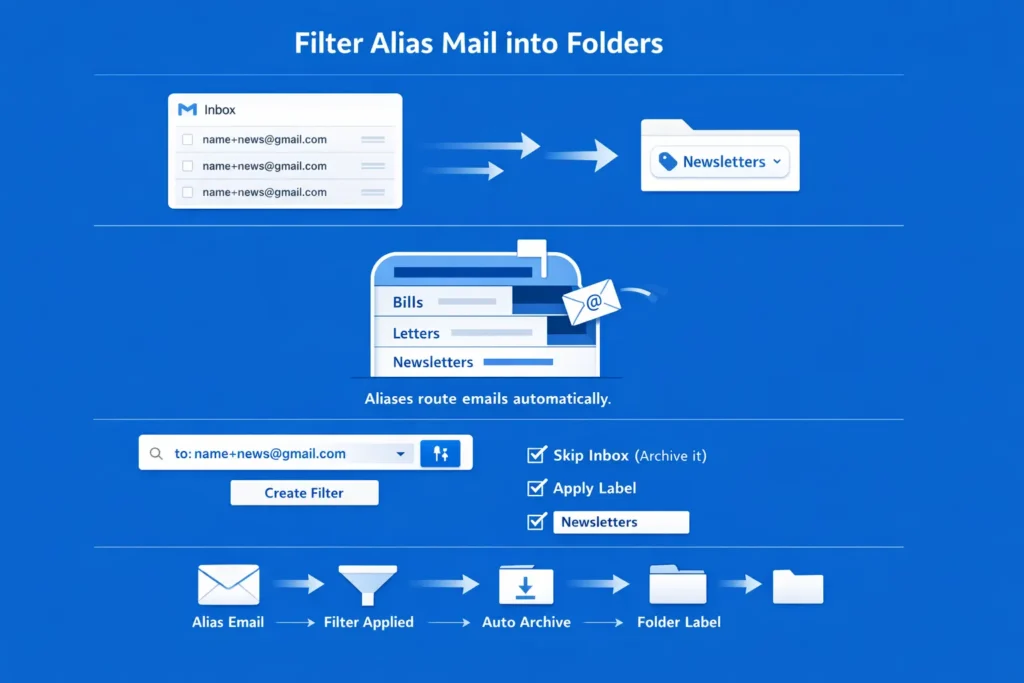
Steps to Auto-Archive Aliases
- Search: Type
to:name+news@gmail.comin the search bar. - Filter Icon: Click the “Show search options” icon.
- Create Filter: Click the button at the bottom.
- Action: Check “Skip the Inbox (Archive it)” and “Apply the label.”
- Choose Label: Create a new label like “Newsletters.”
What are the advanced uses for Gmail aliases?
Advanced uses for Gmail aliases include “Sourced Tracking” to see which companies sell your data. If you sign up for a site with name+sitename@gmail.com and you start getting spam for a different product sent to that same address, you know exactly who leaked your info.
This gives you “Data Evidence.” You can then choose to block that specific site or confront them about their privacy policy. It is a way to police your own digital life. Most people don’t realize how often their data is shared until they start using this “tagging” method.
You can also use them for “Priority Filtering.” Give your boss or your family a special alias like name+urgent@gmail.com. Set a filter so any mail to that address makes your phone beep or puts a star on the message. Everything else stays silent. This protects your time and your focus.
How to secure your temporary email use?
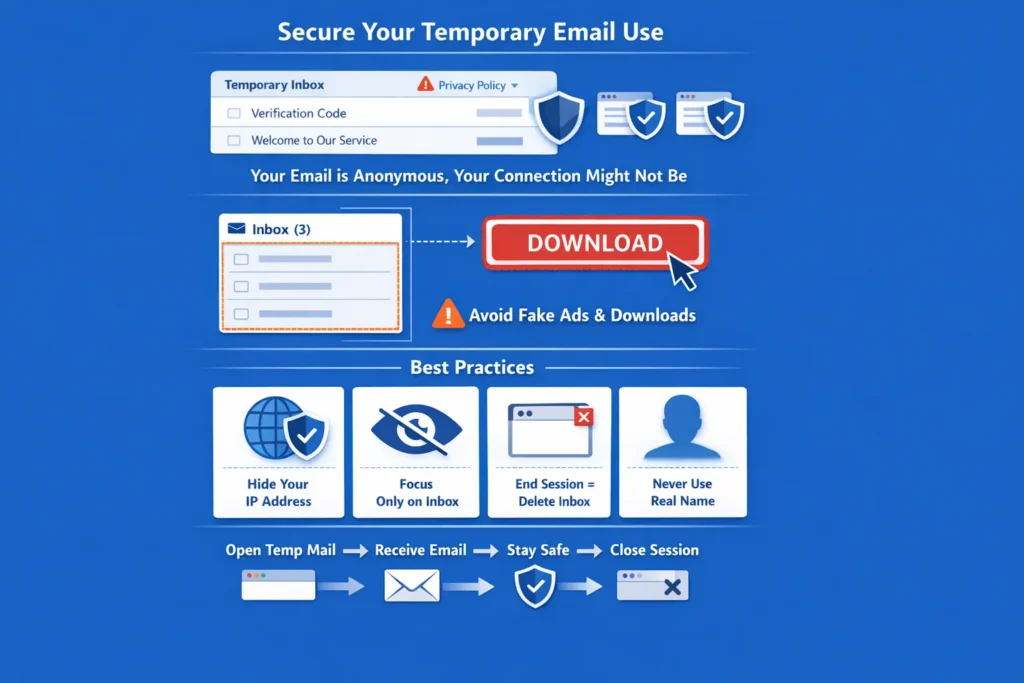
Secure your temporary email use by checking the “Privacy Policy” of the provider to see if they log your IP address. While the email is anonymous, your connection might not be. Use a browser that blocks trackers, like Brave or Firefox, when you use burner sites to ensure total privacy.
Also, be careful what you click. Some burner sites are full of “Fake Download” buttons. These are ads meant to trick you. Only look at the inbox section. Never download a file or an “extension” from a burner site unless you are 100% sure it is safe. Stick to well-known providers like temp Gmail.
- Use a VPN: Hides your home IP.
- Ignore Ads: Only look at the mail list.
- Close Tab: Delete the session when done.
- No PII: Never put your real name in the “To” name.
Will AI replace both aliases and temporary emails?
AI will likely merge both Gmail aliases vs temporary email into a single, automated privacy layer in your browser. By late 2026, we expect browsers to offer a “Hide My Email” button on every form. This AI will decide if a site is “Trustworthy” or “Spammy” and generate the right type of address for you.
You won’t have to think about plus signs or burner sites. The AI will handle the filtering, the expiration, and the verification codes. It will just ask you, “Do you want to hear from this site again?” If you say no, the email dies. If you say yes, it becomes a permanent alias. This “Zero-Effort” privacy is the next big step in web browsing.
Until then, we have to do it ourselves. Learning these tricks now gives you an edge. It keeps your data safe and your mind clear while the rest of the world struggles with a mountain of spam.
Conclusion
Both Gmail aliases and temporary email addresses serve useful but different purposes. Gmail aliases are ideal for organizing your inbox, tracking where messages come from, and managing long-term subscriptions. Temporary emails are better for privacy because they hide your real identity and disappear after short-term use. Choosing the right option depends on your goal. If you want control and organization, a Gmail alias works best. If you want anonymity and zero long-term contact, a temporary email is the smarter choice. Using both strategies together can significantly reduce spam while giving you better control over your digital footprint.