

You’re signing up for a service that you might need for more than just ten minutes, perhaps a weekend project or a beta test that lasts a few days. You want the privacy of a burner, but you also want the security of a password so that no one else can stumble into your temporary messages. It leads to a common question in 2026: Can you actually get a temporary email with password protection?
While the very definition of “temporary” usually implies a “no-strings-attached” experience, the landscape of digital privacy has evolved. Today, users are looking for a middle ground, something more secure than a public burner but less permanent than a full Google account. This guide explores how these password-protected systems work, why they are becoming a standard for “prosumer” privacy, and how to use them without leaving a permanent digital trail.
Do Temporary Emails Need Passwords?
Most standard temporary emails do not need passwords, as they are designed for instant, public access. However, premium “private” temporary services offer password protection to ensure that only you can view incoming verification codes. This added layer of security prevents unauthorized users or scripts from scraping your sensitive sign-up data.
The Risks of “Passwordless” Public Inboxes
If you use a common name like test123@provider.com, anyone else who types that same name can see your mail. In 2026, malicious bots constantly monitor these public-facing inboxes for 6-digit OTPs (One-Time Passwords). If you are verifying an account that has even a small amount of value, like a gaming profile or a tool subscription, a passwordless inbox is a significant security hole.
Why the “Private Inbox” Trend is Growing
Privacy-conscious users are shifting toward “Private Session” burners. These services generate a unique token or allow you to set a simple pin. This ensures that even if someone guesses your temporary username, they can’t see the content of your messages. It’s the perfect solution for when you need a temp gmail experience but with the locked-down security of a personal account.
How Temp Email Systems Work?
Temporary email systems work by routing mail to a volatile database rather than permanent storage. When password protection is added, the system encrypts the message at the server level. The content is only decrypted and displayed when the user provides the correct session key or password through a secure web interface.
Behind the Scenes: Session Keys and Encryption
In a standard system, the mail is stored as plain text. In a password-protected system, the server treats your “inbox” as an encrypted container. When you set a password, you are essentially creating a one-time cryptographic key.
Because these systems are still ephemeral, the “password” isn’t stored in a long-term user database. Instead, it lives in the server’s active memory (RAM). This is why if you forget the password to a temp email, there is no “Forgot Password” link, once the data is locked and the key is lost, the message is effectively destroyed. This “Zero-Knowledge” approach is a hallmark of high-end disposable mail providers in 2026.
Delivering the Verification Payload
Even with a password, the speed of delivery remains the priority. The system still uses WebSockets to alert you that a message has arrived. You’ll see a notification that says “1 New Encrypted Message.” Only after you enter your credentials does the system render the HTML, allowing you to click your verification link or copy your code.
Alternatives to Password-Based Temp Emails
If you find that setting a password for every burner is too much work, there are other ways to achieve the same level of security:
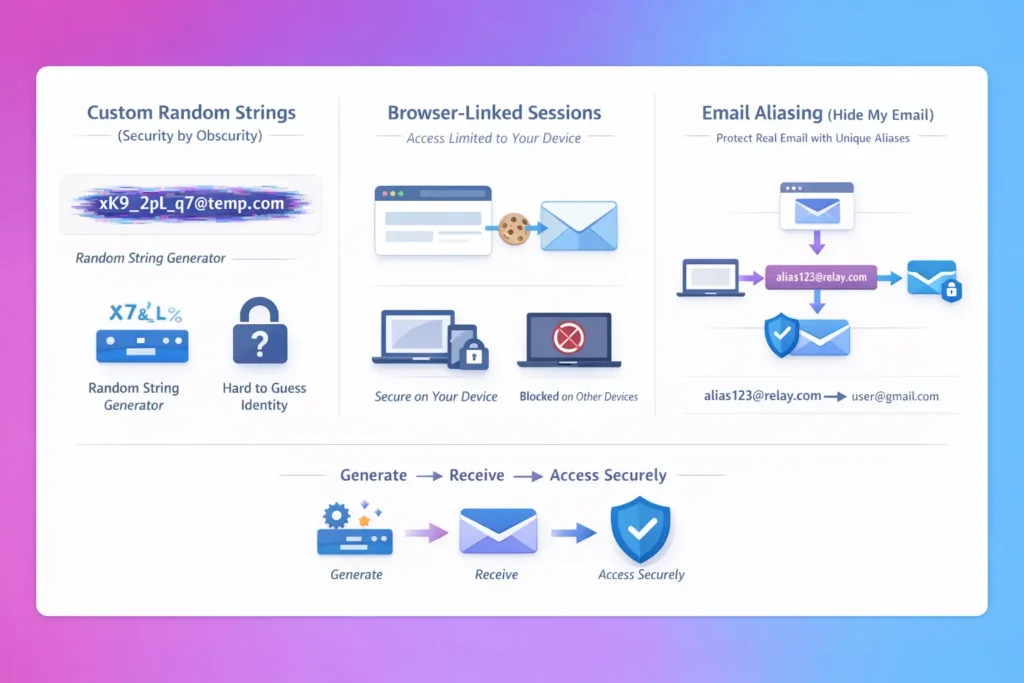
- Custom Random Strings: Instead of using
john@temp.com, use a temp password generator to create a string likexK9_2pL_q7@temp.com. Since no one can guess this address, it is “secure by obscurity.” - Browser-Linked Sessions: Some 2026 services link the inbox to your specific browser “cookie.” Only your physical device can open the inbox, removing the need for a typed password entirely.
- Email Aliasing: Using a “Hide My Email” feature allows you to have a unique address for every site that forwards to your real inbox. You use your real password to access your mail, but the website only ever sees the burner address.
Security Tips for Temporary Addresses
1. Never Reuse Your “Real” Passwords: If a temporary service asks you to set a password, do not use the same one you use for your bank or primary Gmail. Use a simple, unique string. Remember, the goal of a 10 minute mail is to isolate your data, not create new links to it.
2. Use a “Self-Destruct” Timer: Choose a provider that allows you to manually wipe the inbox the second you get your code. This is more effective than any password. If the data no longer exists, it cannot be hacked.
I once used a public burner to sign up for a crypto-news tracker. Within five minutes of getting my “Welcome” email, I noticed a second email in the same public inbox from a different sender trying to “reset” my password for that tracker. Someone was watching that public address in real-time.
I immediately switched to a password-protected temporary service. It added five seconds to my sign-up process, but it meant my verification code was for my eyes only. That was the day I realized “public” and “private” burners are two very different tools.
FAQs
Can I recover a temporary email password?
No. Most temporary services do not store your personal info or a recovery email. If you lose the password to your temporary inbox, the messages inside are lost forever. This is a security feature designed to ensure that data eventually vanishes completely.
Does Google provide a temporary email with a password?
Google does not offer a “disposable” service in the traditional sense. However, you can use their “Plus” addressing or “iCloud Hide My Email” (on iOS/macOS) to create aliases that are protected by your main account password.
Are password-protected temp emails free?
Many basic “public” services are free, but those offering private, encrypted inboxes with password protection often have a “Premium” tier or require you to view an extra ad to support the higher server costs associated with encryption.
Is it better to use a password or a random address?
For most users, a long, random address is enough. Unless you are receiving highly sensitive information, the chances of someone guessing a random 15-character string are nearly zero. Use a password only if you are using a very common or simple username.