

Many websites today refuse to accept temporary email addresses. They check the domain and instantly block anything that looks like a disposable inbox. But at the same time, you probably don’t want to give your real Gmail address to every website that asks for it.
That’s where disposable Gmail comes in. It gives you the credibility of a Gmail address while still acting like a temporary email. You can receive verification codes, access downloads, or test new services without exposing your primary inbox to spam, tracking, or future marketing emails.
What Is Disposable Gmail?
Disposable Gmail refers to a temporary, short-lived email address that utilizes the @gmail.com domain or a “Google-proxied” alias. It allows users to satisfy strict website registration requirements that block standard burner emails, providing a high-reputation gateway to receive verification codes while keeping their primary Google account completely private.
The Technical “Alias” Method
Google’s infrastructure inherently supports disposable-like behavior through “Sub-addressing.” If your email is user@gmail.com, you can use user+anything@gmail.com. While this isn’t a “fake” address, it acts as a disposable filter. You can give a different “plus” address to every site, then set a single rule in your Gmail settings to automatically delete any mail sent to those specific tags.
The “Proxy” and “Relay” Method
For true anonymity, a disposable mail relay is the preferred 2026 method. These services provide a temporary interface that looks like a Gmail inbox to the sender but isn’t actually hosted by Google. The email is intercepted by a “relay” server and displayed to you in an ephemeral browser session. This ensures there is zero technical link between the burner address and your actual identity or IP address.
Disposable Gmail vs. Temporary Email
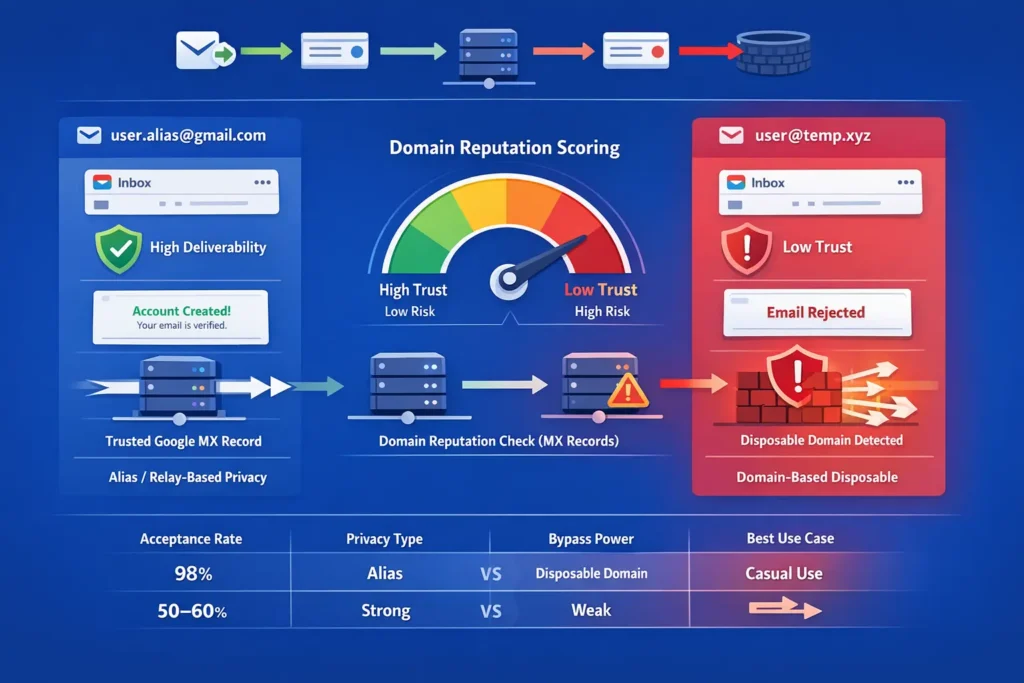
The difference lies in deliverability and trust. Standard temporary emails use generic, often-blacklisted domains (like .xyz or .info). Disposable Gmail uses high-reputation Google domains or aliases, ensuring a near 100% success rate on websites that normally block “burner” services, while still offering the same self-destructing privacy benefits.
Why Standard Burners Often Fail
In 2026, many websites use “Domain Reputation Scoring.” If you use a standard fake email generator, the site checks the domain’s MX record. If it’s a known disposable provider, your sign-up is blocked. Disposable Gmail bypasses this because the incoming mail server identifies the sender as a trusted Google-related entity.
Comparison: Trust vs. Anonymity
| Feature | Disposable Gmail | Standard Temporary Email |
| Acceptance Rate | 98% (High Trust) | 50-60% (Low Trust) |
| Privacy Type | Alias or Relay-based | Domain-based |
| Bypass Power | Works on Discord/OpenAI | Often blocked by SaaS |
| Best For | High-security sign-ups | Casual blog comments |
Benefits of Disposable Gmail
Using a disposable Gmail strategy isn’t just about being “sneaky”, it’s about data hygiene. In an age where data breaches are common, a temp gmail is your first line of defense.
- Zero Spam Accumulation: Since the address is ephemeral or easily filtered, your primary “Promotions” tab stays empty.
- Protection Against Data Breaches: If a site you signed up for gets hacked, the leaked email is a useless disposable address rather than your master Google ID.
- Bypassing “Gmail-Only” Requirements: It solves the frustration of being forced to provide a “reputable” email for a one-time task.
- Enhanced Tracking Prevention: It breaks the link between your shopping, browsing, and social media habits that advertisers use to build “Shadow Profiles.”
When to Use Disposable Gmail
A disposable Gmail isn’t something you need for every website. But in certain situations, it becomes one of the easiest ways to protect your inbox while still passing strict sign-up requirements. Here are some common scenarios where using a disposable Gmail makes the most sense.
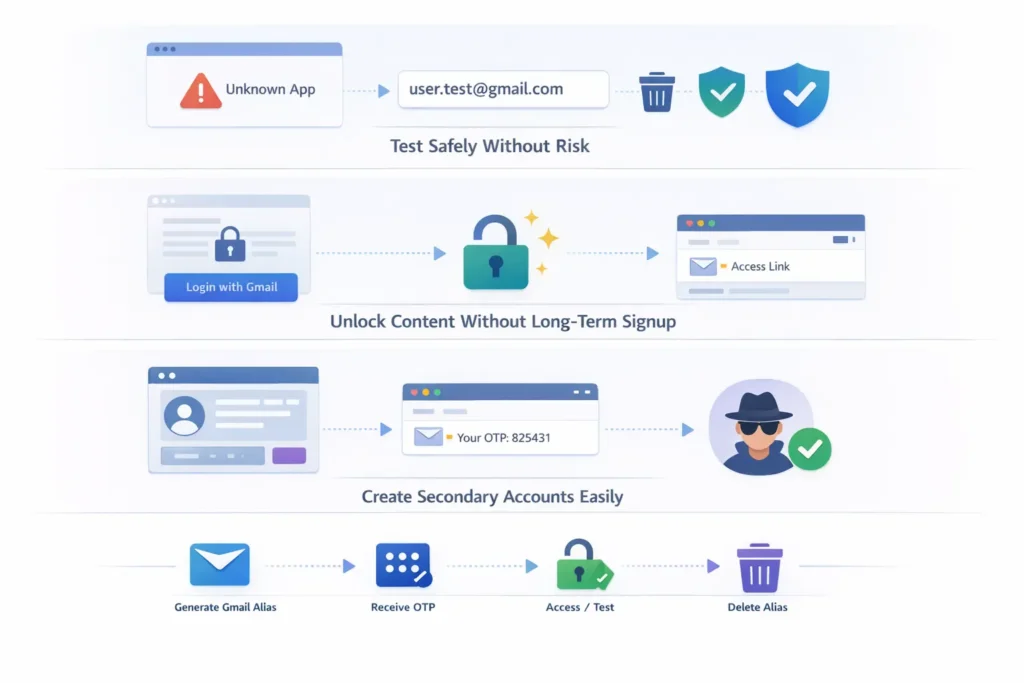
1. Testing “Unverified” Software
If you want to try a new browser extension or beta app but aren’t sure about their privacy policy, use a disposable Gmail. If the app turns out to be “scammy,” you can simply delete the alias.
2. Accessing Gated Content
Many 2026 publications require a “Gmail Login” just to read a single case study or download a PDF. A disposable address gives you access in seconds without signing you up for a lifetime of newsletters.
3. Creating “Stealth” Accounts
If you need a secondary social media or gaming profile for testing purposes, a disposable Gmail provides the high deliverability required for the initial OTP (One-Time Password) verification.
Best Disposable Email Tools in 2026
Choosing the right disposable email tool can determine whether a signup works instantly or gets blocked. Below are some of the most reliable disposable email tools people use in 2026.
1. Temp-Mail
- Very fast instant inbox generation
- No signup required
- Automatically generates a temporary address when you open the site
- Good for quick verification emails and OTP codes
2. 10 Minute Mail
- Creates a temporary inbox that lasts about 10 minutes
- Perfect for fast one-time signups
- Emails appear instantly in the browser
3. Guerrilla Mail
- Disposable inbox that can last up to 24 hours
- Supports attachments and custom addresses
- Often used for quick burner emails
4. Maildrop
- Simple temporary email service with no registration
- Clean inbox and fast delivery
- Useful for sign-ups and testing websites
5. EmailOnDeck
- Generates a temporary email in two quick steps
- Designed for fast account verification and privacy protection
FAQs
Can I use disposable Gmail for banking?
No. Never use a disposable or temporary address for financial or high-value accounts. If you lose your password or the site triggers a security check, you will not be able to access the inbox to recover your account.
How do I “Self-Destruct” a Gmail alias?
If you used the “plus” method (user+tag@gmail.com), you can “self-destruct” it by creating a filter in Gmail: To: user+tag@gmail.com -> Delete it. For proxy services, the address usually expires automatically after 10 to 60 minutes.
Do I need a phone number to use disposable Gmail?
Standard Google accounts require a phone number for verification. However, third-party disposable Gmail relays do not require any personal info or phone numbers, as they are providing a temporary interface rather than a full Google account.
Why do some sites still block my disposable Gmail?
If a site is using “Browser Fingerprinting,” they might recognize your device even if you change your email. For the best results, always use a private/incognito window alongside your disposable address.