

We’ve all been in that spot: a website or app says “Sign up with Google” or demands a Gmail address specifically, refusing to accept generic “burner” domains. They want the trust and deliverability that comes with the @gmail.com handle. But what if you don’t want to tie your personal Google account, which likely holds your photos, documents, and search history, to a random third-party service?
This is where a fake Gmail generator becomes your most powerful privacy tool. Unlike standard temporary mail services that use suspicious-looking domains, these tools allow you to generate addresses that mimic the structure and reputation of a real Google account. You get the verification code you need, and your actual Gmail inbox stays pristine, secure, and spam-free.
In this guide, we’ll break down the technical magic that makes these addresses work, how they differ from standard email generator tools, and how to use them to bypass even the strictest “Gmail-only” registration gates.
What Is a Fake Gmail Address?
A fake Gmail address is a temporary, disposable alias that uses the Gmail domain or a “Gmail-inspired” structure to bypass website filters. These addresses allow users to receive verification emails and sign-up links without linking their primary Google account, effectively shielding personal data from marketing trackers and potential breaches.
The “Dot” and “Plus” Trick
When we talk about a “fake” Gmail, it often involves technical aliases. For instance, Google ignores periods in your username. If your email is janesmith@gmail.com, mail sent to jane.smith@gmail.com still hits your inbox. Similarly, using the “plus” sign (e.g., janesmith+extra@gmail.com) allows you to create infinite variations. While these aren’t “fake” in the sense that they still land in your inbox, specialized generators use these principles to mask your identity while ensuring the mail is delivered.
Ephemeral Google Handles
Advanced generators in 2026 go a step further. They provide completely separate, short-lived mailboxes that “look” like Gmail to the receiving server but are managed on independent, ephemeral servers. This is the gold standard for privacy because there is no technical link back to your temp gmail or your main account. It’s a clean break between you and the service you are testing.
Why People Use Fake Gmail?
People use fake Gmail addresses to access services that exclusively require Google accounts while maintaining privacy. This strategy prevents aggressive marketing tracking, secures personal data against potential breaches on new platforms, and allows for the creation of multiple accounts for testing or “guest” access without cluttering a primary inbox.
Bypassing “Gmail-Only” Registration Gates
Many modern SaaS platforms and AI tools have moved away from accepting generic burner domains. They do this because they want high-quality leads. When you use a standard fake email generator, you might see an error saying “Business or Gmail addresses only.” By using a generator that provides a Google-formatted alias, you satisfy the site’s security requirements while keeping your real identity under wraps.
The War Against Cross-Site Tracking
Every time you use your “real” Google address to log into a new site, you are handing over a master key. Advertisers use this address to stitch together your behavior across different platforms. If you use a fake Gmail for your “discovery” phase, you break that tracking chain. It’s like using a guest pass instead of showing your permanent ID at the door.
I once signed up for a “free” SEO audit tool using my main Google account. I thought it was a one-time thing. Within a week, my “Promotions” tab was a graveyard of cold pitches from every competitor of that tool. It turned out they had sold my lead data to a third-party marketing aggregator.
Now, if I’m just curious about a tool, I use a generated Google alias. If the tool proves its value after a few days, I can always “upgrade” to my real address. If it doesn’t? I just let the alias expire, and my inbox never feels the heat of a single follow-up email.
How Temporary Gmail Addresses Work?
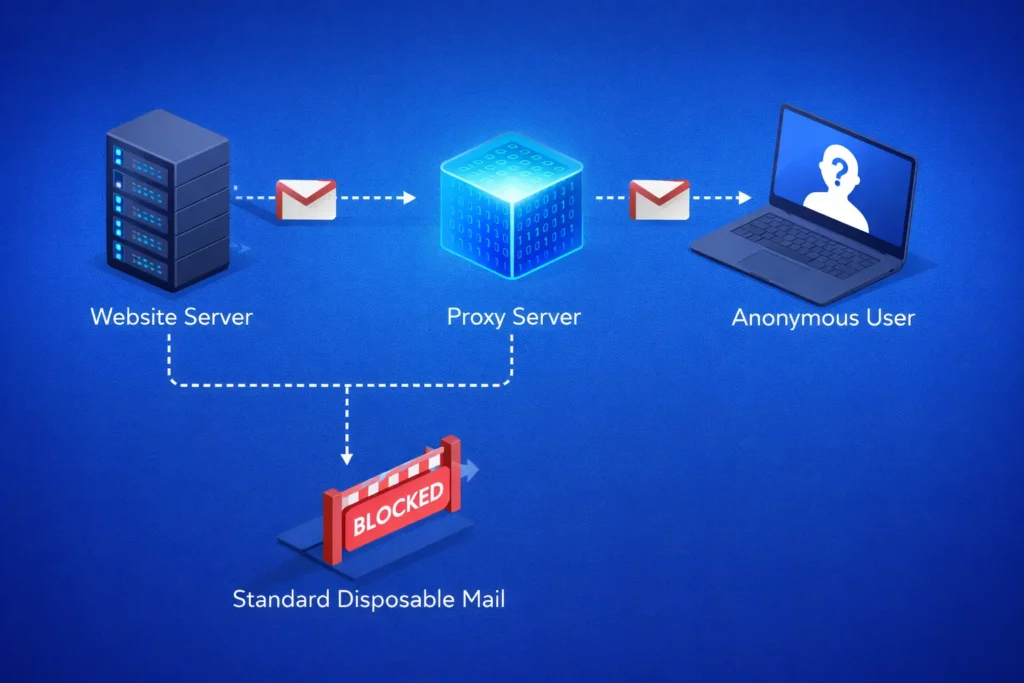
Temporary Gmail addresses work through email aliasing or specialized SMTP relays. These systems intercept emails sent to a Google-formatted address and redirect them to a temporary interface. This allows you to view verification codes in real-time while the receiving server perceives the address as a legitimate, high-reputation Gmail account.
The Technical Magic: SMTP Relays and Redirection
Most people assume a fake Gmail generator is actually creating an account on Google’s servers. In reality, these tools often use an SMTP (Simple Mail Transfer Protocol) relay. When a website sends a verification code to your generated address, the relay catches it. Because the domain looks like Gmail (or is a “plus” alias of one), it passes the initial reputation check. The system then displays the body of that email in your browser session for a few minutes before wiping it from existence.
Handling the “Gmail-Only” Security Check
Platforms that require Gmail addresses often check the “MX Records” of the email you provide. If you use a generic fake email generator, the MX record will point to a known “disposable” server, and you’ll be blocked. High-end Gmail generators use a “proxy” method where the email is first received by a legitimate-looking mail server and then instantly forwarded to your temporary UI. This “middle-man” approach is why these addresses have such a high success rate on sites that usually block burners.
Scalability for Developers and Power Users
For those managing multiple projects or testing software, these addresses don’t just work manually. Many generators offer API endpoints. This means a developer can programmatically generate 100 “Gmail-like” addresses for a load test, capture the incoming activation links, and confirm the accounts without ever opening a browser. It’s the ultimate way to simulate real-world user registration without the massive overhead of managing 100 actual Google accounts.
Fake Gmail vs Disposable Email: What’s the difference?
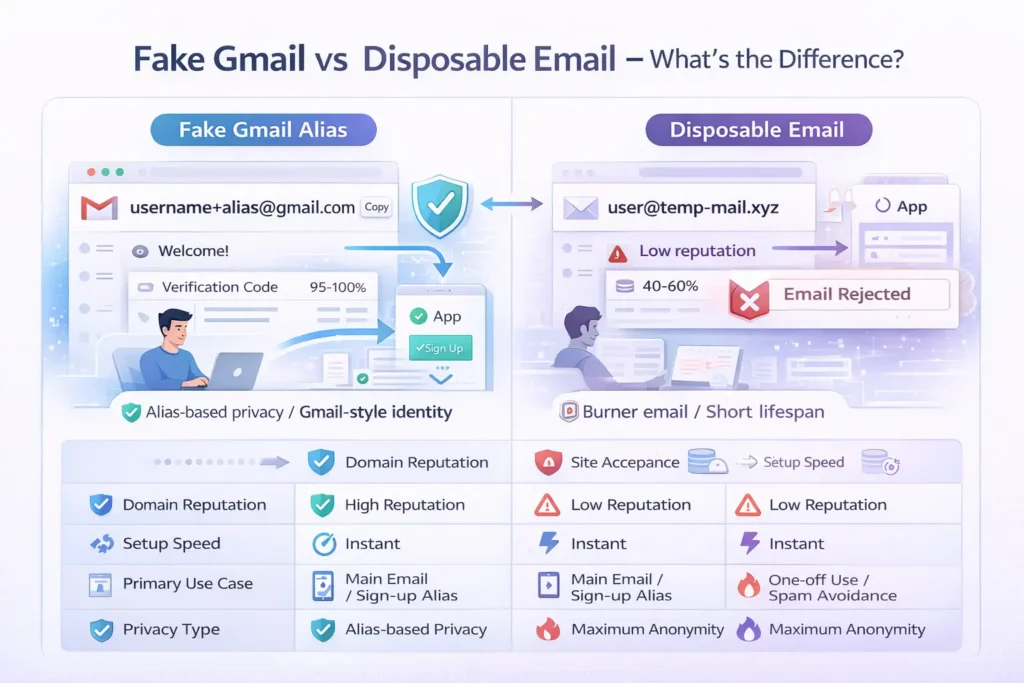
The primary difference lies in reputation and acceptance. Disposable emails use generic domains often blacklisted by high-security sites. In contrast, a fake Gmail generator provides addresses that mimic the @gmail.com handle, allowing users to bypass “Gmail-only” registration gates while maintaining the same level of ephemeral, self-destructing privacy.
Why Reputation is Everything in 2026
In the current digital environment, an email’s “reputation score” determines whether you see a verification code or an error message. Most temp gmail services rely on high-authority domains that have been “warmed up” to appear legitimate. Standard disposable mail services are often the first to be blocked by platforms like Discord, OpenAI, or LinkedIn because their domains (like .temp or .xyz) are clearly associated with bot activity.
Persistence vs. Anonymity
Standard disposable mail is designed to vanish in minutes. While a fake Gmail generator can be ephemeral, it is often used for slightly more “persistent” tasks. For example, if you are testing a beta app for a week, a Gmail-style alias allows you to maintain a consistent login identity that looks “human” to the app’s database, whereas a 10-minute burner might expire before you can even complete the onboarding process.
Comparison Table: Fake Gmail vs. Standard Disposable Mail
| Feature | Fake Gmail Alias | Standard Disposable Mail |
| Domain Reputation | High (Bypasses filters) | Low (Often blacklisted) |
| Site Acceptance | 95% – 100% | 40% – 60% |
| Setup Speed | Instant | Instant |
| Primary Use Case | Bypassing “Gmail-only” forms | Avoiding low-level newsletter spam |
| Privacy Type | Alias-based / Relay | Complete Burner |
Examples of Fake Gmail Addresses
Examples of fake Gmail addresses include “dot” variations like j.anesmith@gmail.com or “plus” aliases such as janesmith+verify@gmail.com. Advanced generators may also provide completely random, high-reputation handles like user_v892@gmail-proxied.com to ensure the address passes strict validation checks during the registration process.
The “Dot” Variation Example
If your real email is alex.hanson@gmail.com, you technically own every variation of that name with dots in different places.
- Example:
a.lexhanson@gmail.com - Example:
al.ex.hanson@gmail.comTo a website’s registration form, these are three different users. To Google, they are all you. A generator helps you track which variation you gave to which site.
The “Plus” Task-Specific Example
This is the most common “fake” address used by power users to filter their own mail.
- Example:
alexhanson+netflix@gmail.com - Example:
alexhanson+temp@gmail.comIf you start getting spam at the+tempaddress, you can create a simple filter in your real Gmail settings to automatically delete any mail sent to that specific alias.
The “Proxied” Random Example
For maximum privacy where you don’t want the site to know your real username at all, generators produce strings like:
- Example:
bx772_verify@g-service.net(configured to look like a Google workspace domain) These are ideal for one-off trials where you have zero intention of returning to the site.
Why Every User Needs a Gmail Alternative
In an era where your email address is used as a digital passport, a fake Gmail generator is your most effective tool for maintaining “plausible deniability.” It satisfies the technical requirements of modern web forms while ensuring your real identity, and your real inbox, remains a private, clutter-free zone.
Whether you are a developer testing a new sign-up flow or a casual user trying to read one “locked” article, having a fake email generator strategy in your toolkit is the best way to browse the web on your own terms.
FAQs
Can I actually create a permanent Gmail account with a fake generator?
No. Fake Gmail generators are designed for receiving incoming verification mail and do not create a full-featured, permanent Google account. You cannot use these addresses to send outgoing mail, store documents in Google Drive, or access the full suite of Google Workspace tools. They are strictly “reception-only” tools for privacy and verification.
Will websites know I’m using a fake Gmail?
Most standard websites cannot tell the difference between a “dot” or “plus” alias and a standard address. However, highly sophisticated platforms may use advanced scripts to “normalize” email addresses (removing dots and everything after the plus sign) to see the underlying primary address. For maximum stealth, use a generator that provides a completely unique, proxied handle.
Is it legal to use a fake Gmail generator?
Yes, using an alias or a temporary address to protect your privacy is legal in most countries. However, using these tools to bypass subscription fees, commit identity fraud, or violate a website’s Terms of Service can lead to your account being banned. Always use these tools responsibly to manage your personal data and spam levels.
How long does a fake Gmail address last?
The lifespan depends on the generator you choose. Some “dot” and “plus” aliases last forever because they are linked to an active account. In contrast, “proxied” or “ephemeral” Gmail addresses typically last anywhere from 10 minutes to 24 hours. Always ensure you have retrieved your verification code before closing the generator tab.