

Your Gmail address is connected to almost everything in your digital life. It’s tied to your bank, social accounts, subscriptions, and personal files. Giving that address to every website that asks for it is like handing out the key to your online identity.
That’s why many people now use a Gmail burner email. It works like a disposable shield between you and the internet. You can receive verification links, downloads, and trial access without exposing your real inbox. Once the task is done, the burner address becomes a dead end for spam, tracking, and unwanted marketing emails.
This guide will show you how to master the burner strategy to reclaim your inbox and your privacy.
What Is a Burner Email?
A burner email is a temporary, single-use address designed to protect your primary identity. It allows you to receive verification codes and activation links without revealing your permanent email. Once the task is complete, the burner address is discarded, effectively cutting off all future spam and third-party tracking from that source.
The Evolution of “Burner” Culture
The term “burner” originally came from the world of disposable phones, used for a single purpose and then thrown away. In 2026, we’ve applied this to our digital identities. A temp gmail burner is specifically prized because it carries “high deliverability.” While many sites block generic “burner” domains (like .xyz or .temp), they almost always trust a Gmail-based address, making it the ultimate tool for bypassing stubborn registration forms.
How a Gmail Burner Differs from a Regular Account
A regular account is built for longevity and storage. A burner is built for evanescence. Whether it’s an alias that forwards to your main account or a proxied inbox that exists for only 10 minutes, the goal is the same: to create a “dead end” for marketers. You get the value (the download, the code, the access) and they get a non-responsive, ephemeral address.
Gmail Burner vs. Disposable Email
The difference lies in “Domain Authority.” Standard disposable emails use low-reputation domains that are often blacklisted by security-conscious sites like LinkedIn or Discord. A Gmail burner uses the @gmail.com handle or a high-trust relay, ensuring you pass through “Anti-Bot” filters that usually block standard disposable services.
Why Google Reputation Matters
Websites use “Email Risk Scoring” to decide if you are a real human or a bot. Because billions of legitimate users use Gmail, it is considered the “gold standard” of reputation. When you use a standard disposable mail, you are often flagged as a “low-intent” or “high-risk” user. Using a Gmail-formatted burner allows you to “hide in plain sight” by looking like a standard user while maintaining total anonymity.
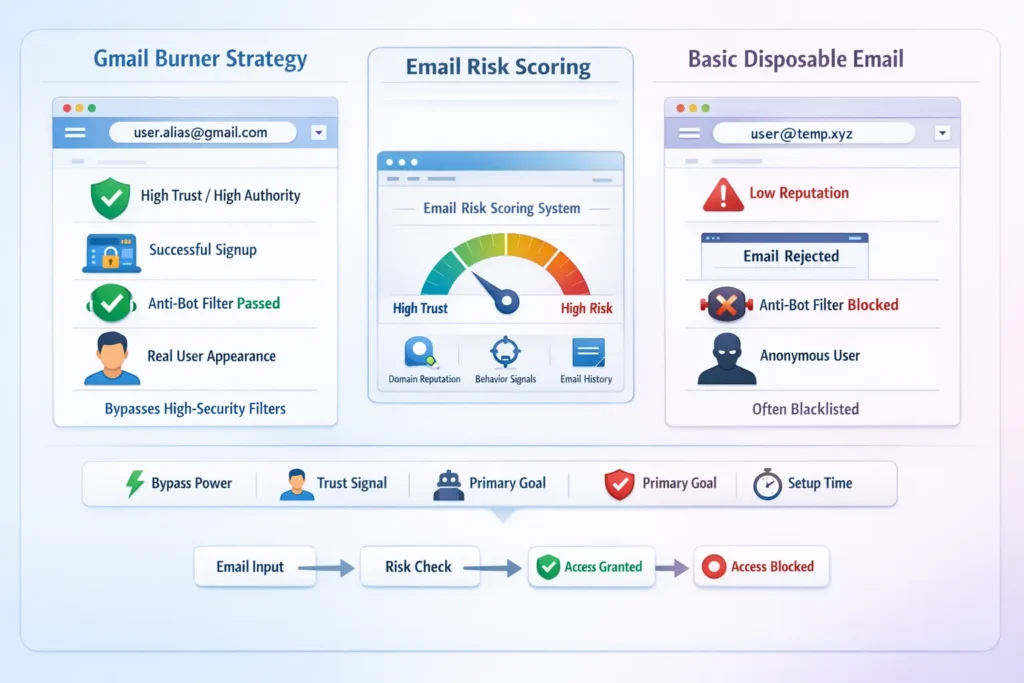
Comparison: Burner Strategy vs. Basic Disposal
| Feature | Gmail Burner Strategy | Basic Disposable Mail |
| Bypass Power | Extremely High | Moderate to Low |
| Trust Signal | Real User Profile | Bot/Temp Profile |
| Primary Goal | Privacy on High-Security Sites | Avoiding low-level spam |
| Setup Time | Instant (with right tools) | Instant |
When to Use a Burner Gmail
1. One-Time “Gated” Downloads
Need that industry report or a “free” e-book? Sites usually demand an email just to send you a download link. Use a burner Gmail to grab the PDF and avoid the 12-week “nurture sequence” that usually follows.
2. Testing New AI Tools
In 2026, new AI platforms launch daily. Many are experimental and may not have robust security. Using an email alias creator to make a burner ensures that if the AI startup suffers a data breach, your primary credentials remain safe.
3. Public Wi-Fi & Event Sign-ups
Conferences and airport Wi-Fi often require an email for access. These are notorious for sharing lists with local “partners.” A burner Gmail satisfies the login gate without letting local advertisers follow you home.
Privacy Benefits of the Burner Strategy
- Breaks the Tracking Chain: Advertisers use your email as a “Unique Identifier” to link your behavior across the web. A burner breaks this chain, making you invisible to cross-site tracking.
- Reduces Attack Surface: By not using your real email, you reduce the chances of your PII (Personally Identifiable Information) appearing in “leaked” databases.
I recently used a burner Gmail to sign up for a “free trial” of a fitness app. A month later, I checked the data breach logs on Have I Been Pwned. That fitness app had been breached, and thousands of emails were leaked, including the burner I used. Because I used a burner, the hackers got an address that had already expired and was linked to nothing. My real bank accounts, social media, and work files stayed completely safe. It was the best five seconds of “extra work” I’ve ever done.
FAQs
Can I turn a regular Gmail into a burner?
Yes, using the “Plus” trick (myname+burner@gmail.com). However, this still links to your main account. For true privacy, it is better to use a dedicated burner tool that provides a proxied interface.
Are Gmail burners free?
Most basic burner tools are free. However, in 2026, “Premium” burners that can bypass advanced anti-bot measures (like Cloudflare’s deepest checks) sometimes require a small subscription or a “pay-as-you-go” model.
Is it against Google’s rules to use a burner?
Google itself provides alias features, so they generally don’t mind. However, individual websites might have Terms of Service that prohibit “disposable” emails. Always check the site’s rules if you are signing up for something high-stakes.
How long does a burner last?
Depending on the tool, a burner can last anywhere from 10 minutes to a few days. If you are using an alias-based burner, it lasts until you decide to “delete” that specific alias.