

Temporary email for app testing has become an essential tool for modern development teams that need to validate user workflows quickly and efficiently. When building applications, developers must constantly test critical features such as user registration, email verification, password resets, notifications, and onboarding flows. Using a regular email account for these tests quickly becomes messy and difficult to manage. Temporary email services solve this problem by generating disposable inboxes that allow teams to simulate real user activity without polluting their primary mailboxes.
By creating unique addresses instantly, developers can run automated QA tests, CI/CD pipelines, and load testing scenarios at scale. These temporary inboxes help teams verify that transactional emails, verification codes, and system alerts are delivered correctly. As software testing becomes more automated in 2026, disposable email tools and APIs play a key role in ensuring that applications deliver reliable email functionality across real-world conditions.
What is a temporary email for app testing?
Temporary email for app testing provides a short-lived, functional inbox that developers use to verify email-based features in a software product. These addresses do not require a permanent account and usually expire after a set time. They help teams simulate real-world signups and check that automated triggers work as planned.
Testing a new app requires high speed. You cannot wait five minutes to set up a new Gmail account for every test case. Disposable email services allow you to generate a new address in a single click. This speed lets you run hundreds of test cycles in a single afternoon. It also prevents “data pollution” in your primary work account.
For most teams, these tools are about isolation. When you test a “Welcome” sequence, you want to see exactly what the user sees. You want to check the layout, the links, and the delivery speed. A burner email gives you a fresh start every time. You don’t have to worry about old filters or labels hiding your test results.
| Feature | Real Email Account | Temporary Test Email |
| Setup Time | 5-10 minutes | Instant |
| Lifespan | Permanent | Minutes to Hours |
| Privacy | Low (Linked to you) | High (Anonymous) |
| API Access | Limited/Complex | High/Developer Friendly |
| Cost | Usually Free/Limited | Free or Cheap for Bulk |
Why do developers need disposable addresses for QA?
Developers need disposable addresses to verify that automated system alerts and user life-cycle emails reach their target correctly. These tools prevent a single mailbox from being flooded with thousands of test messages. They also allow for “parallel testing,” where multiple team members check the same feature using different unique addresses.
Imagine a team of ten people all testing a signup form. If they all use their own work emails, their inboxes become useless. They will lose track of real client mail among the test alerts. A temporary mail service gives each tester their own bucket. This keeps the workspace organized and reduces the stress of managing test data.
It also helps with “Edge Case” testing. You can test what happens when a user signs up with a long name, a name with special characters, or a very long domain. You can create these “weird” emails instantly to see if your code breaks. This is much harder to do with a standard email provider that has strict rules on what an address can look like.
- Avoid Spam: Keep your personal and work mail separate from test data.
- Scale Tests: Create 500 accounts for a load test in seconds.
- Check Formatting: See how your HTML templates look on different domains.
- Test Unsubscribe Flows: Ensure that clicking “Unsubscribe” actually works.
- Verify Speed: Measure how long it takes for a code to land in the inbox.
How does it speed up the dev cycle?
It removes the “Account Creation” bottleneck from your workflow. In the past, QA teams had to maintain a list of “test accounts” and clear them out manually. Now, you just generate a new one and let it die when the test is done. This “ephemeral” approach fits perfectly with modern Agile and DevOps practices.
Can you use temporary email for automated testing?
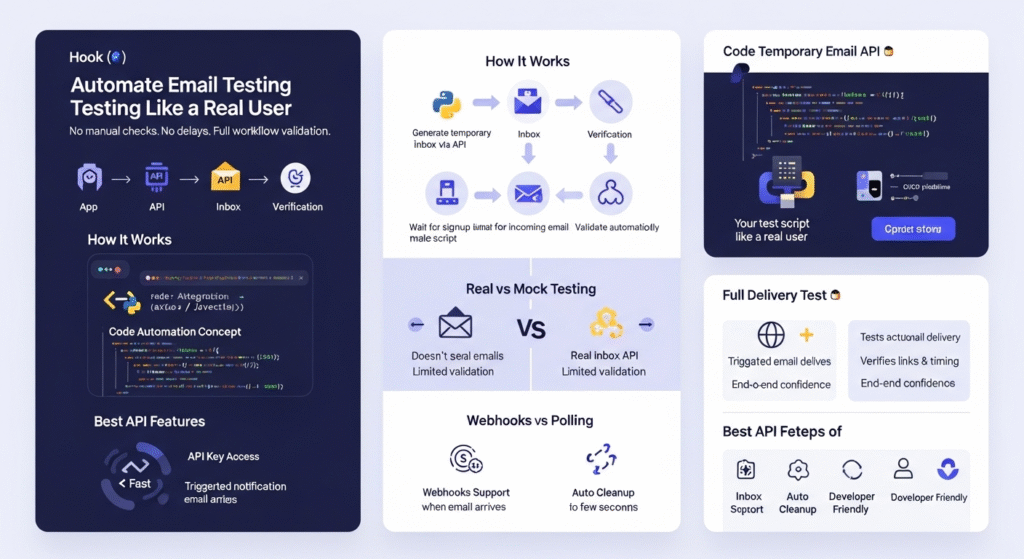
You can use a temporary email for automated testing by integrating a burner mail API into your Python or JavaScript test scripts. This allows your code to create an inbox, wait for a message, and extract verification links automatically. It removes the need for manual checks and makes your CI/CD pipeline much faster.
Automation is the goal for any serious tech team. When you use an API, your test suite acts like a real user. It goes to your site, signs up, and then “checks” the email. The API lets your script read the text of the email to find a six-digit code or a “Magic Link.” If the code matches, the test passes.
This is much more reliable than using a “mock” service. A mock service just pretends to send an email. A temporary email API actually tests the whole trip. It verifies that your server sent the mail and that it could travel across the web. This gives you real confidence that your users will get their mail.
Which APIs work best for QA teams?
Look for APIs that offer webhooks. A webhook tells your script the moment a new email arrives. This is faster than “polling,” where your script asks “Is it there yet?” every two seconds. Services like Mail.tm or MailSlurp are popular in 2026 for this reason.
- Select a provider with a stable API.
- Generate an API key in your dashboard.
- Use a library like
axiosorrequeststo call the service. - Parse the JSON response to find the link you need.
- Clean up by deleting the test account via code.
How to test password reset flows safely?
To test password reset flows safely, use a unique temporary email for every reset attempt. This ensures that you are checking the specific “token” generated for that session. It also prevents old password links from confusing your test results or creating a security risk in your staging environment.
Password resets are a high-risk part of any app. If the link is broken, your users are locked out. If the link doesn’t expire, your app has a hole. By using a burner email, you can check that the link works once and then fails the second time. You can also verify that the “From” address looks professional and isn’t being flagged as spam.
Why is isolation key for security tests?
Isolation prevents “Cross-Pollination” of sessions. If you use the same test email for five different password resets, you might accidentally click a link from an old test. A temporary address is a “Clean Room.” It only holds the data for the current test. This makes your results much more accurate and easier to trust.
What are the risks of using burner emails in dev?
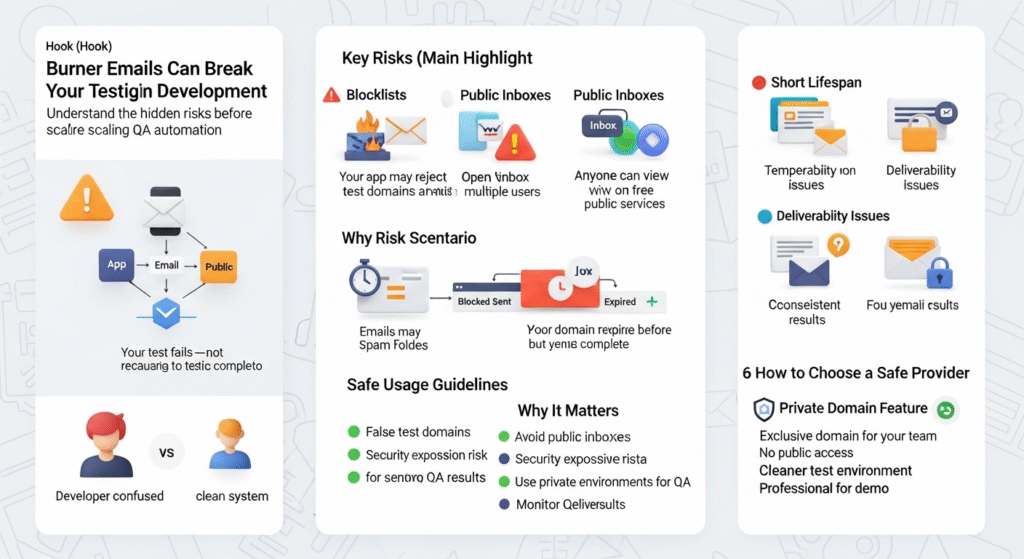
The risks of using burner emails include being blocked by your own firewall and losing access to accounts you might need later. Many sign-up forms use “Blacklists” to stop fake accounts. If your app blocks these domains, your tests will fail. You must “Whitelist” your test domains to ensure your QA team can work.
Another risk is “Public Inboxes.” Some free services show the mail to anyone who has the address. If you are testing with real user data or sensitive secrets, you should never use a public tool. Always use a private, paid service for any test that involves sensitive info.
- Blocklists: Your app might reject the email as “Invalid.”
- Public Access: Others might see your test links.
- Short Lifespan: The email might vanish before you finish a long test.
- Deliverability: Some test domains have a poor reputation and go to spam.
How to choose a safe provider for your team?
Check for a private domain feature. This gives your team a domain that no one else can use. It prevents “noise” from other users of the service and makes it much harder for someone to guess your test addresses. It also looks more professional when you are showing a demo to a client.
How do temporary emails improve load testing?
Temporary emails improve load testing by allowing you to simulate thousands of “Unique Active Users” (UAUs) at once. Most apps limit how many accounts can share an email. To test how your server handles 10,000 new signups, you need 10,000 unique emails. A generator API is the only way to do this at scale.
During a load test, you want to see if your mail server can handle the pressure. If you send 5,000 emails in one minute, will they all arrive? Or will your mail provider block you? Using disposable addresses helps you find these limits before you launch a major marketing campaign.
| Load Test Phase | Action | Purpose |
| Warm-up | Generate 100 emails | Check base delivery speed |
| Peak Load | Send 5,000 emails | Test server CPU and memory |
| Soak Test | Send 500 emails/hour | Check for slow memory leaks |
| Stress Test | Send 20,000 emails | Find the “break point” of the system |
How to bypass “Disposable Email” blocks during testing?
To bypass blocks, use a service that offers “Residential” or “Private” domains that aren’t on the major blacklists. You can also temporarily turn off your “Burner Detection” feature in your staging environment. This allows your QA team to work without fighting the security filters built for real users.
Blacklisting is a game of “Whack-a-Mole.” As soon as a domain becomes popular for testing, it gets blocked. If you are a developer, the best move is to have a “Test Mode” flag in your code. When this flag is on, the app accepts any email from a specific list of domains. This keeps your production security high while keeping your dev work smooth.
Why do some sites block these emails?
Sites block them to stop bots and prevent people from creating multiple accounts to cheat on promos. For your own app, you want this feature on. But for your dev team, you want a way around it. It is a balance of security and usability.
- Step 1: Identify the domain of your test tool.
- Step 2: Add that domain to your app’s “Allowed” list.
- Step 3: Disable the “MX Record” check for test environments.
- Step 4: Use a custom domain for your QA team.
What is the difference between real and temporary test accounts?
The difference lies in ownership and data persistence. A real account is tied to a person and stays in the database forever. A temporary account is built for a specific test case and can be wiped once the test passes. Real accounts are for “User Behavior” studies; temporary accounts are for “Feature Verification.”
If you want to see how a user interacts with your app over a year, use a real email. If you just want to see if the “Delete Account” button works, use a temporary one. Most teams use a mix of both. They have 10 “Gold Standard” accounts for long-term tests and thousands of throwaway ones for daily coding.
Future of automated email testing in 2026
In 2026, we expect to see “Self-Healing” test scripts that can handle changes in email layouts automatically. AI will likely manage your test mailboxes, identifying if a change in the “Welcome” mail was intended or a bug. We also see more services offering “Visual Testing” for emails, which checks the pixel-perfect design of every message.
The web is getting faster, and testing must keep up. We will see more “Real-Time” email verification where the test script doesn’t even have to wait. It will “listen” to the server’s outgoing traffic directly. This will make the dev cycle even tighter, helping teams go from “Code” to “Live” in minutes rather than hours.
Conclusion
Temporary email for app testing gives developers a fast and scalable way to verify email-driven features without relying on permanent inboxes. By generating disposable addresses, QA teams can test registration flows, password resets, notifications, and automated alerts in isolated environments. This approach keeps test data organized, speeds up development cycles, and improves the reliability of automated testing pipelines. As applications become more complex and testing moves deeper into CI/CD workflows, temporary email tools will continue to play a crucial role in building stable, secure, and user-friendly software.