

Disposable email addresses have become an important tool for anyone who wants to keep their inbox organized and protect their online privacy. Every time you register for a website, download a resource, or unlock gated content, you are usually required to submit an email address. Over time, these small sign-ups can fill your primary inbox with newsletters, promotional offers, and unwanted messages.
A disposable email address solves this problem by acting as a temporary buffer between your real inbox and the internet. Instead of sharing your personal email, you can generate a short-term address that receives messages instantly and can be discarded after use. This makes it useful for one-time registrations, verification emails, or quick trials.
In this guide, you’ll learn what disposable email addresses are, how they work, why people use them, and when they are safe to rely on. We’ll also explore tools such as FreeMail, which are expected to simplify temporary email usage in the near future.
What is a disposable email address?
A disposable email address is a temporary tool that lets you receive mail without using your permanent account. It serves as a middleman for verification links or one-time codes. These addresses usually expire after a set time, such as ten minutes or an hour, which keeps your personal data safe from future spam.
Using these addresses has become common for people who value their online privacy. When you visit a new site, they often ask for an email to let you see content. If you give them your real address, they might sell it to marketers. A throwaway address solves this. It gives the site what it wants but keeps your real inbox empty.
Most people call these “burner emails.” If you want to understand how disposable emails work with Gmail addresses, you can read about using a Gmail burner email. You do not need to provide your name, phone number, or physical address to get one. This anonymity is the core reason they are so popular. You simply go to a site like FreeMail.ai, grab the generated string of text, and paste it into the sign-up box.
The mail that arrives there is visible only to you during that session. You can click the links inside the email to verify an account. Once you close the tab, that email path usually breaks. This prevents companies from tracking your behavior across different platforms. It is a simple way to take back control of your digital footprint.
| Feature | Primary Email | Disposable Email |
| Lifespan | Permanent | Minutes to days |
| Privacy | Low (linked to identity) | High (anonymous) |
| Spam Risk | High | Zero |
| Best Use | Banking, Work, Family | Free trials, Downloads, Coupons |
| Setup Time | Several minutes | Instant |
How does a disposable email address work?
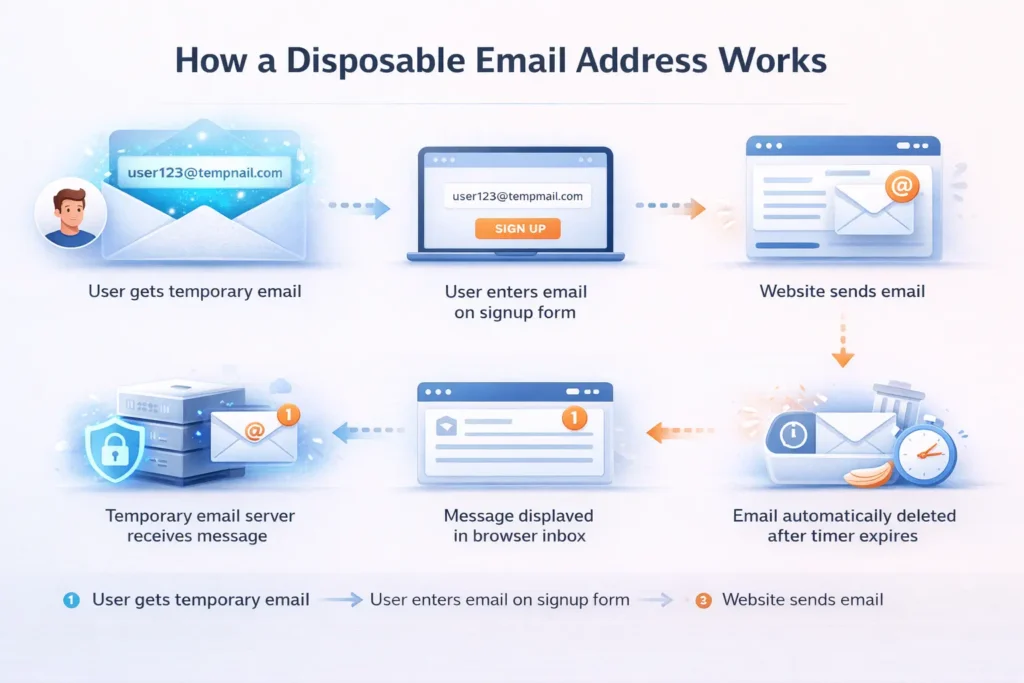
A disposable email address works by creating a temporary mailbox on a server that accepts incoming mail for a specific domain. The service generates a random username and pairs it with an active domain name. When a sender hits “send,” the message routes to this temporary server and shows up in your browser window.
The tech behind this is straightforward but clever. The provider owns several web domains. They set up their mail servers to catch every message sent to those domains. Instead of checking if a user exists first, the server just displays the mail to whoever has the right session ID or URL. This is why you do not need a password for most temporary services.
Most services use a “catch-all” setup. This means any text before the “@” symbol will work. For example, if the domain is temporary.com, you could use pizza123@temporary.com. The server will see that message and put it in a temporary folder for you.
Here is the typical path a message takes:
- You copy the random address from the provider.
- You paste it into a website’s registration form.
- The website sends a confirmation email.
- The provider’s server receives the data.
- The server displays the text and links in your browser.
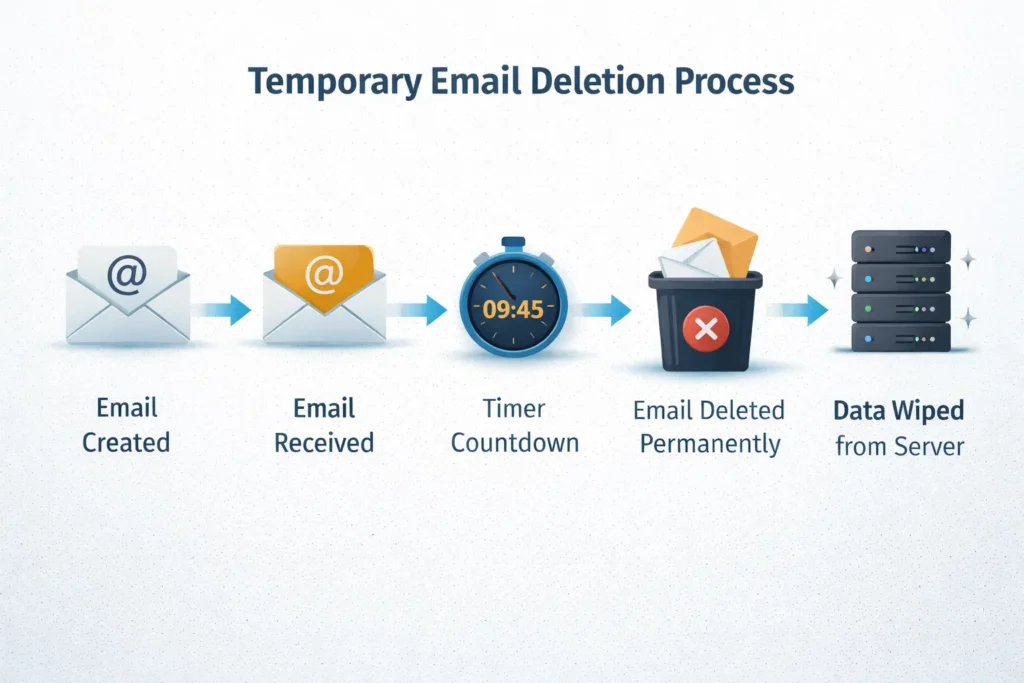
- The system deletes the message after a timer runs out.
This process happens in real-time. There is no delay like you might see with old-school email clients. Because these servers handle millions of messages, they have to be fast. They do not store your data long-term. Storage is expensive, so they wipe the hard drives constantly. This “wipe” is what makes the email truly disposable.
Why do people use disposable email addresses?
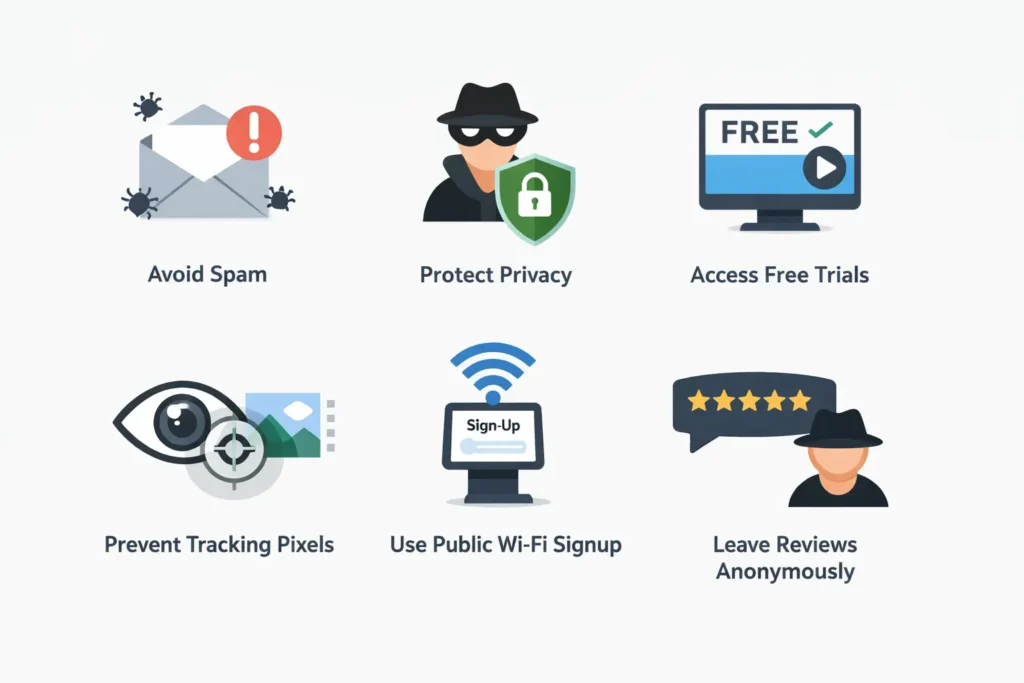
People use a disposable email address to avoid marketing spam and protect their private information from data breaches. It allows users to access “gated content” like eBooks or software trials without committing to a long-term subscription list. It is a tactical tool for maintaining a clean and organized primary inbox.
The biggest reason is the “spam war.” Every time you give your email to a store to get a 10% discount, you are signing up for years of ads. These ads clutter your view and make it hard to find important work emails. A burner address lets you get the discount code and then never hear from that store again.
How do they help with security?
Security is another major factor. Data breaches happen every day. If you use the same email for every site, a hacker only needs one successful breach to start a “credential stuffing” attack. They take your email and try it on other sites. By using a unique, temporary email for every non-essential site, you limit the damage if one site gets hacked.
Can they help with software testing?
Developers also rely on these tools. When building a new app, they need to test the sign-up flow many times. They cannot use their own email over and over. They use a script to grab a new disposable address for every test run. This lets them verify that their “Welcome” emails are sending correctly without hitting their own inbox limits.
- Avoid Phishing: Keeping your real email off public forums lowers the risk of targeted scams.
- Prevent Tracking: Many emails contain “tracking pixels.” These tell a sender when and where you opened a message. Disposable services often strip these out.
- Test Public Wi-Fi: Many airports or cafes require an email to use the internet. A throwaway email gets you online without the future marketing fluff.
- Review Sites: If you want to leave a review but don’t want the business to contact you later, use a temporary address.
Is using a disposable email address safe?
Using a disposable email address is safe for low-stakes tasks like signing up for newsletters or trials. However, it is not safe for sensitive accounts like banking, social media, or government services. Since many of these inboxes are public or lack passwords, anyone who knows the address might see your mail.
You should understand the trade-off when using a temporary email address. While it can help protect your privacy from the website you are signing up for, it does not always provide the same level of security as a private, password-protected inbox. Many temporary Google mail services display inboxes publicly, meaning anyone who enters the same address may be able to view the messages.
For example, if you create a common address like test@provider. com, another person could open that same inbox and see the emails that arrive there. Because of this, temporary Google mail should only be used for quick sign-ups, verification codes, or short-term access rather than for personal or sensitive communication.
Never use a throwaway email for:
- Bank accounts: You will lose access to your money if you need to reset a password.
- Medical portals: Your health data is too sensitive for a public server.
- Main social media: If you get locked out, you can’t get back in.
- Work communications: This can lead to serious data leaks for your company.
The safety also depends on the provider. Some sites might log your IP address. While they don’t ask for your name, they still know where the request came from. If you are doing something that requires total anonymity, you should pair a disposable email with a VPN. This hides your location from the email provider itself.
What is the difference between disposable and alias emails?
The difference lies in ownership and lifespan. A disposable email address is a short-term account hosted by a third party that you do not own. An alias is a permanent “nickname” for your real inbox. Both hide your main address, but you keep control over an alias forever while a disposable address disappears.
Aliases are great for people who want to filter their mail. Most major providers let you add a “+” sign to your name. For example, myname+shopping@gmail.com. This still goes to your main box, but you can set a rule to move it to a “Shopping” folder. The downside is that the site still knows your “myname” part. It is not anonymous.
Disposable emails are “fire and forget.” You don’t care about the mail once you get what you need. Aliases are for long-term relationships with brands you actually like. If you want to hear from a specific blog every week but want to keep those emails out of your “Work” view, an alias is the better choice.
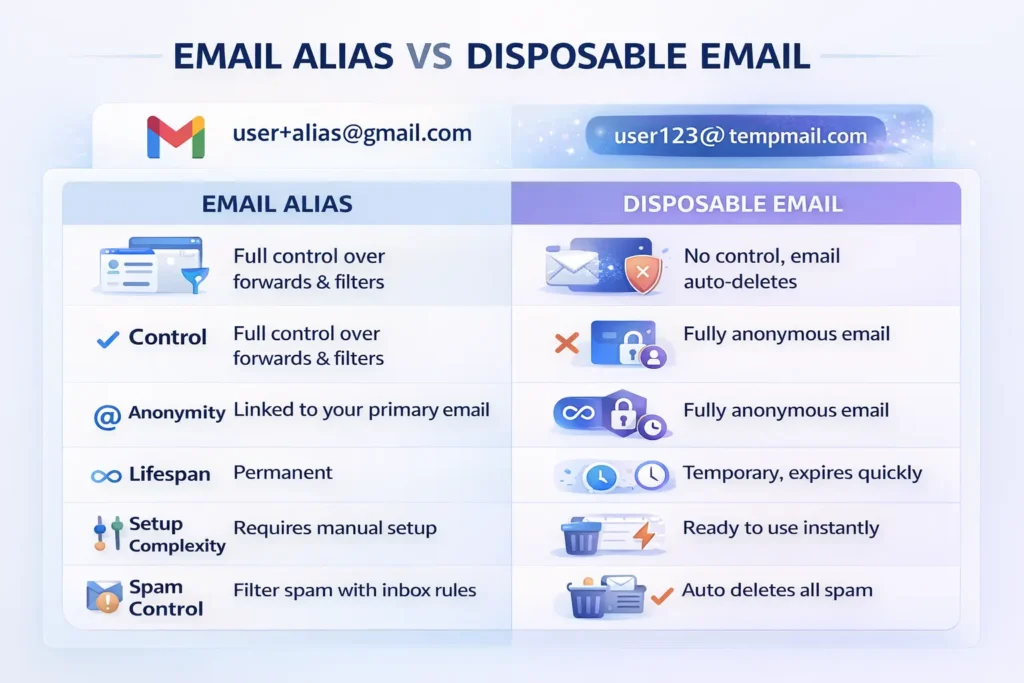
Comparison Table: Alias vs. Disposable
While some users prefer the “Gmail dot trick” or plus-addressing (e.g., username+spam@gmail.com) to manage sign-ups, these aliases function very differently from a true temporary email.
| Feature | Email Alias | Disposable Address |
| Control | Full control via your main account | Limited to the session |
| Anonymity | Partial (linked to your main ID) | High (totally random) |
| Lifespan | As long as you want | Very short |
| Complexity | Requires setting up filters | No setup required |
| Spam Control | You must manually block it | The system deletes it for you |
How do you choose the right temporary email tool?
Choose a tool that offers a wide variety of domains and a fast refresh rate for the inbox. Look for services that allow you to pick your own username if needed. A good provider should also offer a clear privacy policy that states they do not store your data longer than necessary.
Speed is the most important factor. You do not want to sit for five minutes waiting for a “Forgot Password” link to show up. The best tools update the inbox every few seconds. They should also handle attachments. Some cheap sites only show plain text, which can break some buttons or links inside the email.
Another thing to check is the “Domain Health.” Some websites keep a list of known temporary email domains. They will block you if you try to sign up with them. A high-quality provider changes their domains often. This helps you get past those blocks. If one domain doesn’t work, a good service will have ten others you can try.
If you need a more secure option with controlled access, you may also want to read about temporary email with password protection, which allows you to keep the inbox private while still using a temporary address.
Quick Things to Check
- Check the domain list: Is it a common domain that websites might block?
- Test the speed: Send a test email from your phone and see how quickly it appears.
- Review the interface: Make sure the inbox is easy to read on both desktop and mobile.
- Custom options: Some tools allow you to choose a specific username.
- Privacy and security: Confirm the service uses HTTPS and does not store messages unnecessarily.
Why do websites try to block these addresses?
Websites block a disposable email address because they want real, reachable leads for their marketing databases. They also want to prevent “multi-accounting” where a user signs up for many free trials at once. Blocking these addresses ensures that their user numbers represent real people who can be contacted later.
For a business, a disposable email is a “dead lead.” They spend money to get you to their site. If you use a throwaway email, they can never talk to you again. This makes their marketing budget less effective. They also worry about fraud. Scammers often use temporary mail to create thousands of fake accounts for bot attacks or to manipulate votes and reviews.
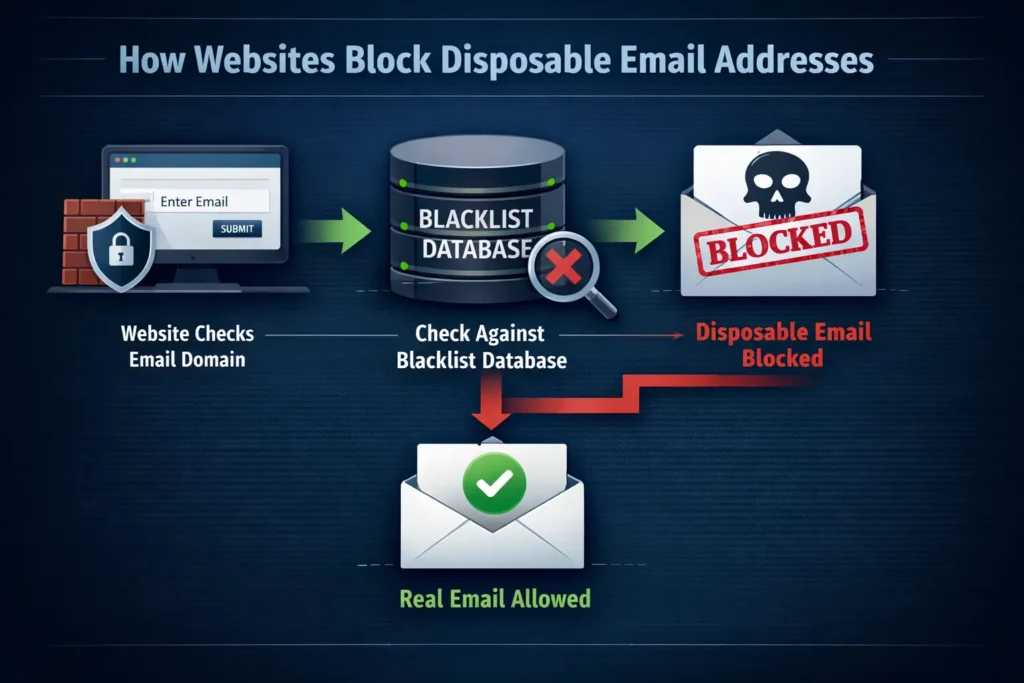
To block them, companies use “blacklists.” These are large databases of known temporary mail providers. When you type in an email, the site checks the domain against the list. If it finds a match, it gives you an error message. This creates a “cat and mouse” game. Providers create new domains, and websites eventually find and block them.
If you find a site that blocks your burner email, you have a few choices. You can try a different provider that uses fresher domains. You can also look for a “private” disposable service that charges a small fee but offers domains that aren’t on the public blacklists. Usually, just switching to a less popular provider works.
Can you recover a deleted temporary email?
No, you generally cannot recover a disposable email address once the session ends or the timer expires. These services are built to be ephemeral for privacy reasons. Once the server wipes the data, it is gone forever. This is why you should never use them for any account you might need to access in the future.
This lack of recovery is a feature, not a bug. It ensures that your data doesn’t sit on a server where a hacker could find it later. If you could recover it, so could someone else. The total deletion is what provides the security.
If you are using an email for something that might take a few days, look for a “long-term” temporary service. Some sites let you keep an address for a week or a month. This is helpful if you are waiting for a shipping confirmation or a manual review of your account. But even then, once that time is up, the door closes.
- Rule 1: Assume the email will be gone in 20 minutes.
- Rule 2: Take screenshots of any important info in the email.
- Rule 3: If the site requires a “re-login” later, don’t use a burner.
How do disposable emails affect data privacy laws?
Disposable emails help users exercise their right to privacy under laws like the GDPR. These laws say you should have control over your personal data. By using a temporary address, you are choosing not to give away your “Personal Identifiable Information” (PII). This reduces the amount of data companies can collect and store about you.
Since the email is not linked to your name or real identity, it isn’t really PII. This makes it a great tool for people living in regions with strict privacy rules. It prevents the “shadow profiles” that big tech companies build. These profiles track you across the web even if you don’t have an account with them. A burner email breaks that chain of tracking.
It also helps you avoid the “Right to be Forgotten” headache. Instead of having to email a company later and ask them to delete your data, you never gave them your data in the first place. You have essentially “forgotten” yourself from their system the moment you close your browser.
Final Thought
A disposable email address is a simple but powerful privacy tool. It helps you sign up for services, download resources, or test platforms without exposing your real inbox to spam or tracking. While it should never replace your primary email for sensitive accounts, it works well for low-risk tasks where anonymity and convenience matter. Used wisely, temporary email addresses give you more control over your digital footprint and keep your main inbox clean, organized, and secure.